
Keeping track of academic performance doesn’t have to be complicated. With the Free Excel Grade Calculator with GPA Formula, you can automatically calculate grades, weighted averages, and GPA using built-in Excel formulas—saving time and reducing errors. Whether you’re a student monitoring your progress or a teacher managing multiple records, this Excel template gives you a structured and reliable system.
This Excel template is fully compatible with Microsoft Excel and also works seamlessly in Google Sheets, so you can access and update your data from anywhere. Designed with simplicity and functionality in mind, it helps you focus on results instead of calculations.
What This Excel Template Includes
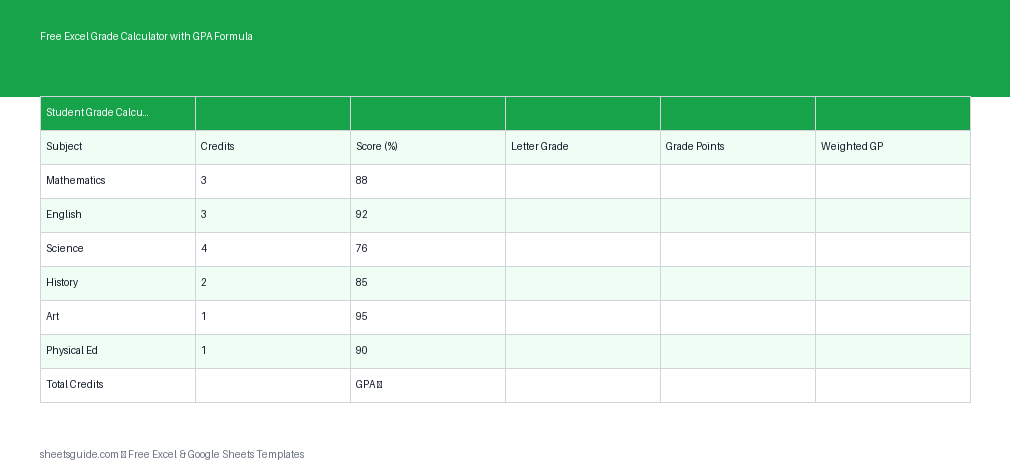
The template is built around six essential columns that capture all the key data needed for accurate grade and GPA calculations:
- Subject – The name of the course or subject
- Credits – Credit value assigned to the subject
- Score – Numeric grade (e.g., percentage or marks)
- Grade – Letter grade calculated automatically
- Grade Points – Numeric GPA equivalent of the grade
- Weighted GP – Grade Points multiplied by Credits
These columns work together through embedded Excel formulas, meaning once you enter your data, everything else updates instantly.
Key Features
- Automatic GPA Calculation: Instantly compute GPA based on credit-weighted grade points
- Built-in Formulas: No manual calculations required
- Flexible Grading Scales: Customize grading thresholds if needed
- Error Reduction: Eliminate calculation mistakes with automated logic
- Excel-First Design: Optimized for Excel performance, with full Google Sheets compatibility
Why Use an Excel Grade Calculator?
Manual grade calculations can be time-consuming and prone to mistakes, especially when dealing with multiple subjects and varying credit weights. This Excel template simplifies the process by handling all the math for you.
Instead of juggling formulas or relying on separate tools, everything is contained in one clean spreadsheet. You enter your data once, and the template takes care of the rest. It’s especially useful for:
- Students tracking semester performance
- Teachers managing class grades
- Parents monitoring academic progress
- Anyone needing quick GPA calculations
How the GPA Formula Works
The GPA calculation in this Excel template follows a standard weighted formula:
- Each subject is assigned Grade Points based on the score
- Grade Points are multiplied by Credits to get Weighted GP
- The sum of Weighted GP is divided by total Credits
This ensures that subjects with higher credit values have a greater impact on your GPA. The formulas are already embedded in the template, so you don’t need to set anything up.
Practical Example
Let’s say you enter the following:
- Math – 4 credits, score 85
- Science – 3 credits, score 90
- History – 2 credits, score 78
The template will automatically:
- Assign letter grades (e.g., A, B+)
- Convert them into grade points
- Calculate weighted grade points
- Compute your overall GPA
All results update instantly as you change any value.
How to Use in Excel
- Download and open the Excel template in Microsoft Excel.
- Enter your subjects in the Subject column.
- Input credits for each subject based on your curriculum.
- Add your scores (percentages or marks).
- Review automatic results:
- Letter grades will populate instantly
- Grade points will be assigned automatically
- Weighted GP will calculate per subject
- Check your GPA at the summary section of the sheet.
If you want to customize grading scales (for example, different score ranges for A, B, or C grades), you can easily modify the formula or reference table inside Excel.
If you’re using Google Sheets, simply upload the Excel file and it will work with the same formulas and structure.
Tips for Getting the Most Out of This Template
- Double-check credit values: GPA accuracy depends heavily on correct credits
- Use consistent scoring: Stick to one grading format (e.g., percentages)
- Update regularly: Enter scores as soon as they’re available
- Customize grading scale: Adjust formulas if your institution uses a different system
- Duplicate sheets: Track multiple semesters in one file
Who This Excel Template Is For
This Excel template is ideal for a wide range of users:
- Students: Monitor GPA and identify areas for improvement
- Teachers: Keep organized grade records for classes
- Academic advisors: Quickly assess student performance
- Parents: Stay informed about academic progress
Because it works in both Excel and Google Sheets, it’s flexible enough for use on desktops, laptops, and even mobile devices.
Why This Template Stands Out
There are many grade calculators out there, but this one is designed specifically as an Excel template with built-in efficiency and clarity. It doesn’t require any technical knowledge, yet it delivers accurate and professional results.
Everything is transparent—you can see and adjust formulas if needed, making it far more flexible than locked or web-based tools.
Final Thoughts
The Free Excel Grade Calculator with GPA Formula is a practical, easy-to-use solution for managing academic performance. With automatic calculations, a clean layout, and compatibility with both Excel and Google Sheets, it removes the stress from grade tracking.
Whether you’re planning ahead or reviewing results, this Excel template gives you a reliable way to stay on top of your GPA without the hassle of manual calculations.