
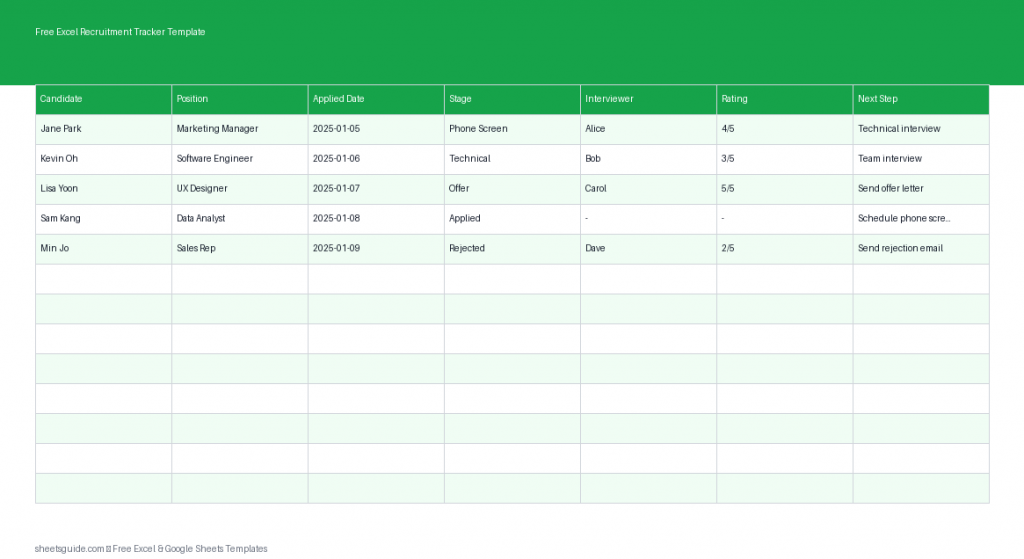
Hiring can quickly become overwhelming when applications start piling up across emails, job boards, and referrals. Without a structured system, it’s easy to lose track of candidates, miss follow-ups, or forget key interview notes. That’s where this Excel template comes in.
This Free Excel Recruitment Tracker Template is designed to help you manage your hiring pipeline from application to final decision. Whether you’re a small business owner, HR professional, or hiring manager, this tool gives you a clear, organized view of every candidate in one place. It works seamlessly in Excel and is also fully compatible with Google Sheets for flexible use.
Why Use an Excel Recruitment Tracker Template?
Recruitment involves multiple moving parts—applications, interviews, evaluations, and decisions. Trying to manage all of this without a system often leads to inefficiencies and missed opportunities.
This Excel template helps you:
- Centralize all candidate information
- Track progress across hiring stages
- Record interviewer details and feedback
- Prioritize top candidates using ratings
- Stay on top of next steps and follow-ups
Instead of juggling spreadsheets, emails, and notes, everything you need is in one structured, easy-to-update file.
What’s Included in the Template
The template is built with essential columns to support a complete hiring workflow:
- Candidate – Full name of the applicant
- Position – Job title applied for
- Applied Date – When the application was received
- Stage – Current step in the hiring process (e.g., Screening, Interview, Offer)
- Interviewer – Person responsible for interviewing
- Rating – Candidate evaluation score
- Next Step – Upcoming action or follow-up
These fields give you a complete snapshot of each candidate’s journey, making it easier to compare applicants and make informed decisions.
Key Benefits
1. Clear Hiring Pipeline Visibility
At a glance, you can see exactly where each candidate stands. This reduces confusion and helps you quickly identify bottlenecks in your hiring process.
2. Improved Collaboration
If multiple people are involved in hiring, this Excel template acts as a shared reference point. Everyone can see interviewer assignments, ratings, and next steps without needing constant updates.
3. Better Candidate Experience
Keeping track of timelines and next steps ensures that candidates aren’t left waiting unnecessarily. A well-managed process reflects positively on your organization.
4. Data-Driven Decisions
With ratings and structured notes, you can compare candidates objectively rather than relying on memory or scattered feedback.
How to Use in Excel
- Download and open the Excel template
Open the file in Microsoft Excel. You’ll see pre-built columns ready for data entry. - Enter candidate details
Start by filling in each candidate’s name, position applied for, and application date as they come in. - Define hiring stages
Use consistent stage labels such as “Applied,” “Phone Screen,” “Interview,” “Final Round,” and “Offer.” This keeps your pipeline organized. - Assign interviewers
Record who is responsible for each stage. This avoids confusion and ensures accountability. - Rate candidates
Use a simple scoring system (e.g., 1–5 or 1–10) to evaluate candidates after interviews. This helps with comparisons later. - Update next steps
Always fill in the “Next Step” column so you know exactly what action is required—whether it’s scheduling an interview, sending an offer, or following up. - Sort and filter data
Use Excel’s filter feature to view candidates by stage, position, or rating. This is especially useful when managing multiple roles. - Review regularly
Set aside time daily or weekly to update the tracker. Keeping it current ensures you never miss important actions.
This Excel template also works in Google Sheets, allowing you to collaborate online if needed, but Excel remains the primary and recommended platform for full functionality.
Practical Use Cases
Small Business Hiring
If you don’t have a dedicated HR system, this template acts as a lightweight alternative. You can manage all applicants without investing in expensive software.
Recruitment Agencies
Track multiple candidates across different roles and clients. Use filters to quickly focus on specific positions or hiring stages.
Internal HR Teams
Standardize your hiring process across departments. Everyone follows the same structure, improving consistency and reporting.
Freelancers and Startups
When hiring occasionally, you may not need complex tools. This Excel template provides just enough structure without added complexity.
Tips for Getting the Most Out of This Template
- Keep stage names consistent to maintain clarity when filtering or sorting
- Use conditional formatting in Excel to highlight high-rated candidates or urgent next steps
- Add notes if needed by inserting an extra column for interview feedback
- Regularly clean up data by archiving candidates who are no longer in consideration
- Duplicate the sheet for each new hiring cycle to keep records organized
Customize the Template to Fit Your Process
Every hiring process is different, and this Excel template is flexible enough to adapt to your needs. You can:
- Add columns for contact details or resume links
- Create dropdown lists for standardized stages
- Include a “Source” column to track where candidates applied from
- Add a “Decision” column to record final outcomes
These small adjustments can turn a simple tracker into a powerful recruitment management tool tailored to your workflow.
Stay Organized and Hire Smarter
A structured recruitment process doesn’t require complex software. With this Free Excel Recruitment Tracker Template, you can stay organized, collaborate effectively, and make better hiring decisions—all within a familiar spreadsheet environment.
Whether you’re reviewing a handful of applicants or managing a large hiring pipeline, this Excel template gives you the clarity and control you need to move candidates through each stage efficiently.
Download the template, start tracking your applicants today, and bring order to your hiring process.