
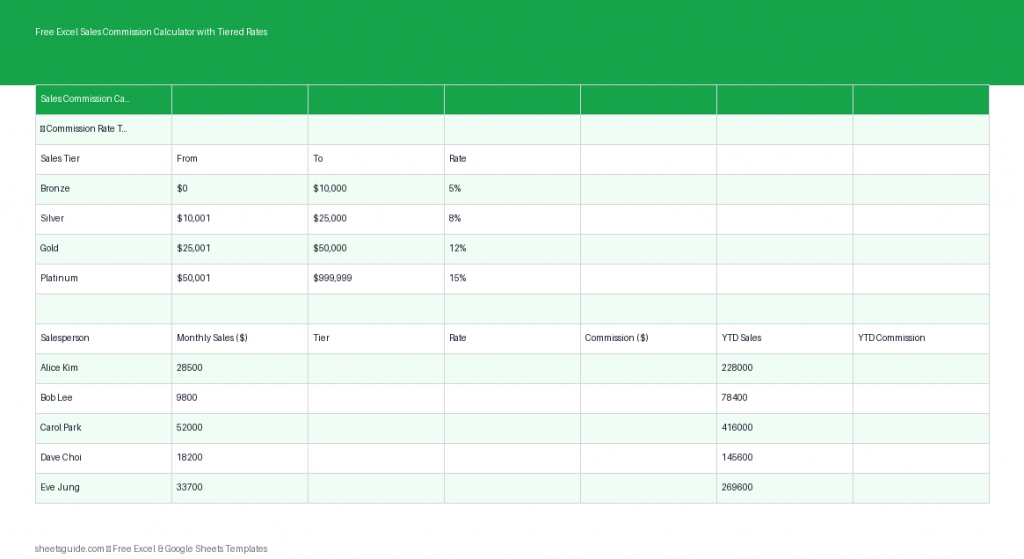
Managing sales commissions can quickly become complicated, especially when you introduce tiered commission structures. Whether you’re rewarding higher performance with increased rates or tracking year-to-date earnings, accuracy and consistency are critical. This Excel template is designed to simplify the entire process by automatically calculating commissions using nested IF formulas—saving time and reducing errors.
Built primarily for Microsoft Excel and fully compatible with Google Sheets, this template helps sales managers, business owners, and finance teams handle commission calculations with confidence and clarity.
Why Use a Tiered Commission Structure?
Tiered commission structures are commonly used to incentivize higher sales performance. Instead of applying a flat rate to all sales, different commission rates are applied based on predefined sales thresholds.
For example:
- 0–$5,000 in sales: 5% commission
- $5,001–$10,000: 7% commission
- $10,001+: 10% commission
This structure motivates salespeople to exceed targets while ensuring fair and scalable compensation.
What This Excel Template Includes
This Excel template comes with a clean, easy-to-use layout and pre-built formulas. The included columns are:
- Salesperson – Name of the team member
- Sales Amount – Total sales value for the period
- Tier – Automatically assigned based on sales thresholds
- Rate – Commission percentage applied
- Commission – Calculated payout
- YTD Total – Year-to-date commission earnings
The template uses nested IF formulas to dynamically determine the correct tier and rate based on the entered sales amount. This eliminates manual calculations and ensures consistency across your data.
Key Benefits
1. Automated Calculations
No need to manually calculate commissions or double-check formulas. The template automatically applies the correct rate based on the sales amount entered.
2. Scalable for Teams
Whether you have a small team or a growing sales force, you can easily extend the template to accommodate additional rows and track multiple employees.
3. Error Reduction
By embedding logic directly into formulas, you reduce the risk of miscalculations and inconsistencies that often come with manual tracking.
4. Flexible Structure
You can customize the tier thresholds and commission rates to match your company’s compensation plan without needing advanced Excel skills.
5. Works in Excel and Google Sheets
This Excel template is optimized for Microsoft Excel but also works seamlessly when uploaded to Google Sheets, making it accessible from anywhere.
How the Tiered Calculation Works
The core of this template is the nested IF formula used to determine the commission tier and rate. Based on the sales amount, the formula evaluates conditions step by step and assigns the appropriate percentage.
For example, a simplified version of the logic might look like this:
- If sales are less than or equal to $5,000 → apply 5%
- If sales are between $5,001 and $10,000 → apply 7%
- If sales exceed $10,000 → apply 10%
Once the rate is determined, the commission is calculated automatically by multiplying the sales amount by the assigned rate.
How to Use in Excel
- Download and open the Excel template
Open the file in Microsoft Excel. Make sure editing is enabled so formulas function properly. - Enter salesperson names
Input the names of your sales team in the Salesperson column. - Input sales amounts
Enter each individual’s total sales for the selected period. The rest of the calculations will update automatically. - Review assigned tiers and rates
The template will automatically assign a tier and corresponding commission rate based on the sales amount. - Verify commission calculations
The Commission column will display the calculated earnings. Double-check a few entries initially to ensure everything aligns with your expectations. - Track year-to-date totals
Use the YTD Total column to monitor cumulative commission earnings over time. You can update this column manually or extend formulas depending on your workflow. - Customize tiers if needed
Adjust the nested IF formulas to reflect your specific commission structure. For example, you can add more tiers or change thresholds. - Expand the template
Drag formulas down to add more rows as your team grows or as you track additional periods.
If you’re working in Google Sheets, simply upload the Excel file and continue using the same structure and formulas without modification.
Practical Use Cases
Sales Team Management
Managers can quickly evaluate performance and ensure commissions are calculated fairly across all team members. The automated structure also makes it easier to explain payouts.
Small Business Operations
For small businesses without dedicated payroll software, this template provides a reliable and cost-effective way to manage commission-based compensation.
Freelance Sales Tracking
Independent sales professionals can use the template to track their own earnings, set targets, and understand how different performance levels impact income.
Financial Reporting
Finance teams can use the template as a supporting tool for payroll calculations, budgeting, and forecasting commission expenses.
Tips for Getting the Most Out of This Template
- Standardize data entry – Ensure consistent formatting for names and numbers to avoid confusion.
- Protect formula cells – Lock formula columns to prevent accidental edits.
- Use conditional formatting – Highlight top performers or high commission values for quick insights.
- Update regularly – Keep the data current to maintain accurate YTD totals.
- Document your tier rules – Add notes or a reference table within the sheet for transparency.
Customization Ideas
This Excel template is flexible and can be adapted to suit different business needs. Here are a few ways you can enhance it:
- Add more tiers for complex commission structures
- Include bonus calculations for exceeding targets
- Track monthly or quarterly performance in separate sheets
- Create charts to visualize sales and commission trends
- Integrate with other financial tracking templates
Final Thoughts
Commission tracking doesn’t have to be complicated. With this Excel template, you can automate calculations, reduce errors, and focus on what really matters—driving sales performance. The built-in tiered logic ensures that every salesperson is rewarded accurately based on their results.
Whether you’re managing a team or tracking your own earnings, this tool provides a simple yet powerful solution. And because it works in both Excel and Google Sheets, you have the flexibility to use it wherever you prefer.
Download the template, customize it to your needs, and take control of your commission tracking today.