
Managing a growing sales pipeline can quickly become overwhelming without a clear system in place. Leads come in from different sources, deals move through multiple stages, and revenue forecasts change constantly. A simple, organized structure makes it much easier to see where opportunities stand and what actions to take next.
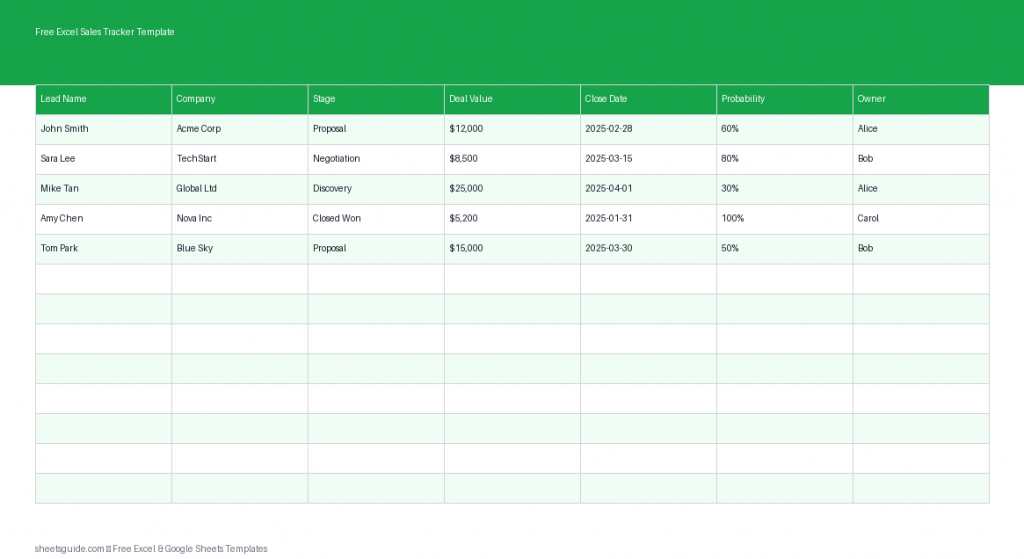
This Free Excel Sales Tracker Template is designed to help you track leads, monitor deal progress, and estimate potential revenue in one easy-to-use spreadsheet. The Excel template provides a clear pipeline view so you can understand your sales activity at a glance and keep your team focused on the right opportunities.
The template works seamlessly in Microsoft Excel and is also fully compatible with Google Sheets, making it flexible for individuals, freelancers, startups, and small sales teams.
Why Use an Excel Sales Tracker?
Customer relationship management (CRM) tools are powerful, but they can also be expensive and complicated. If you’re just getting started with structured sales tracking, an Excel template provides a lightweight and effective alternative.
With a well-organized sales tracker, you can:
- Track every lead and opportunity in one place
- Monitor the stage of each deal in your pipeline
- Estimate expected revenue using deal probability
- See upcoming close dates
- Assign ownership to specific sales reps
- Identify stalled deals that need attention
Because Excel is flexible and widely used, you can also customize the template as your sales process evolves.
What’s Included in the Excel Sales Tracker Template
This Excel template uses a simple pipeline-style structure that keeps sales data organized and easy to update. Each row represents a lead or deal in your pipeline.
Template Columns
- Lead Name – The contact person associated with the opportunity
- Company – The organization or business connected to the lead
- Stage – Where the opportunity currently sits in your sales pipeline
- Deal Value – The estimated value of the deal if it closes
- Close Date – Expected date the deal will be won or finalized
- Probability – Estimated likelihood of the deal closing
- Owner – The salesperson responsible for managing the opportunity
These fields give you a quick overview of your entire pipeline and help you track the progress of every opportunity.
How This Excel Template Improves Sales Visibility
One of the biggest challenges in sales is visibility. Without a central place to store deal information, it becomes difficult to answer simple but important questions:
- Which deals are closest to closing?
- What revenue might close this month?
- Which opportunities are stuck?
- Who owns each deal?
This Excel sales tracker solves that problem by organizing all opportunity data in a single spreadsheet. Instead of searching through emails, notes, or different systems, you can see the entire pipeline at once.
For managers, this also makes it easier to monitor team activity and forecast revenue more accurately.
Example Sales Pipeline Stages
The Stage column represents where a deal currently sits in your pipeline. While every business has a slightly different process, many teams use a structure similar to the following:
- New Lead
- Contacted
- Qualified
- Proposal Sent
- Negotiation
- Closed Won
- Closed Lost
Using consistent stage names helps you understand the overall health of your sales funnel and identify bottlenecks in the process.
How to Use the Deal Probability Column
The Probability field is one of the most valuable parts of this Excel template. It allows you to estimate how likely a deal is to close.
For example:
- New Lead – 10%
- Qualified – 30%
- Proposal Sent – 60%
- Negotiation – 80%
When combined with the Deal Value column, probability helps you create more realistic revenue forecasts. Instead of assuming every deal will close, you can estimate expected revenue based on likelihood.
Benefits of Tracking Your Sales Pipeline in Excel
This Excel sales tracker template offers several practical advantages for individuals and teams:
1. Simple and Easy to Maintain
The template is intentionally minimal. You can add new leads in seconds and update deal stages without navigating complex CRM systems.
2. Clear Pipeline Overview
By listing every deal in one place, the spreadsheet provides a quick snapshot of your pipeline and upcoming opportunities.
3. Flexible and Customizable
You can easily adapt the Excel template to match your sales process. For example, you may add columns for lead source, product type, or notes.
4. Ideal for Small Teams
Small businesses and startups often need a simple way to track opportunities before investing in larger sales software. This template provides exactly that.
How to Use in Excel
- Download the Excel template and open it in Microsoft Excel.
- Add your leads by filling in the Lead Name and Company columns.
- Select the deal stage that represents where the opportunity currently sits in your sales process.
- Enter the estimated deal value to track potential revenue.
- Set an expected close date so you can monitor upcoming deals.
- Add a probability percentage based on how likely the deal is to close.
- Assign an owner so each opportunity has a clear responsible salesperson.
- Update the sheet regularly as deals progress through the pipeline.
The template works best when it becomes part of your daily or weekly sales routine. Updating stages, probabilities, and close dates ensures your pipeline remains accurate and useful.
If you collaborate with others online, the same Excel template can also be uploaded to Google Sheets for easy sharing and real-time editing.
Tips for Getting the Most Out of This Sales Tracker
Review the Pipeline Weekly
Set aside time each week to review every opportunity. Update deal stages, adjust probabilities, and confirm expected close dates.
Focus on Stalled Deals
If a deal has been in the same stage for too long, it may require follow-up or additional qualification.
Track Sales Ownership Clearly
The Owner column ensures accountability and helps teams understand who is responsible for each opportunity.
Use Filters for Quick Analysis
Excel’s filtering tools allow you to quickly view deals by stage, owner, or close date. This makes it easy to identify priority opportunities.
Who Should Use This Excel Sales Tracker Template?
This template is ideal for:
- Freelancers managing client leads
- Small businesses tracking sales opportunities
- Startups building their first sales pipeline
- Sales representatives organizing personal deal flow
- Teams that want a lightweight CRM alternative
Because the structure is simple and flexible, it can be used across many industries including consulting, SaaS, agencies, real estate, and service-based businesses.
Start Tracking Your Sales Pipeline Today
A well-managed pipeline is one of the most important parts of a successful sales process. When leads, deals, and revenue forecasts are clearly organized, it becomes much easier to prioritize work and close more opportunities.
This Free Excel Sales Tracker Template gives you a practical way to manage your sales pipeline without complex tools or software. By tracking leads, deal stages, and expected revenue in a single Excel spreadsheet, you gain better visibility and control over your sales process.
Download the Excel template, add your current opportunities, and start building a clearer view of your pipeline today. Whether you’re working in Excel or collaborating through Google Sheets, this simple system helps keep every deal organized and moving forward.