
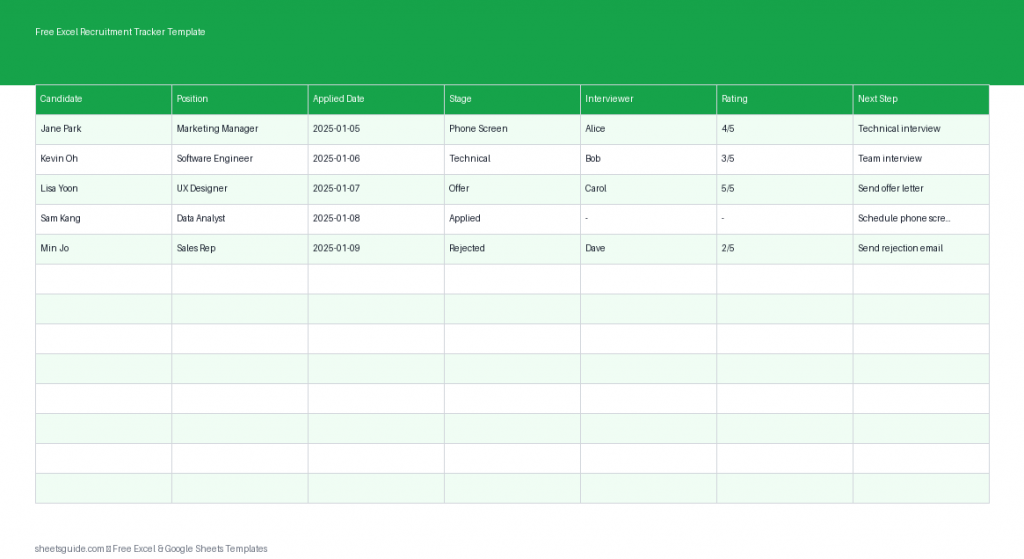
Hiring can quickly become overwhelming when applications start piling up across emails, job boards, and notes. A simple, organized system can make the entire recruitment process easier to manage. This Free Excel Recruitment Tracker Template helps you keep every candidate, stage, and interview detail in one structured spreadsheet.
This Excel template is designed to help recruiters, hiring managers, small business owners, and HR teams track applicants from the moment they apply all the way through the final hiring decision. Because it is built in Excel format, it works seamlessly in Microsoft Excel and can also be uploaded and used in Google Sheets for teams who collaborate online.
Instead of searching through emails or scattered notes, this tracker provides a single dashboard-style sheet where you can quickly review candidate progress, upcoming steps, and interviewer feedback.
Why Use an Excel Recruitment Tracker?
Recruitment involves many moving parts. Even small hiring campaigns can involve dozens of applicants, multiple interviews, and ongoing communication. Without a simple tracking system, important details can easily slip through the cracks.
An Excel recruitment tracker solves this problem by giving you a clear structure for managing candidates. You can instantly see who has applied, who is scheduled for interviews, and who is ready for the next stage.
Using an Excel template also offers several advantages:
- Centralized information so every candidate record is in one place
- Easy status updates during the hiring process
- Consistent evaluation with interview ratings and notes
- Better organization for hiring managers and HR teams
- Quick filtering and sorting to review applicants by role or stage
Because this file is an Excel template, you can customize it to match your hiring workflow while still keeping the structure simple and easy to maintain.
What the Excel Recruitment Tracker Template Includes
This Excel template includes a straightforward table designed for practical recruiting workflows. Each column captures an important part of the hiring process so you always know the status of each applicant.
Candidate
This column records the name of the applicant. Keeping candidate names clearly listed makes it easy to search, sort, and review applicants for each position.
Position
Use this field to record the job role the candidate applied for. If you are hiring for multiple positions at the same time, this column allows you to filter candidates by job title and review them separately.
Applied Date
The applied date helps you monitor how long candidates have been in the pipeline. It also helps ensure applications are reviewed promptly and that candidates are not left waiting for long periods.
Stage
The stage column tracks where each candidate is in the hiring process. Typical stages might include:
- Application Received
- Screening
- First Interview
- Second Interview
- Final Interview
- Offer
- Hired
- Rejected
This column gives you a quick overview of your entire recruitment pipeline.
Interviewer
This column identifies who conducted or will conduct the interview. For teams with multiple hiring managers or departments, this ensures accountability and helps coordinate scheduling.
Rating
The rating field allows interviewers to score candidates based on their performance. Many teams use a simple numeric scale such as 1–5 or 1–10. Ratings help make comparisons between candidates easier and support more objective hiring decisions.
Next Step
The next step column records upcoming actions for each candidate. This might include scheduling another interview, sending an assessment, preparing an offer, or sending a rejection message.
Having a clear next step ensures that no candidate is accidentally forgotten during the process.
How This Template Improves Your Hiring Workflow
Recruitment is often a collaborative process involving HR staff, team leaders, and department managers. This Excel template creates a shared structure that everyone can follow.
1. Clear Pipeline Visibility
With every candidate listed in one table, you can immediately see how many applicants are in each stage of the hiring process.
2. Faster Decision Making
Ratings and interviewer notes make it easier to compare candidates and decide who should move forward to the next stage.
3. Better Candidate Experience
When applicants are tracked properly, responses and interview scheduling happen faster. This improves the overall candidate experience and reflects well on your organization.
4. Organized Interview Management
Knowing which interviewer is assigned to each candidate reduces confusion and prevents scheduling conflicts.
5. Historical Hiring Records
Keeping past recruitment data allows your team to review previous hiring campaigns and learn what worked best.
How to Use in Excel
Using this Excel template is simple and requires only a few minutes to set up.
- Download the Excel template and open it in Microsoft Excel.
- Enter each applicant’s name in the Candidate column as applications arrive.
- Add the job title in the Position column for the role they applied to.
- Record the application date to track how long the candidate has been in the pipeline.
- Update the Stage column as the candidate progresses through interviews.
- Assign an interviewer responsible for the next meeting or evaluation.
- Add a rating after interviews to evaluate candidate performance.
- Fill in the Next Step column to ensure clear follow-up actions.
You can also sort or filter the table in Excel to view candidates by position, interview stage, or interviewer. This makes it much easier to manage multiple hiring processes at once.
If your team prefers working online, this Excel template can also be uploaded to Google Sheets for shared access and collaboration. A separate section below explains how to use the file in Google Sheets.
Tips for Getting the Most from Your Recruitment Tracker
Standardize Your Hiring Stages
Define a consistent set of recruitment stages for every role. This makes your tracker easier to maintain and ensures candidates move through a clear process.
Update the Tracker Daily
The template works best when it is updated regularly. After each interview or hiring decision, immediately update the candidate’s stage and next step.
Use Ratings Consistently
Encourage interviewers to use the same scoring scale when rating candidates. Consistent scoring helps create more objective comparisons.
Review the Pipeline Weekly
A weekly review of the tracker helps hiring teams identify bottlenecks, prioritize interviews, and move strong candidates forward faster.
Who Should Use This Excel Recruitment Tracker Template?
This Excel template is useful for many different hiring situations:
- Small businesses managing their own hiring
- HR professionals tracking multiple applicants
- Startup founders recruiting early team members
- Department managers running internal hiring
- Recruiters managing several open positions
Because the template is flexible, it can easily scale from a small hiring campaign to a larger recruitment pipeline.
Stay Organized Throughout the Hiring Process
Successful hiring depends on clear organization and consistent tracking. When every candidate, interview, and next step is recorded in one place, your team can move through the recruitment process with confidence.
This Free Excel Recruitment Tracker Template gives you a simple but powerful way to manage applicants, evaluate candidates, and make better hiring decisions. Whether you are filling one position or coordinating multiple roles, the template helps you stay organized from application to final offer.
Download the template, customize it for your hiring workflow, and start tracking candidates efficiently in Excel today.