
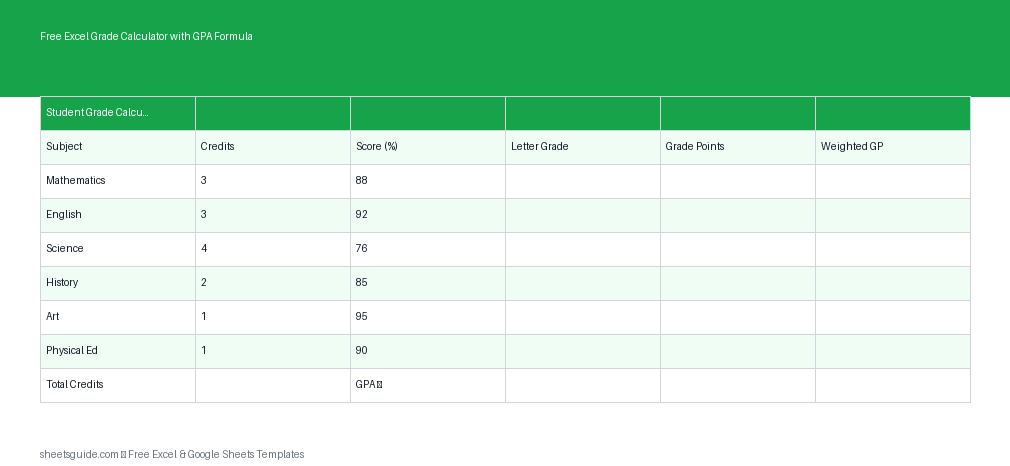
Tracking grades across multiple subjects can get messy fast, especially when credits, weightings, and GPA calculations come into play. This Excel template simplifies everything into one clean, automated system. Whether you’re a student managing your own progress or a teacher organizing class data, this tool helps you calculate grades, weighted averages, and GPA instantly using built-in Excel formulas.
Designed for use in Excel first and fully compatible with Google Sheets, this template removes the need for manual calculations while giving you full visibility into how each subject contributes to your final GPA.
What This Excel Template Does
This Excel template is built to automate grade tracking and GPA calculation using a structured set of columns. You simply enter your data, and the formulas handle the rest.
- Subject: Name of the course or subject
- Credits: Credit hours assigned to the subject
- Score: Numeric score or percentage
- Grade: Letter grade calculated automatically
- Grade Points: Numeric GPA value (e.g., A = 4.0)
- Weighted GP: Grade points multiplied by credits
At the bottom of the sheet, totals and GPA are calculated automatically using Excel formulas. This ensures accuracy and saves time compared to manual calculations.
Why Use an Excel Grade Calculator?
Manual grade tracking often leads to errors, especially when dealing with weighted courses or multiple grading systems. This Excel template solves that by standardizing the process and automating every step.
- Eliminates calculation mistakes
- Handles weighted GPA automatically
- Provides instant updates when scores change
- Keeps all academic data organized in one place
- Works in Excel and Google Sheets
Instead of recalculating your GPA every time a score changes, this template updates everything in real time.
How the GPA Formula Works
The template uses a standard weighted GPA calculation method:
- Each letter grade is converted into grade points (e.g., A = 4.0, B = 3.0)
- Grade points are multiplied by course credits
- The total weighted grade points are divided by total credits
This ensures that higher-credit courses have a greater impact on your GPA, which reflects real academic systems used by schools and universities.
All of these calculations are handled automatically through Excel formulas embedded in the template, so you never need to write or edit formulas yourself unless you want to customize them.
Who This Template Is For
This Excel template is flexible enough to be used in many academic situations:
- Students: Track semester grades and monitor GPA progress
- Teachers: Organize and calculate student performance
- Parents: Keep track of children’s academic progress
- Tutors: Manage multiple students and subjects efficiently
Whether you’re tracking a single term or multiple courses across a school year, this template keeps everything clear and consistent.
Key Features of This Excel Template
Automatic Grade Conversion
Enter a numeric score, and the template converts it into a letter grade automatically using predefined grading thresholds.
Built-In GPA Formula
No need to calculate GPA manually. The template computes it instantly based on credits and grade points.
Weighted Calculations
Courses with more credits automatically carry more weight in the GPA calculation.
Customizable Grading Scale
You can adjust the grading thresholds and grade point values to match your institution’s system.
Excel-First Design
Optimized for Excel performance while remaining fully compatible with Google Sheets.
How to Use in Excel
- Download and open the Excel template
Open the file in Microsoft Excel. Make sure editing is enabled so formulas can function properly. - Enter your subjects
Fill in the Subject column with each course you are taking. - Input credit values
Enter the number of credits assigned to each subject in the Credits column. - Add your scores
Type your numeric scores or percentages into the Score column. - Review automatic calculations
The template will automatically populate the Grade, Grade Points, and Weighted GP columns. - Check your GPA
Scroll to the summary section to see your total credits, total weighted points, and final GPA. - Customize if needed
You can modify grading scales or grade point values directly in Excel to match your school’s system.
If you’re using Google Sheets, simply upload the Excel file and the formulas will continue to work with minimal or no adjustments.
Tips for Getting the Most Out of This Template
- Update regularly: Enter scores as soon as they are available to keep your GPA current
- Double-check credit values: Incorrect credits can significantly affect GPA results
- Use consistent grading scales: Ensure all subjects follow the same grading system
- Duplicate for new terms: Create copies of the template for each semester or year
By keeping your data accurate and up to date, you’ll always have a clear picture of your academic standing.
Common Use Cases
Semester GPA Tracking
Monitor your GPA throughout the semester and identify which subjects need improvement.
Academic Planning
Estimate future GPA by entering projected scores and adjusting credits.
Performance Analysis
Identify patterns in performance across subjects and focus on areas that need attention.
Teacher Grade Management
Teachers can adapt the template to track multiple students by creating separate sheets or files.
Why This Excel Template Saves Time
Without automation, calculating GPA involves multiple steps: converting grades, applying credit weights, and computing averages. This template compresses all of that into a single workflow. You enter data once, and everything updates automatically.
It also reduces the risk of human error, which is especially important when grades directly impact academic decisions.
Final Thoughts
This Excel template is a practical, reliable solution for anyone who needs to calculate grades and GPA quickly and accurately. By combining structured inputs with built-in formulas, it removes the complexity from academic tracking and replaces it with a simple, efficient system.
Use it in Excel for the best experience, or open it in Google Sheets if you prefer working online. Either way, you’ll have a powerful grade calculator that keeps your academic data organized and up to date.
Download it, enter your data, and let Excel handle the math.