
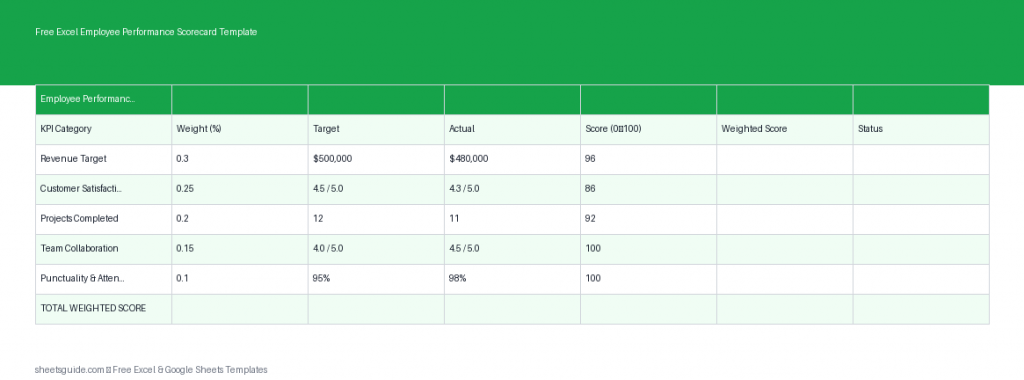
Managing employee performance can quickly become messy without a structured system. That’s where this Excel template comes in. Designed for clarity and consistency, this Employee Performance Scorecard helps you evaluate staff using measurable KPIs, weighted scoring, and automatic calculations—all in one place.
Whether you’re a small business owner, team leader, or HR professional, this template gives you a reliable framework to track performance over time, compare employees fairly, and make informed decisions. It works seamlessly in Excel and is also compatible with Google Sheets, so you can use it in the environment you prefer.
What This Excel Template Includes
This Employee Performance Scorecard Excel template is built around a simple but powerful structure. Each column serves a clear purpose in evaluating performance:
- Employee – The name of the employee being evaluated
- KPI – The key performance indicator (e.g., Sales, Attendance, Customer Satisfaction)
- Weight – The importance of each KPI (expressed as a percentage or number)
- Target – The expected performance level
- Actual – The employee’s real performance
- Score – Automatically calculated performance score
- Weighted Score – Score adjusted by KPI weight for overall evaluation
These elements work together to give you a balanced and objective view of performance across multiple dimensions.
Why Use an Employee Performance Scorecard?
Performance reviews often suffer from inconsistency and bias. This Excel template helps eliminate guesswork by turning subjective feedback into measurable data.
Here’s why this approach works:
- Consistency: Every employee is evaluated using the same criteria
- Transparency: Clear metrics help employees understand expectations
- Objectivity: Weighted scores reduce personal bias
- Efficiency: Automated formulas save time during reviews
- Flexibility: Customize KPIs for different roles or departments
Instead of relying on vague impressions, you’ll have concrete data to support promotions, bonuses, or improvement plans.
How Scoring Works
This Excel template uses a straightforward scoring method to translate performance into numbers.
The Score is typically calculated based on how the Actual value compares to the Target. For example:
- If Actual meets Target → Score = 100%
- If Actual exceeds Target → Score can exceed 100%
- If Actual falls short → Score drops proportionally
The Weighted Score multiplies this result by the KPI’s importance. This ensures that critical metrics (like revenue or project delivery) have a bigger impact than less critical ones.
This structure helps you avoid overvaluing minor achievements while keeping the evaluation balanced.
How to Use in Excel
- Enter Employee Names
Start by listing each employee in the Employee column. You can repeat names across multiple KPIs for a complete evaluation. - Define KPIs
Assign relevant KPIs for each employee. These could include productivity, quality, attendance, teamwork, or role-specific metrics. - Set Weights
Assign a weight to each KPI based on its importance. For example, Sales might be 40% while Attendance is 10%. Ensure total weights per employee add up logically (often 100%). - Input Targets
Enter expected performance levels for each KPI. These should be realistic and aligned with company goals. - Record Actual Results
Fill in actual performance data. This could come from reports, tracking tools, or manager evaluations. - Review Automatic Scores
The template calculates Scores and Weighted Scores automatically, saving time and reducing errors. - Analyze Results
Use the weighted totals to compare employees, identify top performers, and spot areas for improvement.
You can easily duplicate rows or sections to evaluate multiple employees or review different time periods.
Practical Use Cases
This Excel template is versatile and can be adapted across industries and roles. Here are some practical ways to use it:
1. Quarterly Performance Reviews
Track employee progress every quarter using consistent KPIs. This makes annual reviews much easier and more accurate.
2. Sales Team Evaluation
Measure metrics like revenue, conversion rate, and client retention. Assign higher weights to revenue-driving KPIs.
3. Remote Team Monitoring
Evaluate productivity, task completion, and communication quality for distributed teams.
4. Employee Development Plans
Identify weak areas and create targeted improvement strategies based on low scores.
5. Bonus and Incentive Decisions
Use weighted scores as a fair basis for distributing bonuses or rewards.
Tips for Getting the Most Out of This Template
- Keep KPIs focused: Avoid too many metrics—3 to 6 per employee is usually ideal
- Use realistic targets: Overly ambitious goals can distort scoring
- Review weights regularly: Business priorities change, and your scoring system should reflect that
- Standardize scoring rules: Ensure consistency across managers or departments
- Document assumptions: Keep notes on how targets and weights were chosen
These small practices can significantly improve the accuracy and usefulness of your evaluations.
Customizing the Excel Template
One of the biggest advantages of using an Excel template is flexibility. You can tailor this scorecard to match your organization’s unique needs.
Here are a few customization ideas:
- Add a Department column to group employees
- Include a Manager Comments section for qualitative feedback
- Create summary tables to calculate total scores per employee
- Add conditional formatting to highlight high and low performers
- Adjust formulas for different scoring models (e.g., capped scores or grading scales)
Because it also works in Google Sheets, you can easily share and collaborate with your team in real time if needed.
Common Mistakes to Avoid
Even with a solid Excel template, a few common pitfalls can reduce effectiveness:
- Overcomplicating KPIs: Too many metrics dilute focus
- Ignoring weights: Treating all KPIs equally can skew results
- Inconsistent data entry: Small errors can affect scores
- Not updating regularly: Outdated data leads to poor decisions
- Relying only on numbers: Combine quantitative scores with human judgment
A balanced approach ensures your performance evaluations remain both fair and meaningful.
Who This Template Is Best For
This Excel template is ideal for:
- Small to medium business owners
- HR professionals managing employee reviews
- Team leaders tracking individual performance
- Startups building structured evaluation systems
- Consultants managing multiple client teams
If you need a simple, effective way to track performance without investing in complex software, this template is a practical solution.
Final Thoughts
This Employee Performance Scorecard Excel template brings structure, clarity, and efficiency to your evaluation process. By combining KPI tracking, weighted scoring, and automatic calculations, it helps you make smarter decisions based on real data.
Whether you’re conducting formal reviews or just keeping an eye on team performance, this template gives you a clear and consistent system you can rely on. And since it works in both Excel and Google Sheets, it fits seamlessly into your existing workflow.
Start using it today to turn performance tracking into a streamlined, data-driven process.