
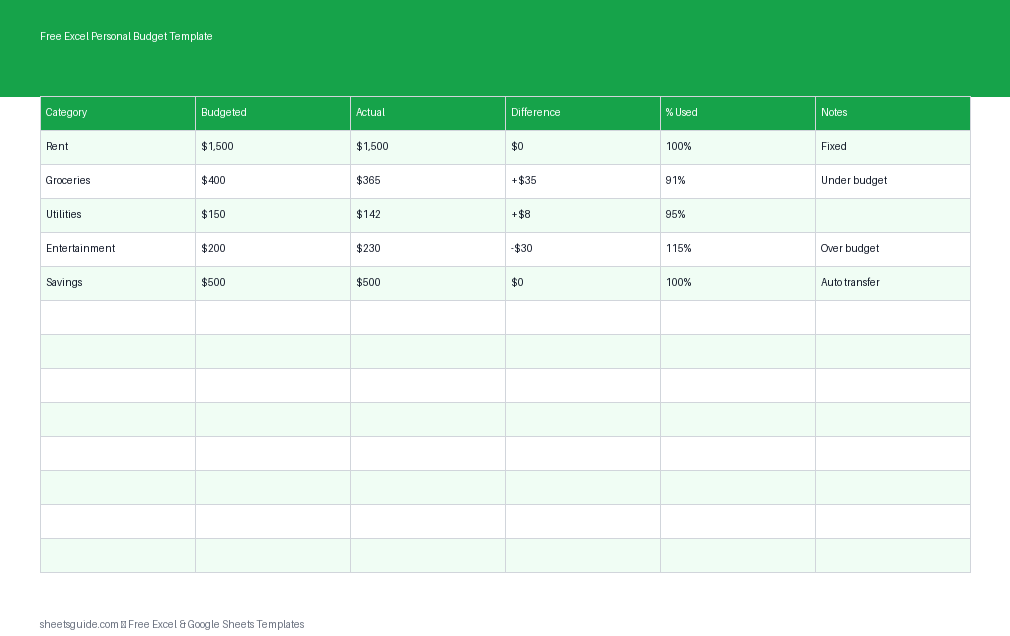
Managing your money doesn’t have to be complicated. With a well-structured Excel template, you can take control of your finances, track where your money goes, and make smarter decisions every month. This Free Excel Personal Budget Template is designed to help you plan your income, monitor your spending, and stay aligned with your savings goals—all in one place.
The best part? While it’s built as an Excel template, it also works seamlessly in Google Sheets, giving you flexibility no matter which tool you prefer.
Why Use an Excel Personal Budget Template?
Budgeting manually or relying on memory often leads to missed expenses and unclear financial habits. This Excel template simplifies everything by organizing your finances into a clear structure with automatic calculations.
- Clarity: See exactly how much you planned vs. what you actually spent
- Control: Identify overspending before it becomes a problem
- Consistency: Build better financial habits month after month
- Flexibility: Customize categories and notes to fit your lifestyle
Whether you’re budgeting for the first time or refining your financial system, this template gives you a reliable foundation.
What’s Included in the Template?
This Excel template uses a clean and practical structure with the following columns:
- Category: Define the type of income or expense (e.g., Rent, Groceries, Salary)
- Budgeted: The amount you planned to spend or earn
- Actual: What you actually spent or received
- Difference: The gap between your budget and actual numbers
- % Used: A quick view of how much of your budget is used
- Notes: Add context, reminders, or explanations
This layout makes it easy to spot trends, adjust your habits, and stay accountable.
How This Template Helps You Stay on Track
The real power of this Excel template lies in how it highlights your financial behavior. Instead of just recording numbers, it shows you what’s working and what needs adjustment.
1. Compare Planned vs. Actual Spending
By entering both budgeted and actual amounts, you instantly see where you’re overspending or saving. The Difference column does the math for you, helping you react quickly.
2. Monitor Budget Usage in Real Time
The % Used column gives you a visual cue of how much of each category you’ve used. If a category is nearing 100%, you know it’s time to slow down.
3. Improve Financial Awareness
Many people underestimate small expenses. This template brings every detail into focus, helping you make more intentional choices.
4. Support Savings Goals
By tracking income and expenses together, you can clearly see how much you’re saving—and where you can improve.
How to Use in Excel
Getting started with this Excel template is simple and takes just a few minutes.
- Download and open the template in Excel
- Enter your categories (e.g., Housing, Transportation, Food, Entertainment, Savings)
- Fill in your Budgeted amounts for each category at the start of the month
- Update the Actual column as you spend or receive money throughout the month
- Review the Difference and % Used columns to monitor your progress
- Add notes to explain unusual expenses or track ideas for next month
At the end of the month, review your totals and adjust your next budget based on what you learned. The template can be reused every month—just duplicate the sheet or reset the values.
If you prefer working online, you can upload this Excel template to Google Sheets and use it there with the same structure and functionality.
Practical Budgeting Tips
Using a template is a great start, but combining it with smart habits makes it even more effective.
Start with Realistic Numbers
A common mistake is setting overly strict budgets that are hard to follow. Base your budget on actual past spending, then gradually improve.
Track Frequently
Update your Excel template every few days instead of waiting until the end of the month. This keeps your data accurate and prevents surprises.
Use Notes Strategically
The Notes column is more powerful than it seems. Use it to record why you overspent or how you saved money—it helps you spot patterns.
Adjust Categories as Needed
Your budget should evolve with your life. Add, remove, or rename categories to match your current priorities.
Celebrate Small Wins
If you stay under budget in a category or increase your savings, take note of it. Positive reinforcement helps build consistency.
Who Should Use This Excel Template?
This Excel personal budget template is suitable for a wide range of users:
- Individuals managing monthly expenses
- Families coordinating shared finances
- Students learning budgeting basics
- Anyone working toward savings or debt reduction goals
Its simplicity makes it accessible, while its structure provides enough detail for meaningful insights.
Customize It to Fit Your Needs
One of the biggest advantages of using an Excel template is flexibility. You can tailor it to match your exact financial situation.
- Add extra columns for dates or payment methods
- Create separate sections for fixed and variable expenses
- Use color coding to highlight important categories
- Duplicate sheets for each month to track trends over time
Because it also works in Google Sheets, you can even access your budget on multiple devices and keep it updated on the go.
Build Better Financial Habits
Consistency is the key to successful budgeting. This Excel template isn’t just a tracking tool—it’s a system that helps you stay mindful of your financial decisions.
Over time, you’ll start to notice patterns, reduce unnecessary expenses, and make more confident choices about your money. Even small improvements can lead to significant results when applied consistently.
Get Started Today
If you’ve been putting off budgeting because it feels overwhelming, this Excel template is a simple way to begin. With clear columns, automatic calculations, and an easy-to-follow structure, you’ll have everything you need to take control of your finances.
Download the template, open it in Excel, and start planning your next month with clarity and confidence. And if you prefer, you can also use it in Google Sheets without any extra setup.
Your financial goals are easier to reach when you can see the full picture—this template helps you do exactly that.