
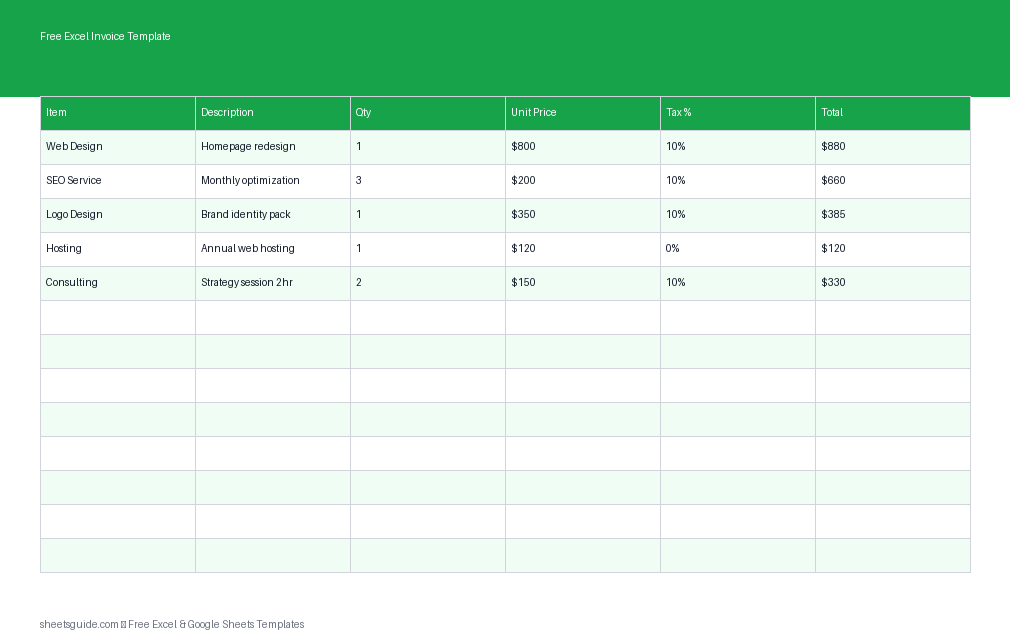
If you’re still creating invoices manually or using messy documents, you’re wasting time and increasing the risk of errors. This Excel template is designed to simplify invoicing with built-in calculations, a clean layout, and easy customization. It works seamlessly in Excel and is fully compatible with Google Sheets, so you can use it wherever you prefer.
Whether you’re a freelancer, small business owner, or side hustler, this invoice template helps you present a professional image while keeping your billing process efficient and accurate.
Why Use an Excel Template for Invoicing?
Invoices are more than just payment requests—they’re part of your brand and financial workflow. Using a structured Excel template ensures consistency and accuracy every time you bill a client.
- Automatic calculations: Totals and taxes are calculated instantly
- Error reduction: No more manual math mistakes
- Professional formatting: Clean, client-ready layout
- Customizable fields: Adapt it to your business needs
- Reusable structure: Save time on every invoice
What’s Included in This Excel Invoice Template
This Excel template is built around a simple but powerful structure that covers everything you need for accurate billing.
Invoice Line Item Columns
- Item: Name of the product or service
- Description: Additional details about the item
- Qty: Quantity provided or sold
- Unit Price: Cost per unit
- Tax %: Applicable tax rate
- Total: Automatically calculated amount
The template automatically multiplies quantity by unit price and applies the tax percentage, giving you a final total without any manual calculations.
Built-In Features
- Automatic subtotal and grand total calculations
- Tax calculation per line item
- Clean invoice layout ready for sharing or printing
- Easy duplication for recurring invoices
Who Should Use This Template?
This Excel template is designed for anyone who needs a straightforward, reliable invoicing system.
- Freelancers (designers, writers, developers)
- Consultants and coaches
- Small business owners
- Service providers (cleaning, repair, maintenance)
- Online sellers and independent vendors
If you send invoices regularly, this template helps you streamline your workflow without investing in expensive software.
How to Use in Excel
- Download and open the file in Excel
Open the Excel template and save a copy with your business name or client reference. - Enter your business details
Add your company name, contact information, and invoice number at the top of the sheet. - Fill in client information
Include the client’s name, address, and any relevant contact details. - Add line items
For each product or service, fill in:- Item name
- Description
- Quantity
- Unit price
- Tax percentage
- Review automatic totals
The template calculates totals for each row and aggregates them into a final amount due. - Customize if needed
You can adjust tax rates, add more rows, or modify formatting to match your brand. - Save and send
Export as a PDF or share the Excel file directly with your client.
If you prefer working online, you can upload the same file to Google Sheets and use it with the same structure and formulas.
Practical Tips for Better Invoicing
Using an Excel template is a great start, but a few best practices can make your invoicing process even more effective.
Be Clear and Detailed
Always include clear descriptions for each line item. This reduces confusion and avoids back-and-forth with clients.
Use Consistent Pricing
Standardize your rates where possible. This helps maintain professionalism and simplifies future invoices.
Track Payment Status
Add a simple note or column to mark invoices as “Paid,” “Pending,” or “Overdue.” This turns your invoice file into a lightweight tracking system.
Duplicate Instead of Rebuilding
Once you’ve created a well-formatted invoice, duplicate the sheet for new clients or projects. This saves time and ensures consistency.
Double-Check Before Sending
Even with automation, always review client details, totals, and tax rates before sending the invoice.
Customizing the Template for Your Business
This Excel template is flexible enough to adapt to different industries and billing styles.
Add Branding
Insert your logo, adjust colors, and choose fonts that match your brand identity.
Include Payment Terms
Add a section for payment terms such as due dates, accepted payment methods, and late fees.
Expand Line Items
If you frequently bill multiple services, extend the table with additional rows while keeping formulas intact.
Add Discounts
You can include a discount column or a summary-level discount to reflect promotions or negotiated pricing.
Why This Excel Template Works in Both Excel and Google Sheets
This Excel template uses standard formulas and formatting that translate smoothly between Excel and Google Sheets. That means you can:
- Edit offline in Excel
- Access online via Google Sheets
- Share easily with clients or team members
You get the flexibility of both platforms without needing to rebuild your invoice system.
Final Thoughts
A reliable invoicing system doesn’t have to be complicated. This Excel template gives you everything you need to create accurate, professional invoices in minutes. With automatic calculations, a simple structure, and easy customization, it’s a practical solution for anyone who wants to save time and reduce errors.
Start using this template today to streamline your billing process, improve consistency, and present a more polished image to your clients.