
Customer feedback is one of the most valuable resources for improving your products, services, and overall customer experience. But without a structured system, feedback can quickly become scattered across emails, chats, surveys, and notes—making it difficult to act on.
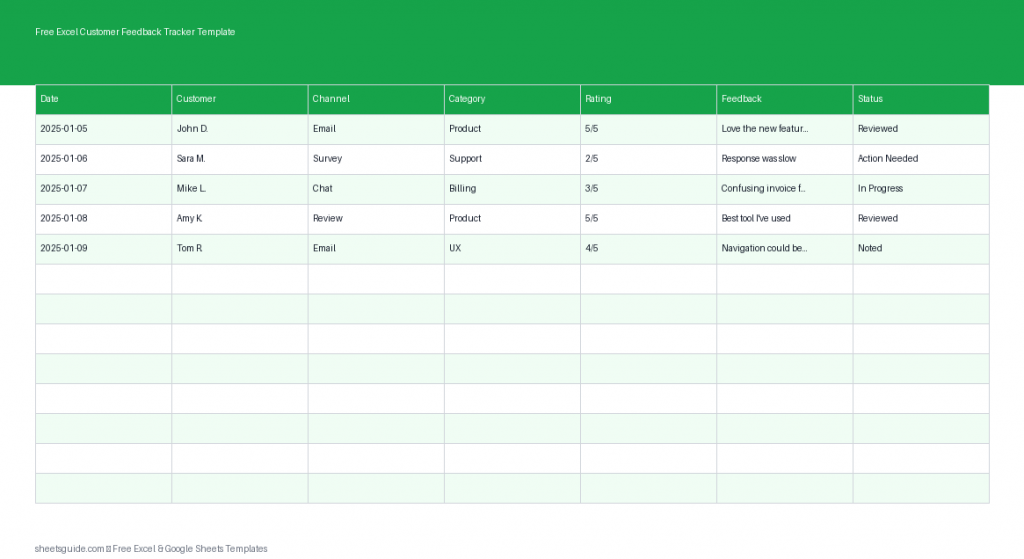
This free Excel Customer Feedback Tracker template gives you a simple, organized way to collect, categorize, and analyze feedback in one place. Built for Excel and fully compatible with Google Sheets, this template helps you turn raw customer input into actionable insights.
Why Use an Excel Customer Feedback Tracker?
When feedback is tracked consistently, it becomes a powerful decision-making tool. Instead of relying on guesswork, you can identify patterns, recurring issues, and opportunities for improvement.
This Excel template helps you:
- Centralize feedback from multiple channels
- Identify trends and recurring complaints
- Prioritize improvements based on real data
- Track the status of issues and resolutions
- Improve customer satisfaction over time
Whether you’re running a small business, managing a support team, or improving a product, this template keeps everything organized and actionable.
What’s Included in the Template
The Excel Customer Feedback Tracker template includes the following columns:
- Date – When the feedback was received
- Customer – Name or identifier of the customer
- Channel – Where the feedback came from (email, social media, phone, etc.)
- Category – Type of feedback (bug, feature request, complaint, praise)
- Rating – Customer satisfaction score or sentiment
- Feedback – The actual comment or summary
- Status – Current state (open, in progress, resolved)
This structure ensures that every piece of feedback is captured consistently and can be easily filtered or analyzed.
Key Benefits of Using This Template
1. Centralized Feedback Management
No more digging through emails or chat logs. Everything is stored in one Excel file, making it easy to review and manage feedback efficiently.
2. Better Decision-Making
By categorizing and rating feedback, you can quickly identify what matters most to your customers and prioritize improvements accordingly.
3. Improved Team Collaboration
Your team can use the template to track progress on issues, ensuring nothing falls through the cracks.
4. Easy Analysis
With Excel’s built-in filters and sorting tools, you can quickly analyze feedback by category, channel, or rating.
5. Scalable for Any Business
This template works just as well for small teams as it does for growing businesses handling large volumes of feedback.
How to Use in Excel
Getting started with this Excel template is quick and straightforward:
- Download and open the template in Excel
Save a copy to your computer or shared workspace so your team can access it. - Customize categories and status values
Adjust the Category and Status columns to match your workflow (e.g., “Bug,” “Feature Request,” “Resolved,” “Pending”). - Start logging feedback
Enter each piece of feedback as it comes in. Be consistent with how you label channels and categories. - Use filters to organize data
Apply Excel filters to quickly view specific types of feedback, such as low ratings or unresolved issues. - Analyze trends
Sort or group feedback by category or rating to identify recurring problems or popular suggestions. - Update status regularly
Keep the Status column current so your team always knows what has been addressed and what still needs attention.
You can also use Excel features like conditional formatting to highlight urgent issues or low ratings for faster decision-making.
Practical Ways to Use This Template
Customer Support Teams
Track incoming support requests and feedback to ensure timely responses and resolution. Identify recurring issues to reduce support volume over time.
Product Development
Collect feature requests and bug reports in one place. Use the data to prioritize your product roadmap based on real user needs.
Small Business Owners
Monitor customer satisfaction without needing complex software. Keep a clear record of what your customers like and what needs improvement.
Marketing Teams
Analyze feedback from campaigns, social media, and surveys to understand customer sentiment and improve messaging.
Tips for Getting the Most Value
- Be consistent: Use standardized terms for categories and channels to keep your data clean and useful.
- Keep feedback concise: Summarize long comments so they are easier to scan and analyze.
- Review regularly: Set a weekly or monthly review to identify trends and take action.
- Prioritize by impact: Focus on feedback that affects the most customers or has the biggest business impact.
- Share insights: Use the data to inform your team and guide decisions across departments.
Excel First, But Also Works in Google Sheets
This template is designed as an Excel template, taking advantage of Excel’s powerful data organization and analysis features. However, it also works seamlessly in Google Sheets, making it easy to collaborate online and share with your team.
If your workflow involves both tools, you can switch between Excel and Google Sheets without losing structure or functionality.
Turn Feedback Into Action
Collecting feedback is only the first step—what really matters is how you use it. This Excel Customer Feedback Tracker template helps you move from scattered comments to clear, actionable insights.
By organizing feedback, tracking progress, and analyzing trends, you can make smarter decisions, improve customer satisfaction, and continuously refine your products and services.
Start using this free Excel template today and turn every piece of feedback into an opportunity for growth.