
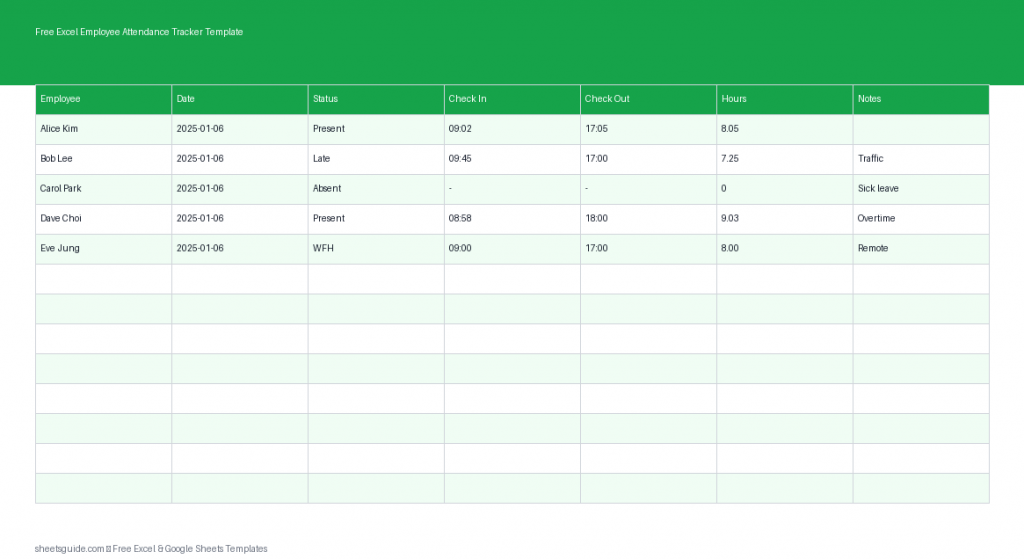
Managing employee attendance doesn’t have to involve complex systems or expensive software. With this free Excel template, you can easily track daily attendance, monitor work hours, and keep a clear record of absences and leaves—all in one place. Whether you manage a small team or a growing workforce, this Excel template offers a simple, reliable solution that also works seamlessly in Google Sheets.
Why Use an Excel Employee Attendance Tracker Template?
Keeping accurate attendance records is essential for payroll, productivity analysis, and compliance. Without a structured system, it’s easy to lose track of who worked, who was absent, and how many hours were logged.
This Excel template helps you stay organized by centralizing all attendance data in one sheet. It eliminates guesswork and reduces manual errors, while giving you instant visibility into your team’s daily activity.
- Track attendance for multiple employees in one place
- Monitor work hours with check-in and check-out times
- Record absences, leaves, and special notes
- Improve payroll accuracy and reporting
- Works in Excel and is fully compatible with Google Sheets
What’s Included in the Template
This Excel template is designed to be simple yet powerful. It includes the following columns to help you manage attendance efficiently:
- Employee – Name or ID of the employee
- Date – The day of attendance
- Status – Present, Absent, Leave, or custom status
- Check In – Time the employee started work
- Check Out – Time the employee finished work
- Hours – Total hours worked
- Notes – Any additional details (late arrival, sick leave, etc.)
The structure keeps everything clean and easy to scan, making it ideal for both daily updates and long-term tracking.
Key Benefits
1. Centralized Attendance Records
Instead of juggling multiple files or systems, this template consolidates all employee attendance data into a single spreadsheet. This makes it easy to review patterns, identify issues, and maintain consistency.
2. Easy Time Tracking
With dedicated columns for check-in and check-out times, you can calculate hours worked quickly. This is especially useful for hourly employees or teams with flexible schedules.
3. Flexible Status Tracking
You can customize the Status column to fit your organization’s needs. Whether you use terms like “Remote,” “Half Day,” or “Sick Leave,” the template adapts to your workflow.
4. Better Payroll Preparation
Accurate attendance data is critical for payroll. This Excel template provides a reliable record that helps ensure employees are paid correctly based on their actual working hours.
5. Works Across Platforms
This is an Excel template first, but it also works smoothly in Google Sheets. That means you can collaborate online if needed while still benefiting from Excel’s powerful features.
How to Use in Excel
Getting started with this Excel template is straightforward. Follow these steps to set up and use it effectively:
- Download and open the template in Excel
Open the file in Microsoft Excel to access full functionality and formatting. - Enter employee names
Start by listing all employees in the Employee column. Use consistent naming to avoid confusion later. - Add dates daily or in advance
Fill in the Date column for each record. You can enter dates daily or pre-fill a full month. - Update attendance status
Use the Status column to mark each employee as Present, Absent, or on Leave. - Record check-in and check-out times
Enter times in the appropriate columns. Excel will help you maintain consistent time formatting. - Calculate hours worked
You can either manually enter hours or use a simple Excel formula (e.g., Check Out minus Check In) to automate calculations. - Add notes when needed
Use the Notes column to capture important details such as late arrivals, early departures, or reasons for absence. - Review regularly
At the end of each week or month, review the data to ensure accuracy and completeness.
Practical Tips for Best Results
To get the most out of this Excel template, consider the following tips:
- Standardize status labels to avoid inconsistencies (e.g., always use “Absent” instead of mixing with “A” or “No Show”)
- Use data validation in Excel to create dropdowns for the Status column
- Freeze the header row so column labels remain visible as you scroll
- Apply filters to quickly view specific employees or dates
- Back up your file regularly to prevent data loss
Who Should Use This Template?
This Excel employee attendance tracker is suitable for a wide range of users:
- Small business owners managing staff attendance
- HR professionals tracking employee records
- Team leaders monitoring daily work hours
- Schools or training centers tracking student attendance
- Freelancers managing contractors or part-time workers
Its simplicity makes it accessible for beginners, while its flexibility allows more advanced users to customize it further.
Customization Ideas
One of the biggest advantages of using an Excel template is the ability to tailor it to your needs. Here are a few ways you can enhance this tracker:
- Add a Department column to group employees
- Create a monthly summary sheet using pivot tables
- Use conditional formatting to highlight absences or late arrivals
- Include a total hours per employee calculation
- Add a holiday calendar for better planning
These small improvements can turn a basic tracker into a powerful attendance management tool.
Common Mistakes to Avoid
While this template is easy to use, a few common mistakes can reduce its effectiveness:
- Forgetting to update attendance daily
- Using inconsistent time formats
- Leaving blank rows or incomplete entries
- Not reviewing data before payroll processing
Staying consistent and disciplined with data entry ensures your records remain accurate and useful.
Final Thoughts
This free Excel Employee Attendance Tracker Template is a practical, no-fuss solution for managing attendance. It gives you the structure you need without overwhelming complexity, making it ideal for everyday use.
By keeping all attendance data in one place, you gain better visibility, improve accuracy, and save time on administrative tasks. And since it works in both Excel and Google Sheets, you have the flexibility to use it however you prefer.
If you’re looking for a simple yet effective way to track employee attendance, this Excel template is a great place to start.