
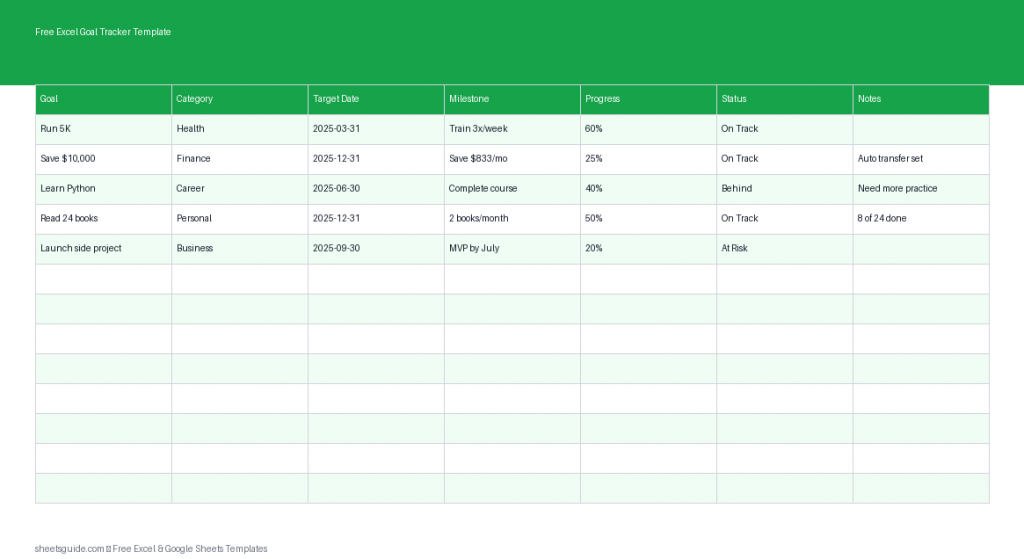
Staying consistent with your goals is often harder than setting them. Whether you’re working toward personal growth, career advancement, or business targets, the difference between success and stagnation usually comes down to tracking progress and staying accountable. That’s exactly where this Free Excel Goal Tracker Template becomes a powerful tool.
This Excel template is designed to help you define SMART goals, break them into manageable milestones, and monitor your progress over time. It works seamlessly in Excel and is also fully compatible with Google Sheets, so you can access and update your goals from anywhere.
Why Use an Excel Goal Tracker Template?
Setting goals without tracking them is like planning a trip without checking your map. You might move forward, but you won’t know if you’re heading in the right direction.
This Excel template helps you:
- Turn vague ideas into structured, measurable goals
- Break large objectives into actionable milestones
- Track progress consistently over time
- Stay motivated with visible progress updates
- Identify delays and adjust your plan early
Instead of juggling notes across apps or forgetting key deadlines, everything is organized in one clear, customizable spreadsheet.
What’s Included in the Template
This Excel template uses a clean and practical structure with the following columns:
- Goal – The main objective you want to achieve
- Category – Area of focus (e.g., Career, Health, Finance, Personal Development)
- Target Date – The deadline for completing the goal
- Milestone – Smaller steps that lead to the final goal
- Progress – A percentage or indicator showing completion status
- Status – Current state (Not Started, In Progress, Completed, On Hold)
- Notes – Additional details, reflections, or reminders
This structure keeps your goals actionable instead of overwhelming. You’re not just writing down what you want—you’re building a roadmap to get there.
How to Use in Excel
- Download and open the Excel template
Open the file in Microsoft Excel. Enable editing if prompted so you can begin customizing it. - List your main goals
Start by entering each goal in the Goal column. Keep them specific and realistic. For best results, follow the SMART framework (Specific, Measurable, Achievable, Relevant, Time-bound). - Assign categories
Use the Category column to group similar goals. This helps you maintain balance across different areas of your life. - Set target dates
Enter deadlines in the Target Date column. Clear timelines create urgency and help prevent procrastination. - Break goals into milestones
In the Milestone column, define smaller steps required to complete each goal. This makes large goals feel manageable and trackable. - Update progress regularly
Use the Progress column to track how far you’ve come. You can enter percentages or simple markers like 25%, 50%, or 100%. - Track status
Update the Status column as you work. This gives you a quick overview of where each goal stands. - Add notes and insights
Use the Notes column to document challenges, ideas, or next steps. This is especially helpful for reflection and improvement.
Once your data is in place, review your sheet weekly. Consistency is what turns this template into a real productivity system.
How This Template Supports SMART Goals
Many people struggle with goal setting because their goals are too vague or unrealistic. This Excel template naturally reinforces the SMART method:
- Specific – Clearly defined goals in the Goal column
- Measurable – Progress tracking makes results visible
- Achievable – Milestones break goals into doable steps
- Relevant – Categories keep goals aligned with priorities
- Time-bound – Target dates ensure accountability
Instead of setting goals once and forgetting them, you actively manage them.
Practical Ways to Use This Goal Tracker
This Excel template is flexible enough for different use cases. Here are a few practical ways you can apply it:
1. Annual Planning
Start your year by listing your top goals across key areas. Break them into quarterly or monthly milestones and track progress throughout the year.
2. Career Development
Track professional goals such as learning new skills, completing certifications, or achieving performance targets. Use milestones to map out each step of your growth plan.
3. Personal Habits and Health
Set fitness, wellness, or habit-building goals. For example, you can track milestones like weekly workouts or diet improvements.
4. Financial Goals
Use the template to monitor savings targets, debt repayment, or budgeting milestones. Progress tracking keeps you accountable.
5. Project Tracking
If you’re managing a small project, this template can double as a lightweight tracker for tasks, deadlines, and progress updates.
Tips for Getting the Most Out of This Template
- Keep goals realistic – Overloading your tracker leads to burnout
- Update frequently – Progress only matters if it’s tracked consistently
- Use clear milestones – Smaller steps make progress visible and motivating
- Review weekly – A quick check-in helps you stay on track
- Adjust when needed – Goals can evolve, and your tracker should too
Think of this template as a living document. It should grow and adapt with your priorities.
Excel First, Flexible Everywhere
This is an Excel template, designed to take advantage of Excel’s simplicity and flexibility. You can sort, filter, and customize it to fit your workflow.
It also works smoothly in Google Sheets, making it easy to access your goals across devices or collaborate with others if needed.
Why This Template Works
Many goal-setting systems fail because they’re either too complicated or too vague. This Excel template strikes a balance by being structured but simple. It gives you just enough detail to stay organized without overwhelming you.
By combining clear goals, measurable progress, and actionable milestones, you create a system that encourages consistent action—not just planning.
Start Tracking Your Goals Today
If you’re serious about achieving your goals, tracking them isn’t optional—it’s essential. This Free Excel Goal Tracker Template gives you a clear, practical way to stay focused and accountable.
Download it, customize it to your needs, and start turning your goals into measurable results. The sooner you begin tracking, the sooner you’ll see progress.