
Free Excel Habit Tracker Template
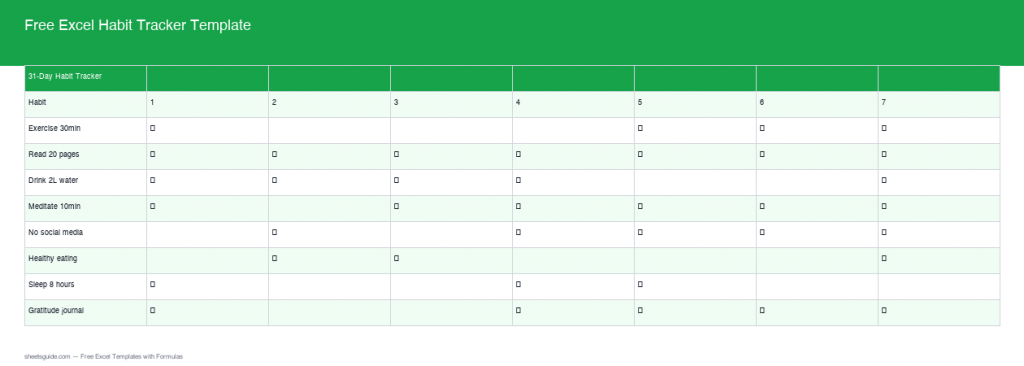
Keeping track of your daily habits is now easier than ever with our enhanced Excel Habit Tracker Template. Powered by real, built-in formulas, this template auto-calculates your habit tracking, offering a seamless and efficient experience. Whether you’re new to habit tracking or an experienced tracker, our Excel template provides the tools you need to stay on target and motivated.
Introduction
With the fast-paced nature of life, maintaining consistent habits can be a challenge. The right tools can make all the difference, and a habit tracker is a powerful way to keep your goals in check. Our updated Excel Habit Tracker Template provides a robust platform to monitor your progress with precision. The addition of real formulas and advanced features makes it an indispensable resource for anyone serious about habit formation.
What’s Included
The Excel Habit Tracker Template now includes:
- A 31-day tracking grid to cover a full month of habits.
- Built-in COUNTIF formulas to automatically calculate the number of done and missed days for each habit.
- Streak calculation to motivate you to keep up with your habits.
- A percentage completion formula for each habit, giving you a comprehensive overview at a glance.
Key Features & Formulas
31-Day Tracking Grid: Log your daily progress over a complete month and view which habits are consistently maintained.
Auto COUNTIF Calculation: With the COUNTIF function, this feature helps you instantly see how many times you’ve completed or missed a habit. As you mark the days, the template automatically keeps count, reducing manual calculations.
Streak Calculation: This element highlights your longest streaks for each habit, encouraging continuity by showcasing your success.
% Complete Formula: Easily see the percentage of completion for any habit. This aggregated overview helps you measure overall success and adjust goals as needed.
How to Use in Excel
Download the template using the link below. Once opened in Excel, you’ll find that each section is clearly labeled. To start:
- Fill in your habits in the designated spaces.
- Mark completion each day with any symbol or text (e.g., “x”, “done”).
- The built-in formulas will automatically calculate your progress, including done/missed days, longest streaks, and percentage complete.
Ensure you enable macros if prompted, to fully utilize the automation.
Tips
Consistency is Key: Attempt to fill in your tracker daily to gain the most accurate reflection of your habits.
Review & Adjust: At the end of the month, review your performance and adjust habits as necessary to improve your outcomes.
Personalize Your Template: Feel free to adjust the graphics, colors, or layout to suit your preferences and make tracking more engaging.
How to Use This Template in Google Sheets
This template is provided as an .xlsx file compatible with both Microsoft Excel and Google Sheets. Follow these steps:
- Download the .xlsx file using the button above.
- Open Google Drive and click + New → File upload.
- Right-click the uploaded file and choose Open with → Google Sheets.
- Click File → Save as Google Sheets to save an editable copy.
All formulas and formatting are fully compatible with Google Sheets.
Conclusion
This Free Excel Habit Tracker Template provides a structured approach to habit formation, with features designed for ease of use and efficiency. The power of automated tracking through real formulas means less manual work for you and more focus on achieving your goals. Download this powerful tool today and take the first step toward better productivity and personal growth.