
Hiring can quickly become chaotic without a structured system. From tracking applications to scheduling interviews and recording feedback, it’s easy for details to slip through the cracks. That’s where a reliable Excel template can make all the difference.
This Free Excel Recruitment Tracker Template is designed to help you manage your hiring pipeline efficiently from start to finish. It works seamlessly in Microsoft Excel and is fully compatible with Google Sheets, giving you flexibility no matter your preferred platform.
Why Use an Excel Recruitment Tracker Template?
Recruitment involves multiple moving parts: candidate information, job roles, interview stages, and decision-making. Without a centralized system, you risk losing visibility into your hiring process.
This Excel template helps you:
- Track every candidate in one place
- Monitor progress through hiring stages
- Assign interviewers and record feedback
- Make faster, more informed hiring decisions
- Reduce administrative overhead
Whether you’re a small business owner, HR professional, or hiring manager, this template simplifies your workflow without requiring complex software.
What’s Included in the Template?
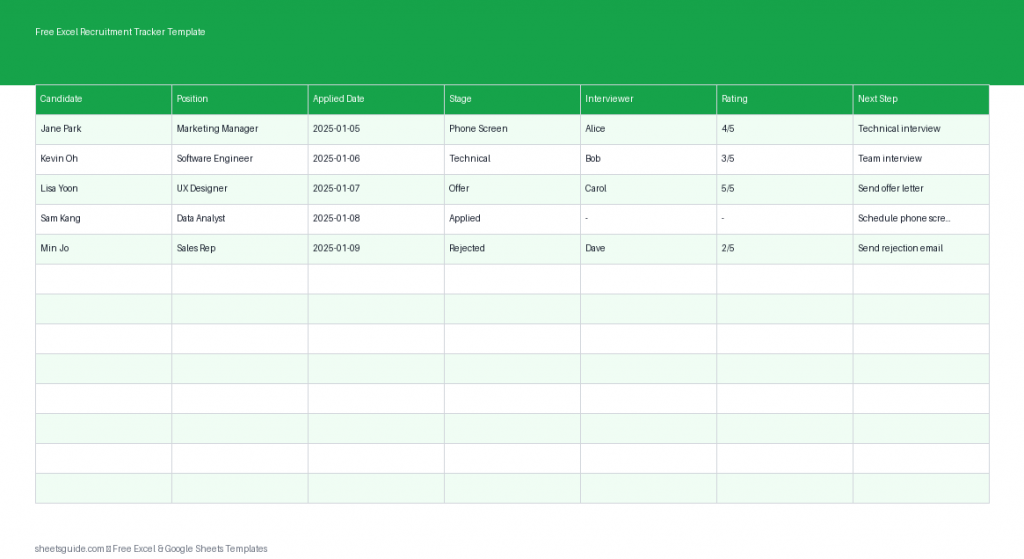
The template is structured with essential columns that cover the full recruitment lifecycle:
- Candidate – The applicant’s name
- Position – The job role applied for
- Applied Date – When the application was submitted
- Stage – Current step in the hiring process (e.g., Applied, Interview, Offer)
- Interviewer – Person responsible for conducting interviews
- Rating – Candidate evaluation score
- Next Step – Follow-up actions or decisions
This structure ensures you always have a clear snapshot of your hiring pipeline.
Key Benefits
1. Centralized Candidate Tracking
No more digging through emails or scattered notes. All applicant information is stored in one organized Excel sheet.
2. Clear Hiring Pipeline Visibility
By updating the Stage column, you can instantly see where each candidate stands, making it easier to prioritize next steps.
3. Improved Collaboration
Assign interviewers and share the file with your team. Since it also works in Google Sheets, collaboration becomes even easier in shared environments.
4. Better Decision-Making
Use the Rating column to compare candidates objectively and ensure consistent evaluation criteria.
5. Time-Saving Simplicity
This Excel template is straightforward and requires no setup. Just open it and start entering your data.
How to Use in Excel
Getting started with this Excel template is simple. Follow these steps to make the most of it:
- Download and open the template
Open the file in Microsoft Excel to begin tracking your recruitment process. - Enter candidate details
Add each applicant’s name, the position they applied for, and the application date. - Update the hiring stage
Use consistent stage labels such as “Applied,” “Screening,” “Interview,” “Offer,” or “Hired” to maintain clarity. - Assign interviewers
Record who is responsible for each interview to avoid confusion and ensure accountability. - Rate candidates
Use a simple numeric or descriptive rating system to evaluate applicants consistently. - Define next steps
Keep momentum by clearly stating what needs to happen next for each candidate (e.g., schedule interview, send offer, reject). - Review regularly
Update the sheet frequently to keep your recruitment pipeline accurate and actionable.
You can also customize the template by adding filters, color coding, or dropdown lists to match your hiring workflow.
Best Practices for Managing Recruitment in Excel
Standardize Your Stages
Define a consistent set of hiring stages and use them across all entries. This improves reporting and reduces confusion.
Use Data Validation
In Excel, you can create dropdown menus for columns like Stage or Interviewer to ensure consistent data entry.
Apply Conditional Formatting
Highlight candidates based on stage or rating. For example, mark high-rated candidates in green or overdue follow-ups in red.
Filter and Sort Data
Quickly view candidates by position, stage, or interviewer using Excel’s built-in filtering tools.
Keep Notes Concise
Use the Next Step column to capture actionable notes rather than lengthy comments. This keeps your tracker clean and easy to scan.
Who Should Use This Template?
This Excel recruitment tracker is ideal for:
- Small business owners managing hiring internally
- HR teams looking for a lightweight tracking solution
- Recruiters handling multiple job openings
- Startups building their first hiring processes
- Hiring managers coordinating interviews and evaluations
If you don’t need a full applicant tracking system (ATS), this Excel template offers a practical and effective alternative.
Excel First, Flexible Everywhere
This template is built for Microsoft Excel, giving you full control over your data with powerful features like sorting, filtering, and formatting. At the same time, it works smoothly in Google Sheets, making it easy to collaborate with remote teams or share updates in real time.
You get the best of both worlds: Excel’s structure and Google Sheets’ accessibility.
Final Thoughts
A well-organized hiring process leads to better decisions and a smoother experience for both your team and your candidates. This Free Excel Recruitment Tracker Template gives you a simple yet powerful way to manage applicants from application to hire.
Instead of juggling multiple tools or losing track of important details, you can rely on a single, structured Excel sheet to guide your recruitment efforts. Customize it to fit your needs, keep it updated, and you’ll have a clear, efficient hiring pipeline at your fingertips.
Start using this Excel template today and bring clarity and control to your recruitment process.