
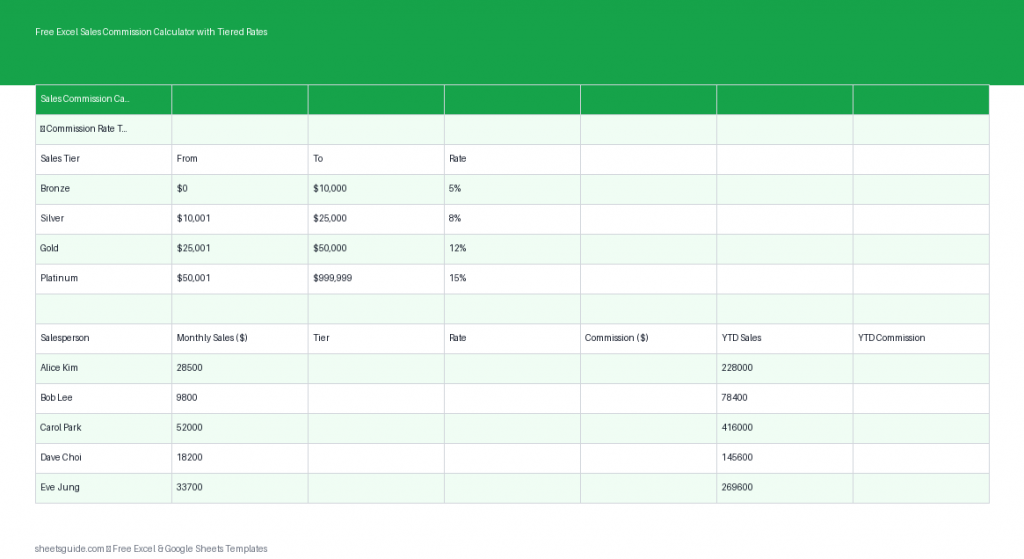
Managing sales commissions can quickly become messy—especially when tiered commission structures are involved. If you’re manually calculating payouts or juggling multiple formulas, errors are almost inevitable. That’s where this free Excel template comes in.
This Excel template is designed to automatically calculate commissions based on tiered rates using built-in formulas. Whether you’re managing a small sales team or tracking your own performance, it simplifies calculations while keeping everything transparent and organized. Even better, the file works seamlessly in both Excel and Google Sheets, so you can use it wherever you prefer.
What This Excel Template Does
This template helps you calculate commissions based on different sales tiers without needing to manually adjust formulas each time. It uses nested IF logic to assign commission rates depending on the sales amount.
The structure is simple and practical, making it easy to customize for different businesses and compensation plans.
Included Columns
- Salesperson – Name of the individual earning the commission
- Sales Amount – Total sales value for the period
- Tier – Automatically assigned based on sales thresholds
- Rate – Commission percentage tied to the tier
- Commission – Calculated payout amount
- YTD Total – Running year-to-date commission total
Why Tiered Commission Structures Matter
Tiered commissions are commonly used to incentivize higher performance. Instead of offering a flat rate, sales reps earn increasing percentages as they hit higher targets. This encourages consistent growth and rewards top performers.
However, tiered systems also introduce complexity. Without automation, it’s easy to miscalculate rates or apply the wrong tier. This Excel template eliminates that risk by embedding the logic directly into the spreadsheet.
Key Features of This Excel Template
- Automated tier assignment using nested IF formulas
- Dynamic commission calculations based on sales input
- Customizable thresholds and rates to match your plan
- Year-to-date tracking for long-term performance visibility
- Compatible with Excel and Google Sheets
Everything updates automatically when you enter or change a sales amount, which makes this template especially useful for monthly or weekly tracking.
How to Use in Excel
- Download and open the file in Excel
Open the template in Microsoft Excel to access all formulas and features. - Enter salesperson names
Fill in the Salesperson column with your team members or individual entries. - Input sales amounts
Add each person’s total sales for the period in the Sales Amount column. - Review automatic tier assignment
The Tier column updates automatically based on predefined thresholds. - Check commission rates
The Rate column reflects the correct percentage tied to each tier. - View calculated commissions
The Commission column multiplies sales by the assigned rate. - Track cumulative earnings
The YTD Total column keeps a running total of commissions over time.
If your commission structure changes, simply update the tier thresholds or rate logic within the formulas. Excel will handle the rest automatically.
Customizing the Template for Your Business
Every organization has its own compensation model, so flexibility is key. This Excel template is designed to be easily adjusted without requiring advanced spreadsheet skills.
Adjusting Tier Thresholds
You can modify the sales ranges that define each tier by editing the nested IF formulas. For example, you might set:
- Tier 1: Up to $5,000
- Tier 2: $5,001–$10,000
- Tier 3: Above $10,000
Just update the values in the formula to match your desired structure.
Changing Commission Rates
If your rates differ across tiers, adjust the formula that populates the Rate column. For example:
- 5% for Tier 1
- 7.5% for Tier 2
- 10% for Tier 3
This ensures commissions always align with your current compensation plan.
Expanding the Template
You can easily extend this Excel template by adding:
- Monthly or quarterly breakdowns
- Bonus columns for special incentives
- Performance targets and variance tracking
Because the core calculations are already set up, expanding the template is straightforward.
Practical Use Cases
This Excel template is versatile enough to support a wide range of scenarios:
Small Business Owners
Track employee commissions without investing in expensive software. This template provides clarity and accuracy with minimal setup.
Sales Managers
Monitor team performance and ensure payouts are calculated correctly. The tiered structure makes it easy to evaluate who is hitting higher targets.
Freelancers and Independent Sales Reps
If you earn commission-based income, this template helps you forecast earnings and verify payments.
Finance Teams
Use the template as a quick validation tool for commission reports before processing payroll.
Common Mistakes This Template Helps Avoid
Manual commission tracking often leads to avoidable errors. This Excel template minimizes those risks by automating key steps.
- Incorrect tier assignment – Automatically determined based on sales data
- Wrong commission rates – Linked directly to tiers
- Calculation errors – Eliminated with built-in formulas
- Inconsistent tracking – Standardized format for all entries
By removing manual calculations, you can focus on analyzing performance instead of fixing mistakes.
Tips for Getting the Most Out of This Excel Template
- Keep formulas locked to prevent accidental changes
- Use data validation for consistent data entry
- Update regularly to maintain accurate YTD totals
- Duplicate sheets for monthly tracking and historical records
Small improvements like these can make your workflow smoother and more reliable.
Excel First, Google Sheets Compatible
This is an Excel template built with Excel’s formula system in mind. However, it also works in Google Sheets with minimal or no adjustments. That means you can collaborate online or share access with your team without losing functionality.
If you primarily work in Excel, you’ll benefit from full compatibility and performance. If you prefer cloud-based access, simply upload the file to Google Sheets and continue working as usual.
Final Thoughts
Commission tracking doesn’t need to be complicated. With this free Excel template, you get a structured, automated system that handles tiered calculations for you. It reduces errors, saves time, and gives you a clear view of earnings and performance.
Whether you’re managing a team or tracking your own commissions, this tool provides a reliable foundation you can build on. Just enter your data, let the formulas do the work, and stay focused on what matters—driving sales and growth.