
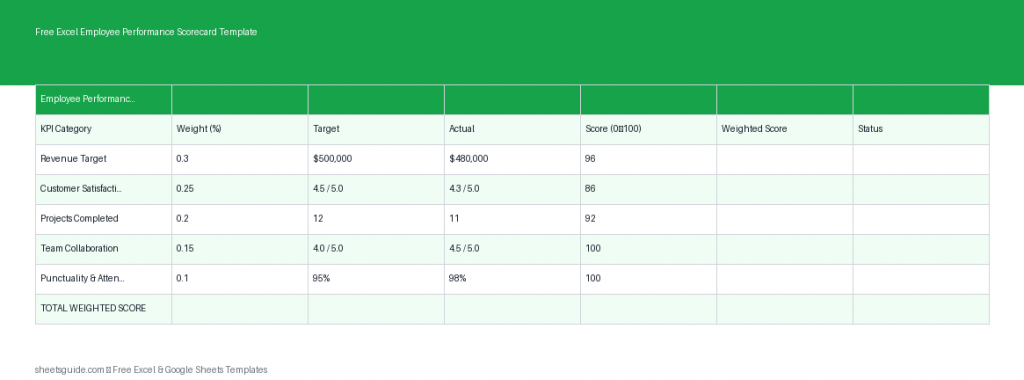
Managing employee performance can quickly become inconsistent, subjective, or overly complicated without the right system in place. This Free Excel Employee Performance Scorecard Template gives you a structured, data-driven way to evaluate team members using measurable KPIs, weighted scoring, and automatic calculations.
Built as an Excel template (and fully compatible with Google Sheets), this tool helps managers, HR professionals, and business owners standardize evaluations, reduce bias, and make informed decisions about promotions, bonuses, and development plans.
What Is an Employee Performance Scorecard?
An employee performance scorecard is a framework used to measure how well an individual meets defined goals and key performance indicators (KPIs). Instead of relying on general impressions, this method uses quantifiable metrics such as productivity, quality, efficiency, and behavioral competencies.
This Excel template simplifies that process by organizing performance metrics into a clear structure with automatic scoring based on targets and actual results.
What’s Included in This Excel Template
The template is designed to be simple yet powerful, using a structured table with the following columns:
- Employee – Name or ID of the employee being evaluated
- KPI – Key performance indicator (e.g., Sales, Customer Satisfaction, Task Completion)
- Weight – Importance of the KPI as a percentage
- Target – Expected performance level
- Actual – Actual performance achieved
- Score – Automatically calculated performance score
- Weighted Score – Final score based on KPI importance
The built-in formulas automatically calculate performance scores, saving time and eliminating manual errors.
Why Use an Excel Employee Performance Scorecard Template?
Performance reviews are often inconsistent because they rely too heavily on subjective judgment. This Excel template introduces structure and fairness into the evaluation process.
1. Standardized Evaluations
Every employee is measured against the same KPIs and criteria, ensuring fairness across teams and departments.
2. Data-Driven Decisions
With weighted scoring and automated calculations, decisions about promotions or performance improvement plans are based on measurable data.
3. Time Efficiency
No need to build formulas or scoring systems from scratch. Everything is pre-configured so you can focus on analysis instead of setup.
4. Flexible and Customizable
You can easily modify KPIs, weights, and targets to match different roles, departments, or business objectives.
5. Works in Excel and Google Sheets
This is an Excel template that also works seamlessly in Google Sheets, allowing teams to collaborate and share evaluations easily.
How Scoring Works
The template uses a simple but effective scoring system:
- Score is calculated by comparing Actual vs Target performance
- Weighted Score multiplies the Score by the KPI Weight
This approach ensures that more important KPIs have a bigger impact on the final evaluation.
For example:
- Sales KPI (Weight: 40%)
- Customer Satisfaction (Weight: 30%)
- Task Completion (Weight: 30%)
If an employee performs exceptionally well in Sales but slightly below target in other areas, the weighted system reflects the true importance of each metric.
How to Use This Excel Template
Step 1: Enter Employee Information
Start by entering the name of the employee in the Employee column. You can duplicate rows to evaluate multiple KPIs for the same individual.
Step 2: Define KPIs
List the key performance indicators relevant to the role. These should be measurable and aligned with business goals.
Examples include:
- Revenue generated
- Projects completed
- Error rate
- Customer feedback scores
Step 3: Assign Weights
Allocate a percentage weight to each KPI based on its importance. Ensure the total weight equals 100% for accurate scoring.
Step 4: Set Targets
Enter the expected performance level for each KPI. Targets should be realistic, measurable, and clearly defined.
Step 5: Input Actual Results
After the evaluation period, input the employee’s actual performance data.
Step 6: Review Automatic Scores
The template will automatically calculate the Score and Weighted Score. Use these values to assess overall performance.
How to Use in Excel
- Download and open the Excel template file
- Enable editing if prompted
- Customize KPI names to match your organization’s metrics
- Adjust weights to reflect priorities (ensure total equals 100%)
- Enter targets and actual performance values
- Review automatically calculated scores
- Use filters or sorting to compare employee performance
If you prefer working online or sharing with a team, you can upload the same Excel template to Google Sheets while keeping all formulas intact.
Best Practices for Performance Evaluation
Keep KPIs Clear and Measurable
Avoid vague indicators like “good communication.” Instead, use measurable metrics such as response time or customer satisfaction ratings.
Review Weights Regularly
Business priorities change, so KPI weights should reflect current goals. For example, growth-focused periods may prioritize sales, while stabilization periods may focus on quality.
Use Consistent Time Periods
Evaluate all employees over the same timeframe (monthly, quarterly, or annually) for fair comparisons.
Combine Quantitative and Qualitative Insights
While this Excel template focuses on numbers, you can complement it with written feedback to provide context and actionable guidance.
Avoid Overloading KPIs
Stick to 4–8 meaningful KPIs per role. Too many metrics can dilute focus and complicate analysis.
Who Should Use This Template?
This Excel Employee Performance Scorecard Template is ideal for:
- HR managers conducting formal performance reviews
- Team leaders tracking employee productivity
- Small business owners managing staff performance
- Department heads aligning team output with business goals
- Organizations implementing KPI-based evaluation systems
Practical Use Cases
Quarterly Performance Reviews
Use the template to evaluate employee performance every quarter and identify trends over time.
Bonus and Incentive Decisions
Link weighted scores to bonus thresholds to ensure fair and transparent compensation decisions.
Employee Development Plans
Identify weak areas and create targeted training plans based on KPI results.
Team Performance Comparison
Compare multiple employees across the same KPIs to identify top performers and areas for improvement.
Customize It for Your Business
One of the biggest advantages of this Excel template is its flexibility. You can easily tailor it to different roles:
- Sales teams: Revenue, conversion rates, client acquisition
- Customer support: Resolution time, satisfaction score, ticket volume
- Operations: Efficiency, error rates, turnaround time
- Marketing: Campaign performance, leads generated, ROI
You can also duplicate sheets to manage multiple departments within the same workbook.
Final Thoughts
This Free Excel Employee Performance Scorecard Template gives you a reliable, structured way to evaluate performance using clear metrics and weighted scoring. By removing guesswork and introducing consistency, it helps you make better decisions, improve accountability, and support employee growth.
Whether you’re running a small team or managing a large workforce, this Excel template (also compatible with Google Sheets) provides a practical foundation for modern performance management.