
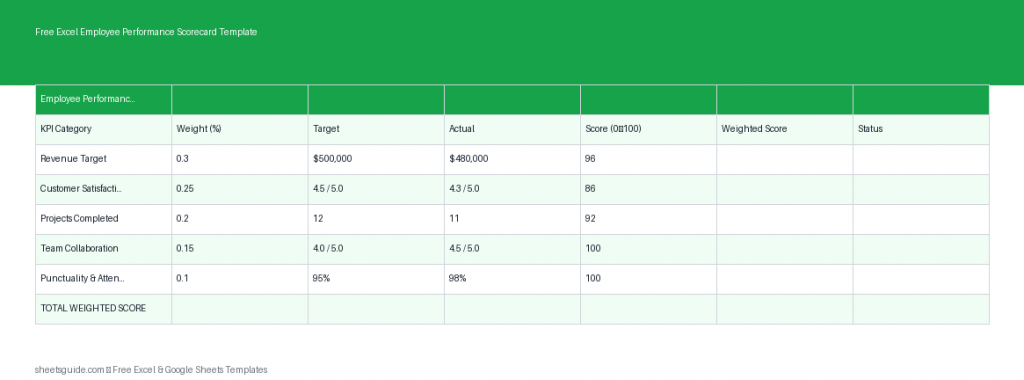
Managing employee performance doesn’t have to be complicated or time-consuming. With the Free Excel Employee Performance Scorecard Template, you can evaluate team members consistently using structured KPIs, weighted scoring, and automated calculations—all inside Excel.
This Excel template is designed to help managers, HR professionals, and team leads measure performance objectively. It also works seamlessly in Google Sheets, making it easy to collaborate across teams while keeping Excel as your primary tool.
Why Use an Employee Performance Scorecard?
Performance reviews often suffer from inconsistency, bias, or lack of clarity. A structured scorecard solves these problems by turning subjective impressions into measurable data.
With this Excel template, you can:
- Define clear KPIs for each employee
- Assign weights based on importance
- Track actual performance against targets
- Automatically calculate scores and overall ratings
- Standardize performance evaluations across your organization
This approach ensures that every employee is evaluated fairly and consistently, while giving you actionable insights for coaching and development.
What’s Included in the Excel Template
The template is simple yet powerful, built around a structured table with the following columns:
- Employee – Name of the team member being evaluated
- KPI – Key performance indicator (e.g., Sales, Customer Satisfaction)
- Weight – Importance of each KPI (percentage or numeric weight)
- Target – Expected performance level
- Actual – Actual achieved result
- Score – Performance score based on target vs actual
- Weighted Score – Final score after applying KPI weight
All calculations are automated, so once you input your data, the Excel template handles scoring instantly.
Key Features
1. Weighted KPI System
Not all tasks are equally important. This template allows you to assign weights to each KPI, ensuring critical metrics have a greater impact on the final score.
2. Automatic Performance Scoring
The Excel template calculates scores based on how actual performance compares to targets. This eliminates manual errors and saves time.
3. Easy Customization
You can tailor KPIs to fit any role—sales, marketing, operations, or customer service—without changing the structure of the template.
4. Clear Performance Insights
By combining scores and weights, the template gives you a clear overall performance rating that’s easy to interpret and share.
5. Excel-First, Google Sheets Compatible
This is an Excel template built for reliability and performance, and it also works smoothly in Google Sheets for teams that collaborate online.
Benefits of Using This Template
Using a structured Excel template for performance evaluation offers several advantages:
- Consistency: Every employee is measured using the same criteria
- Transparency: Clear metrics reduce confusion and disputes
- Efficiency: Automated calculations save hours of manual work
- Better Decisions: Data-driven insights support promotions, raises, and training
- Scalability: Works for small teams and large organizations alike
How to Use in Excel
Getting started with this Excel template is straightforward. Follow these steps to begin evaluating employee performance:
- Download and open the Excel template
Open the file in Microsoft Excel to access all built-in formulas and features. - Enter employee names
Fill in the “Employee” column with the names of the individuals you want to evaluate. - Define KPIs
List the key performance indicators relevant to each role, such as productivity, quality, attendance, or sales. - Assign weights
Allocate a weight to each KPI based on its importance. Ensure the total weight adds up logically (e.g., 100%). - Set targets
Input realistic and measurable targets for each KPI. - Enter actual results
Record the actual performance data for each employee. - Review automatic scores
The template will calculate the score and weighted score automatically. - Analyze performance
Use the final scores to compare employees, identify strengths, and highlight areas for improvement.
If you’re working in a collaborative environment, you can upload the same Excel template to Google Sheets and share it with your team while maintaining the same structure and calculations.
Practical Use Cases
Performance Reviews
Use the template during quarterly or annual reviews to provide objective, data-backed evaluations.
Team Management
Track ongoing performance and quickly identify top performers or those who need support.
Goal Setting
Align employee goals with company objectives by defining clear KPIs and targets.
HR Reporting
Generate consistent performance data that can be used for internal reports and decision-making.
Tips for Best Results
- Keep KPIs specific and measurable
- Avoid assigning too many KPIs—focus on what matters most
- Review and adjust weights periodically
- Use historical data to set realistic targets
- Combine quantitative scores with qualitative feedback
Remember, the goal of this Excel template is not just to score employees, but to support growth, clarity, and better communication across your team.
Who Should Use This Template?
This Excel template is ideal for:
- Managers overseeing team performance
- HR professionals standardizing evaluation processes
- Small business owners managing employees
- Team leads tracking KPIs and productivity
Whether you’re managing a small team or a large workforce, this template provides a simple yet powerful framework for performance evaluation.
Final Thoughts
The Free Excel Employee Performance Scorecard Template brings structure, clarity, and efficiency to employee evaluations. By combining weighted KPIs with automatic scoring, it removes guesswork and helps you make informed decisions.
Start using this Excel template today to streamline your performance management process. And if you collaborate online, you can easily use the same file in Google Sheets without losing functionality.
Consistent evaluation leads to stronger teams—and this template gives you the tools to make it happen.