
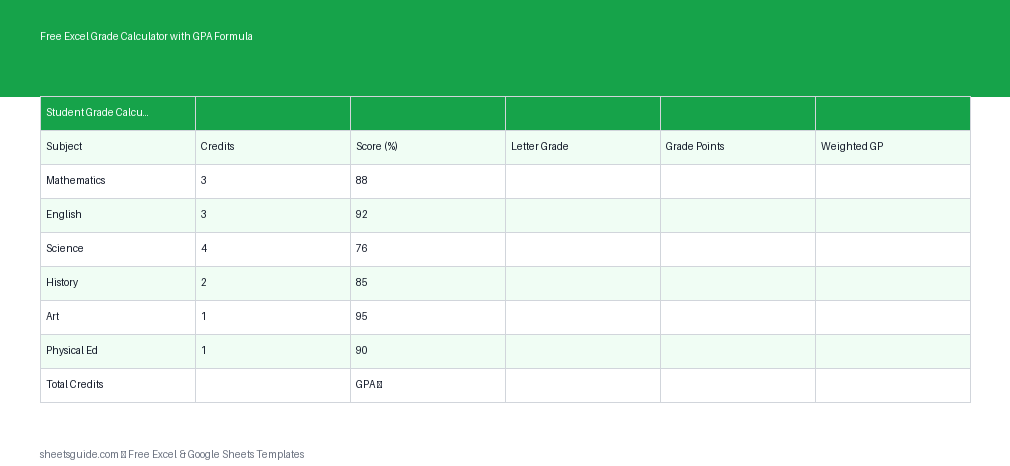
Tracking grades manually can quickly become messy, especially when dealing with multiple subjects, varying credit weights, and GPA calculations. This free Excel template is designed to simplify everything. With built-in formulas, it automatically calculates letter grades, grade points, weighted grade points, and your overall GPA—saving time and reducing errors.
Built for Excel first and fully compatible with Google Sheets, this template is ideal for students, teachers, and parents who want a clean, reliable system for academic tracking.
What This Excel Template Does
This Excel template provides a structured way to record and calculate academic performance. Once you enter your data, all calculations are handled automatically.
- Converts scores into letter grades
- Assigns grade points based on standard GPA scales
- Calculates weighted grade points using course credits
- Computes overall GPA instantly
- Keeps everything organized in a clean table format
Template Structure
The template includes the following columns:
- Subject – Name of the course or subject
- Credits – Number of credits assigned to the course
- Score – Numeric score (percentage or marks)
- Grade – Automatically assigned letter grade
- Grade Points – Numeric GPA value (e.g., 4.0 scale)
- Weighted GP – Grade points multiplied by credits
At the bottom, the template calculates your total GPA based on weighted grade points and total credits.
Why Use an Excel Grade Calculator?
Many students try to calculate their GPA manually or rely on online tools, but those methods often lack flexibility or transparency. This Excel template gives you full control over your data while automating the heavy lifting.
Here’s why it stands out:
- Accuracy: Built-in formulas reduce calculation errors
- Customization: Adjust grading scales or credit values as needed
- Clarity: See exactly how each course contributes to your GPA
- Speed: Instant updates when you change scores
- Compatibility: Works in Excel and Google Sheets
How GPA Is Calculated in This Excel Template
The GPA calculation follows a standard weighted approach:
- Each score is converted into a letter grade
- The letter grade is mapped to grade points (e.g., A = 4.0, B = 3.0)
- Grade points are multiplied by course credits
- Total weighted grade points are divided by total credits
This ensures that higher-credit courses have a greater impact on your final GPA.
How to Use in Excel
Getting started with this Excel template is simple and takes only a few minutes.
- Download and open the Excel template
- Enter your subjects in the Subject column
- Input credits for each course
- Add your scores as percentages or marks
- Review automatic results for grades, grade points, and GPA
The formulas are already built in, so you don’t need to create or edit anything unless you want to customize the grading scale.
Tips for Best Results
- Keep your score format consistent (e.g., all percentages)
- Double-check credit values for accuracy
- Avoid deleting formula cells—only edit input fields
- Use Excel’s table features to add more rows if needed
Customizing the Template
This Excel template is flexible enough to adapt to different grading systems.
You can easily:
- Modify grade boundaries (e.g., A = 90% instead of 85%)
- Adjust GPA scales (e.g., 5.0 weighted scale)
- Add additional columns for notes or semesters
- Track multiple terms in separate sheets
If your institution uses a unique grading system, simply update the formulas in the Grade and Grade Points columns.
Who This Excel Template Is For
This tool is useful for a wide range of users:
- Students: Track progress and predict final GPA
- Teachers: Monitor class performance
- Parents: Stay informed about academic results
- Academic advisors: Help students plan course loads
Whether you’re managing a single semester or an entire academic year, this template keeps everything organized.
Excel First, Google Sheets Ready
This is an Excel template, designed with Excel’s formula system in mind for maximum reliability and performance. However, it also works smoothly in Google Sheets, making it easy to access and edit your data from anywhere.
You get the best of both worlds: Excel’s power and Google Sheets’ convenience.
Common Use Cases
Here are a few practical ways to use this template:
- Estimate your GPA before final grades are released
- Compare how different scores affect your GPA
- Plan course loads based on credit weight
- Track improvement across semesters
- Identify subjects that need more attention
Final Thoughts
If you want a straightforward, reliable way to calculate grades and GPA, this free Excel template is a solid choice. It removes the guesswork, saves time, and gives you a clear picture of academic performance.
Instead of juggling calculators or guessing your GPA, you can focus on what actually matters—improving your results. Just enter your data and let Excel handle the rest.