
Hiring can get messy fast. Between resumes, interviews, feedback, and follow-ups, it’s easy to lose track of where each candidate stands. That’s where a structured system makes all the difference.
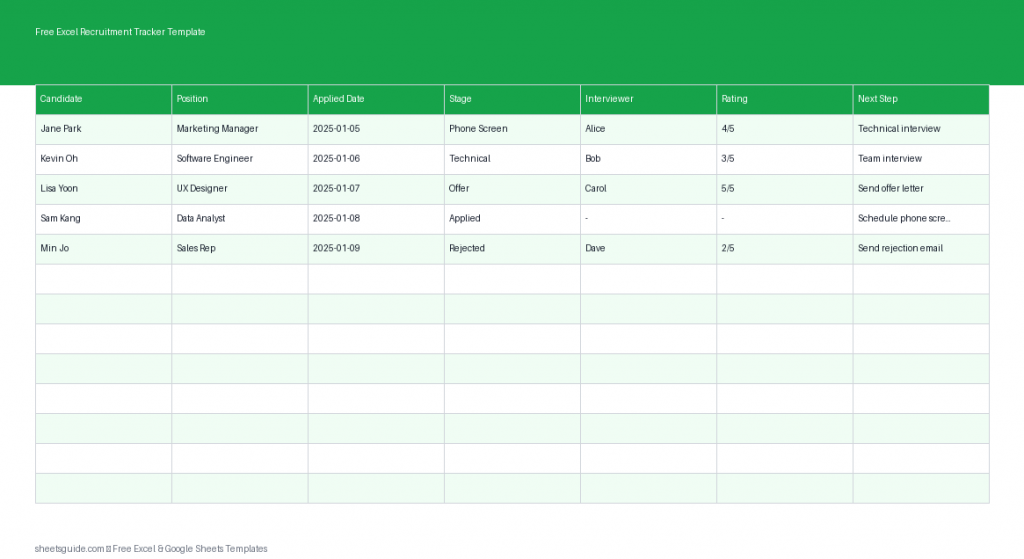
This free Excel recruitment tracker template gives you a simple, reliable way to manage your hiring pipeline from application to final decision. Built for Excel and fully compatible with Google Sheets, it keeps everything organized so you can focus on choosing the right candidate—not chasing information.
Why Use an Excel Recruitment Tracker Template?
Whether you’re a small business owner, HR professional, or hiring manager, you need a clear overview of your recruitment process. Spreadsheets remain one of the most flexible tools for this job.
With this Excel template, you can:
- Track every candidate in one place
- Monitor progress across hiring stages
- Keep interview notes organized
- Compare candidates using consistent ratings
- Stay on top of next steps and follow-ups
Instead of juggling emails and scattered notes, you’ll have a structured workflow that’s easy to update and share.
What’s Included in the Template
This Excel recruitment tracker template is designed to be simple but powerful. It includes the following columns:
- Candidate – Name of the applicant
- Position – Role they applied for
- Applied Date – When the application was submitted
- Stage – Current step in the hiring process
- Interviewer – Person responsible for the interview
- Rating – Evaluation score or notes
- Next Step – Upcoming action or decision
Each column plays a key role in helping you move candidates through your hiring pipeline efficiently.
How This Template Improves Your Hiring Process
1. Clear Visibility Across Candidates
Instead of digging through emails or documents, you can instantly see where every candidate stands. This visibility helps you avoid missed follow-ups and keeps your hiring timeline on track.
2. Consistent Evaluation
The Rating column encourages structured feedback. Whether you use a numeric scale or simple notes, having everything in one place makes comparisons much easier.
3. Better Team Collaboration
If multiple people are involved in hiring, assigning an Interviewer ensures accountability. Everyone knows who is responsible for each step.
4. Reduced Hiring Delays
The Next Step column acts like a built-in reminder system. You’ll always know what action needs to happen next—schedule an interview, send feedback, or make an offer.
5. Scalable for Any Hiring Volume
Whether you’re hiring for one role or managing dozens of applicants, this Excel template scales easily without becoming overwhelming.
How to Use in Excel
Getting started with this Excel recruitment tracker template is quick and straightforward.
- Download and open the template in Excel
Open the file and save a working copy so you can customize it for your hiring process. - Enter candidate details
Add each applicant as a new row. Fill in their name, position, and application date. - Define your hiring stages
Use the Stage column to reflect your workflow, such as:- Applied
- Screening
- Interview
- Final Round
- Offer
- Hired / Rejected
- Assign interviewers
Record who is responsible for each candidate interaction to avoid confusion. - Rate candidates consistently
Use a scoring system (e.g., 1–5 or 1–10) or short notes to evaluate performance. - Update next steps regularly
After each interaction, update the Next Step column so nothing falls through the cracks. - Sort and filter as needed
Use Excel’s built-in filters to view candidates by stage, position, or interviewer.
This template also works seamlessly in Google Sheets, making it easy to collaborate with others if needed.
Practical Tips for Getting the Most Out of This Template
Standardize Your Stages
Keep your hiring stages consistent across all roles. This makes reporting and comparisons much easier.
Use Data Validation
In Excel, you can add dropdown lists for the Stage column to ensure consistent entries and reduce errors.
Color-Code for Quick Insights
Apply conditional formatting to highlight candidates based on stage or rating. For example:
- Green for top-rated candidates
- Yellow for in-progress interviews
- Red for rejected applicants
Review Weekly
Set aside time each week to review your tracker. This helps you spot bottlenecks and keep the hiring process moving.
Duplicate for Each Role (Optional)
If you’re hiring for multiple positions, you can either filter by role or create separate sheets for each job opening.
Who Should Use This Excel Template?
This recruitment tracker is ideal for:
- Small business owners managing hiring themselves
- HR teams handling multiple candidates
- Recruiters tracking pipelines
- Startups building their first hiring process
If you need a lightweight, flexible system without complex software, this Excel template is a perfect fit.
Final Thoughts
Hiring doesn’t need to be chaotic. With the right structure in place, you can turn a scattered process into a smooth, organized workflow.
This free Excel recruitment tracker template gives you everything you need to manage candidates, track progress, and make better hiring decisions. Because it works in both Excel and Google Sheets, you can use it in the environment that fits your workflow best.
Start using it today and bring clarity and consistency to your recruitment process.