
“`html
Introduction
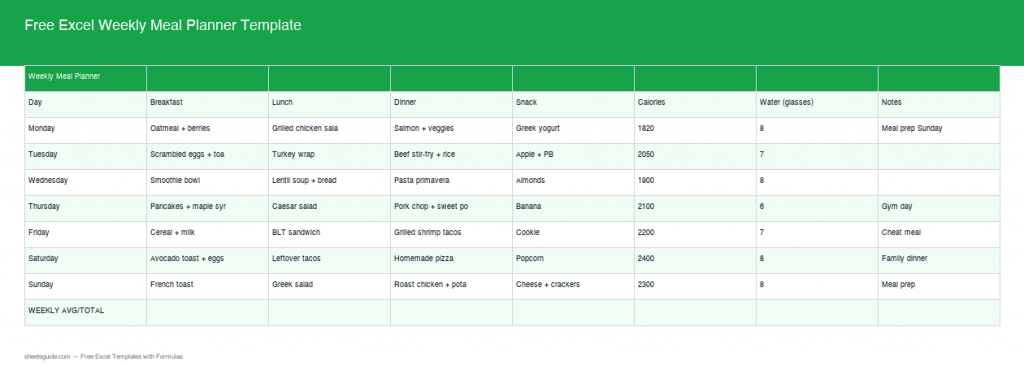
Planning meals can significantly simplify your weekly routine, ensuring that you have healthy, balanced meals while saving time and money. Meal planning is not just a trendy habit; it’s a strategic approach that enables you to take control of your diet and health. We are excited to introduce our updated Free Excel Weekly Meal Planner Template, now enhanced with real formulas and advanced features. This comprehensive tool is designed to make meal planning more efficient and effortless, leading to better nutrition and reduced stress.
What’s Included
The template now includes two distinct sheets:
- Weekly Meal Plan: This section automatically calculates your average calorie intake and total water consumption, providing you with a quick overview of your nutritional status for the week.
- Shopping List: This organizes items by category with intuitive checkboxes for easy tracking, ensuring you never forget a crucial ingredient when you’re at the store.
Key Features & Formulas
Our template is packed with features to enhance your meal planning experience:
- Built-in Formulas: Automatic calculation of average daily calorie consumption is a standout feature, ensuring you meet your nutritional goals efficiently. You can quickly see how many calories you’ve consumed compared to your daily target, aiding in maintaining or adjusting your diet.
- Water Consumption Tracker: This totals your daily water intake, helping you stay hydrated. Remember, hydration is crucial for overall health, and this tracker makes it easy to ensure you’re drinking enough.
- Organized Shopping List: Items are sorted by category, which streamlines your grocery trips. Whether it’s fruits, vegetables, dairy, or proteins, you can navigate the aisles with ease. The interactive checkboxes also let you manage your purchases effortlessly, preventing unnecessary buys.
How to Use in Excel
Using this template in Excel is straightforward, making it accessible for everyone, from beginners to advanced users:
- Download the Template: Click the button below to start your meal planning journey.
- Enter Meal Data: Begin filling in your meal plan for each day, including calorie counts and water intake. You can also add notes about each meal, like preparation methods or variations you’d like to try.
- Shopping List Management: As you plan meals, the shopping list will automatically update. This means no more scrambling to remember what you need at the store. Use the checkboxes to keep track of what you have purchased, making grocery shopping a breeze.
Helpful Tips
Maximize the use of your template with these tips:
- Consistency is Key: Regular updates ensure accurate tracking of nutritional values. Set a routine to fill in your meal plans at the same time each week, which will make it a habit.
- Customization: Feel free to adjust categories in the shopping list to fit your dietary preferences and save time. For example, if you’re gluten-free, you might want to create a separate category for gluten-free items.
- Stay Flexible: While planning helps, adapting to last-minute changes avoids stress. Have a backup meal or ingredient on hand for those days when things don’t go as planned.
- Incorporate Variety: Make an effort to include a diverse range of foods in your meal plan. This not only keeps meals exciting but also ensures you’re getting various nutrients.
How to Use This Template in Google Sheets
This template is provided as an .xlsx file that is compatible with both Microsoft Excel and Google Sheets. Follow these easy steps to start using it in Google Sheets:
- Download the .xlsx file using the button above.
- Open Google Drive and click + New → File upload.
- Right-click the uploaded file and choose Open with → Google Sheets.
- Click File → Save as Google Sheets to maintain an editable copy.
All formulas and formatting are fully compatible with Google Sheets, allowing for seamless transitions between platforms.
Conclusion
Our Free Excel Weekly Meal Planner Template is designed not only to simplify your meal planning process but also to foster healthier eating habits. With its user-friendly interface, essential features, and helpful formulas, you’ll find that meal planning becomes less of a chore and more of an enjoyable task that yields satisfying benefits. Start reclaiming your time, improving your nutrition, and reducing food waste today. Download the template and embark on your meal planning journey!
“`