
Managing freelance finances can quickly become overwhelming when you’re juggling multiple clients, irregular income, and tax obligations. That’s where a well-structured system makes all the difference. This Excel template is designed to simplify how you track income, categorize expenses, and estimate your tax liability—all in one place. Even better, it works seamlessly in both Excel and Google Sheets, so you can stay organized no matter which platform you prefer.
Whether you’re a full-time freelancer, a side hustler, or just getting started, this template helps you stay financially aware and tax-ready without needing complex accounting software.
Why You Need a Freelancer Tax & Income Tracker
Freelancers don’t have taxes automatically withheld like traditional employees, which means it’s easy to underestimate how much you owe. Without consistent tracking, you risk underpaying taxes or missing deductions that could save you money.
This Excel template solves those problems by giving you a structured way to:
- Track income from multiple clients in one place
- Record deductible expenses as they happen
- Automatically calculate taxable income
- Estimate quarterly taxes to avoid surprises
- Monitor your net profit over time
Instead of scrambling during tax season, you’ll always have an up-to-date snapshot of your financial situation.
What’s Included in the Excel Template
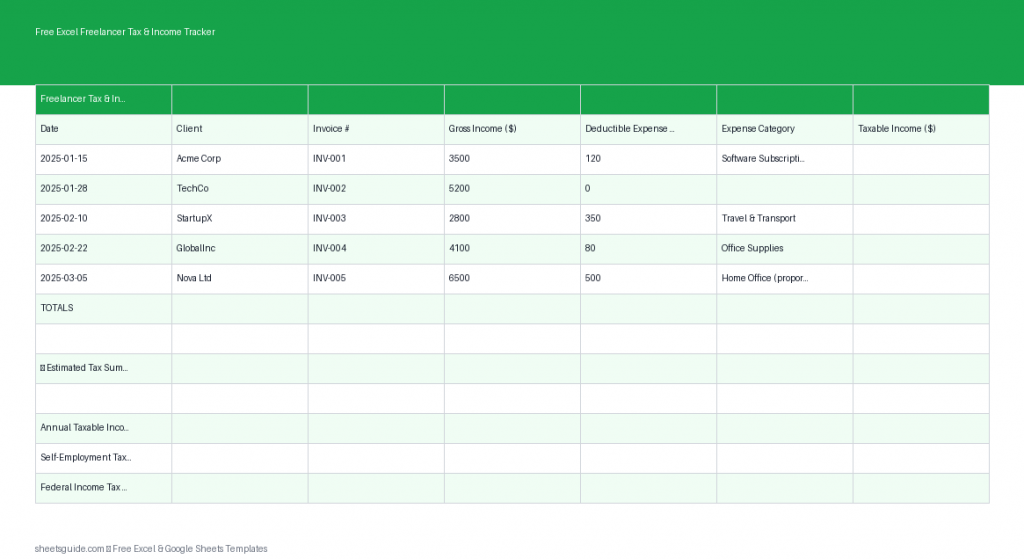
This template is intentionally simple but powerful. Each column is designed to capture essential financial data while keeping calculations automatic.
Columns Breakdown
- Date: Record when the income or expense occurred
- Client: Identify the source of your income
- Income: Enter payments received from clients
- Expense Type: Categorize expenses (e.g., software, travel, office supplies)
- Expense: Record the cost of each deductible expense
- Taxable Income: Automatically calculated (Income minus Expenses)
- Est. Tax: Estimated tax based on your taxable income
With these fields, you can clearly see how much you’re earning, spending, and setting aside for taxes—all without manual calculations.
Key Benefits of Using This Excel Template
1. Stay Organized Year-Round
Instead of collecting receipts and invoices at the last minute, you can log transactions as they happen. This habit not only reduces stress but also improves financial accuracy.
2. Maximize Your Deductions
By consistently recording expenses, you’re less likely to miss deductible items like subscriptions, equipment, or travel costs. Over time, these deductions can significantly reduce your taxable income.
3. Avoid Tax Surprises
The estimated tax column helps you plan ahead for quarterly payments. This prevents underpayment penalties and ensures you’re financially prepared.
4. Simple Yet Flexible
This Excel template is easy to customize. You can adjust tax rates, add categories, or expand columns as your freelance business grows.
5. Works in Excel and Google Sheets
Although this is an Excel template, it also works smoothly in Google Sheets. That means you can access your data from anywhere, collaborate if needed, and keep everything synced.
How to Use in Excel
Getting started is quick and straightforward. Follow these steps to make the most of the template in Excel:
- Download and Open the File
Open the template in Microsoft Excel. Enable editing if prompted. - Enter Your Tax Rate
Locate the estimated tax formula and adjust it to match your local tax rate or combined federal and state rate. - Log Income Transactions
Each time you receive payment, add a new row with the date, client name, and income amount. - Record Expenses Promptly
Enter expenses as they occur, selecting or typing an appropriate expense category. - Review Automatic Calculations
The template will automatically calculate taxable income and estimated tax for each row. - Track Monthly and Quarterly Totals
Use Excel’s built-in filters or create a pivot table to summarize your data by month or quarter. - Back Up Your File
Save copies regularly or store your file in cloud storage to prevent data loss.
If you prefer working online, you can upload the Excel template to Google Sheets and continue using it there with the same structure and calculations.
Best Practices for Freelancers Using This Template
Track Everything Consistently
Consistency is more important than perfection. Even rough entries are better than missing data. Set aside a few minutes each week to update your tracker.
Separate Business and Personal Finances
Use a dedicated bank account for freelance work. This makes it easier to track income and expenses accurately in your Excel template.
Categorize Expenses Clearly
Use consistent labels for expense types. For example, instead of alternating between “Software” and “Subscriptions,” choose one standard term.
Review Your Numbers Monthly
Take time each month to review your income, expenses, and estimated taxes. This helps you spot trends and adjust your pricing or spending habits if needed.
Prepare for Quarterly Taxes
Use the estimated tax column to set aside money regularly. Many freelancers transfer this amount into a separate savings account to avoid spending it.
Who This Excel Template Is For
This template is ideal for:
- Freelancers and independent contractors
- Consultants and gig workers
- Side hustlers managing extra income
- Small service-based business owners
- Anyone needing a simple financial tracking system
If your finances are currently scattered across notes, emails, or multiple apps, this Excel template offers a clean, centralized solution.
Common Mistakes to Avoid
Waiting Until Tax Season
Delaying your tracking leads to incomplete records and missed deductions. Update your Excel template regularly to stay accurate.
Forgetting Small Expenses
Even minor costs add up. Logging every expense ensures your taxable income is calculated correctly.
Ignoring Estimated Taxes
Skipping quarterly planning can result in penalties. Use the template’s estimated tax feature to stay ahead.
Not Reviewing Data
Tracking is only useful if you analyze it. Regular reviews help you make better financial decisions.
Take Control of Your Freelance Finances
Freelancing offers flexibility and independence, but it also comes with financial responsibility. This Excel template gives you a clear, structured way to manage income, track expenses, and prepare for taxes without unnecessary complexity.
By using it consistently, you’ll gain better visibility into your earnings, reduce stress during tax season, and make smarter financial decisions throughout the year. And since it also works in Google Sheets, you can access and update your data wherever you are.
Start using this Excel template today and turn your freelance finances into a system that works for you—not against you.