
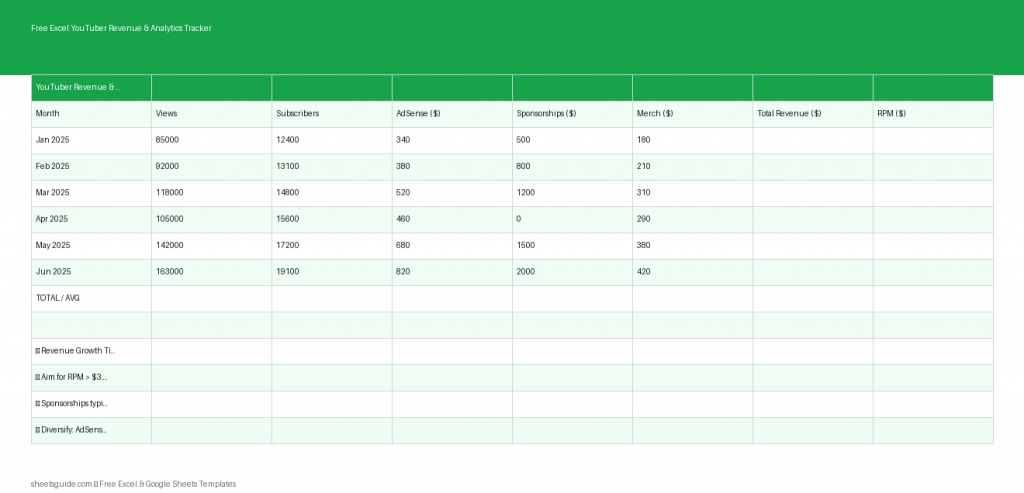
If you’re serious about growing your YouTube channel, you need more than just creative ideas—you need clear numbers. This free Excel template helps you track your YouTube revenue streams and performance metrics in one place, so you can make smarter decisions about your content and monetization strategy.
Designed for ease of use in Excel and fully compatible with Google Sheets, this tracker gives you a structured way to monitor AdSense earnings, sponsorship deals, merchandise sales, and overall channel growth. Whether you’re a beginner or already earning income, having a centralized dashboard will make your workflow more efficient and your insights more actionable.
What This Excel Template Tracks
This Excel template is built around the core revenue streams and performance indicators that matter most to YouTubers. Each column is designed to give you clarity without overcomplicating your workflow.
- Month: Log each month to track trends over time
- Views: Total monthly views across your channel
- AdSense: Revenue earned directly from YouTube ads
- Sponsorships: Income from brand deals and collaborations
- Merch: Earnings from merchandise or digital products
- Total Revenue: Automatically calculated monthly total
- RPM: Revenue per 1,000 views to measure efficiency
With these metrics, you can quickly identify what’s working, where your money is coming from, and how efficiently your channel is monetized.
Why Use an Excel Template for YouTube Tracking?
YouTube Studio provides valuable analytics, but it doesn’t give you a full financial overview—especially when you’re earning from multiple sources. That’s where this Excel template becomes essential.
Instead of jumping between dashboards, emails, and spreadsheets, you can:
- See all income streams in one place
- Track growth trends month over month
- Calculate total revenue automatically
- Understand how your RPM changes over time
- Plan future content based on real data
This structure helps you move from guessing to making data-driven decisions.
Key Benefits of This Excel Template
1. Automatic Calculations
No need to manually sum up your earnings each month. The template automatically calculates total revenue and RPM, reducing errors and saving time.
2. Clear Monthly Overview
Each row represents a single month, making it easy to compare performance across time. You’ll quickly spot patterns like seasonal spikes or dips.
3. Multi-Stream Revenue Tracking
Many creators earn from more than just AdSense. This Excel template lets you track sponsorships and merchandise alongside ad revenue, giving you a complete financial picture.
4. Beginner-Friendly Layout
You don’t need advanced spreadsheet skills. The layout is simple, clean, and intuitive—just enter your numbers and let the formulas do the work.
5. Works in Excel and Google Sheets
While designed as an Excel template, it works smoothly in Google Sheets as well, so you can access and update your data from anywhere.
How to Use in Excel
Getting started with this Excel template is quick and straightforward. Follow these steps to begin tracking your YouTube performance:
- Download and open the Excel template
Open the file in Microsoft Excel to access all features and formulas. - Enter your monthly data
For each month, input your total views, AdSense revenue, sponsorship income, and merchandise sales. - Review automatic calculations
The Total Revenue and RPM columns will update automatically based on your entries. - Track trends over time
Add a new row for each month to build a historical record of your channel’s growth. - Analyze your performance
Look for patterns in revenue and RPM to identify which months or strategies performed best.
Once you’ve entered a few months of data, the real value of this Excel template becomes clear—you’ll start seeing trends that can guide your content and monetization decisions.
How This Template Helps You Grow Your Channel
Tracking your numbers isn’t just about organization—it’s about growth. This Excel template gives you insights that can directly impact your channel’s success.
For example, if your RPM increases while views stay consistent, it could mean your audience is becoming more valuable to advertisers. If sponsorship income spikes during certain months, you might want to double down on outreach during those periods.
By consistently using this tracker, you can:
- Identify your most profitable content periods
- Set realistic monthly revenue goals
- Understand the balance between views and earnings
- Make better decisions about partnerships and products
Tips for Getting the Most Out of This Excel Template
To maximize the value of this tracker, consistency is key. Here are a few practical tips:
- Update monthly: Set a reminder to log your data at the end of each month
- Be accurate: Use exact figures from YouTube Studio and your payment records
- Track all income: Don’t skip smaller revenue streams—they add up
- Review regularly: Spend time analyzing your data, not just entering it
- Use insights to act: Adjust your content or monetization strategy based on what you see
Even a simple tracker becomes powerful when used consistently over time.
Who Should Use This Excel Template?
This Excel template is ideal for a wide range of creators:
- New YouTubers starting to monetize their content
- Growing channels managing multiple income streams
- Full-time creators tracking business performance
- Content managers handling multiple channels
If you want a clearer picture of how your channel is performing financially, this template is a practical and effective tool.
Start Tracking Your YouTube Growth Today
Success on YouTube isn’t just about views—it’s about understanding how those views translate into revenue. This free Excel template gives you the structure you need to track, analyze, and improve your performance over time.
With automatic calculations, a clean layout, and compatibility with both Excel and Google Sheets, it’s an easy upgrade to your workflow that can deliver real insights.
Download the template, start logging your data, and take control of your YouTube analytics and income.