
“`html
Free Excel Business Invoice Template
Introduction
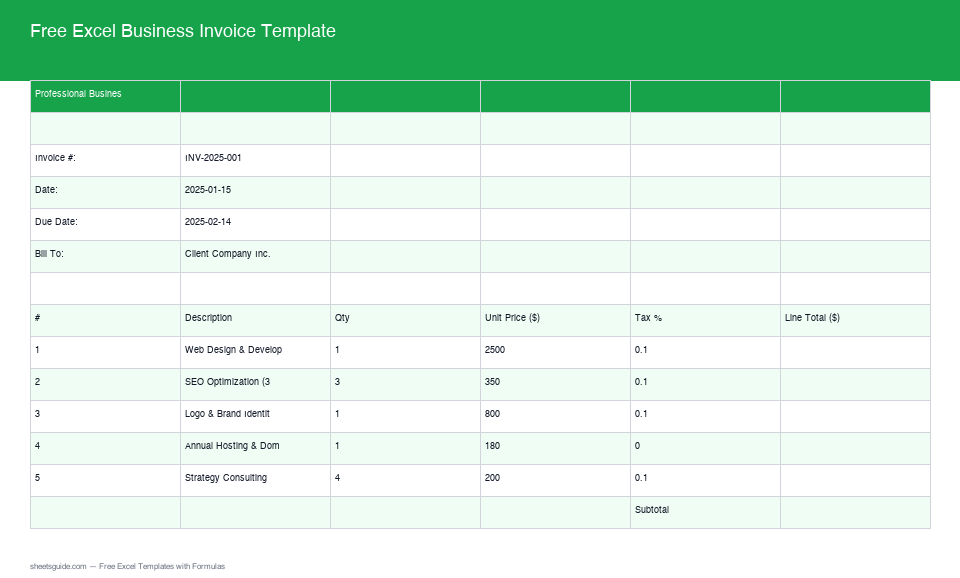
Stay ahead in your business invoicing with our Free Excel Business Invoice Template, now enhanced with real formulas and advanced features that make your accounting tasks a breeze. This user-friendly template is designed to auto-calculate all necessary elements, ensuring that every invoice is accurate and professional. Whether you are a freelancer, a small business owner, or managing a larger enterprise, using an efficient invoicing system can dramatically streamline your cash flow processes.
What’s Included
Our updated template includes everything you need to generate correct invoices:
- Auto line total calculation with quantity, price, and tax considerations
- Subtotal and tax summary
- Auto-calculated Amount Due
- Professional layout with invoice number and due date features
- Customizable sections for payment terms and additional notes
- Fields to include discounts or adjustments for more flexible invoicing
Key Features & Formulas
The major breakthrough of our updated invoice template is the addition of smart formulas designed to save you time and ensure precision:
- Auto Line Total: The line total for each item is automatically calculated using the formula:
Qty × Price × (1 + Tax Rate). This means that if you alter the quantity or price, your total will update instantaneously, allowing you to provide real-time quotes to clients. - Subtotal and Tax Summary: The template provides a clear, comprehensive summary displaying the subtotal of all line items and the total tax amount. This clarity ensures that your clients understand the breakdown of costs, which contributes to transparency and trust in your business dealings.
- Amount Due Auto-Calculation: Easily determine the total amount due by simply entering your data. The template utilizes sum formulas that consolidate all figures, eliminating unnecessary math on your part and reducing the potential for errors.
- Professional Layout: With dedicated sections for invoice number and due date, your invoices appear neatly organized, giving your business a polished image. An orderly invoice can influence your client’s perception of your professionalism.
- Customizable Sections: The ability to edit fields for payment terms and notes gives your invoices a personal touch. You can include terms like “Net 30” or special instructions tailored to the specific client, thereby enhancing customer relations.
With these built-in formulas and features, all you need to do is input your values, and Excel does the rest! Don’t underestimate the power of a well-structured invoice in boosting your business’s image and efficiency.
How to Use in Excel
- Download the Template: Simply click on the download button below and save the file to your preferred location.
- Open in Excel: Launch Microsoft Excel and open the downloaded template. If you have not used macros or complex features before, you will find that this template is straightforward and requires minimal setup.
- Input Your Data: Enter all required information into the designated fields: item descriptions, quantities, prices, and tax rates. Ensure that you fill all relevant fields so that all calculations will operate correctly.
- Review Results: As you input your data, check the auto-calculated fields for accuracy. Adjust your entries as needed to ensure you’re invoicing the correct amounts and making the best impression on clients.
- Save & Send: Save your completed invoice and send it to your client with confidence. Exporting your invoice as a PDF can also help maintain the format and avoid any accidental editing.
It’s as simple as that! Take advantage of this tool to modernize your invoicing approach and enhance your productivity.
Tips
- Double-check that your Excel settings allow for formula calculations to ensure the template functions correctly. Enabling “Automatic Calculation” in the Options menu will save you from issues down the line.
- Customize the template’s visual elements like logos and color schemes to match your company’s branding. A personalized invoice can create a lasting impression and reinforce brand recognition.
- Keep a backup of all invoices for your records. Regularly storing your billing information in a safe location helps with financial audits and keeping track of payments received.
- Regularly update the template with any new tax rules relevant to your business operation. Staying compliant with tax laws is crucial to avoid penalties.
- Consider adding payment options or links directly on your invoices to simplify the process for your clients. This could include an option for online payments which can facilitate faster transactions and improve cash flow.
“`