
Running an e-commerce business without clear visibility into your numbers is like driving with your eyes half closed. You might see revenue coming in, but without understanding your costs, margins, and advertising performance, it’s easy to make decisions that quietly eat into your profits.
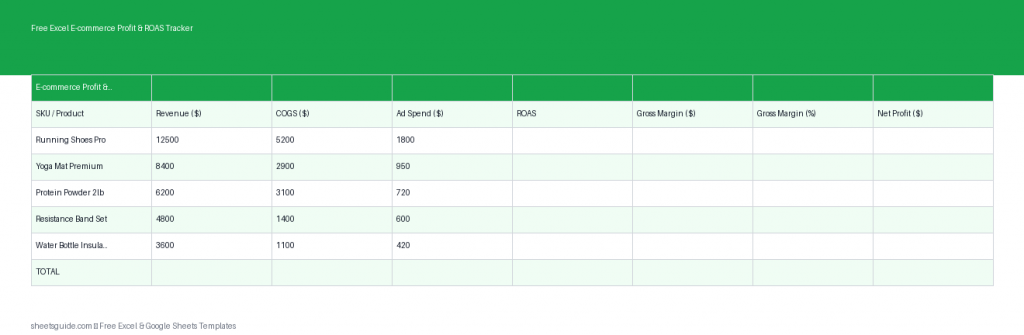
This Excel template is designed to give you a clean, simple, and actionable view of your store’s financial performance. Whether you sell on Shopify, Amazon, Etsy, or your own website, this tracker helps you monitor each product’s profitability, measure ad efficiency through ROAS, and quickly spot what’s working (and what’s not). It also works seamlessly in Google Sheets, so you can use it in your preferred environment.
What This Excel Template Helps You Track
This Excel template focuses on the core metrics that matter most for e-commerce profitability. Instead of overwhelming you with unnecessary complexity, it keeps things lean and actionable.
Included Columns
- SKU – Unique identifier for each product
- Revenue – Total sales generated per product
- COGS (Cost of Goods Sold) – Production or sourcing cost per SKU
- Ad Spend – Advertising cost allocated to each product
- ROAS – Return on Ad Spend
- Gross Margin – Profit before ad spend
- Net Profit – Final profit after all tracked costs
Each metric is calculated automatically, so you only need to input your raw numbers. The template does the rest.
Why You Need a Profit & ROAS Tracker
Many e-commerce sellers focus heavily on revenue growth but overlook profitability. High revenue doesn’t always mean a healthy business. In fact, aggressive ad spending or rising costs can leave you with minimal or even negative profits.
This Excel template helps you avoid that trap by giving you clarity in three critical areas:
- Product-level profitability – Know exactly which SKUs make money
- Ad efficiency – Understand whether your ads are actually paying off
- Cost control – Identify where expenses are cutting too deeply into margins
With this visibility, you can make smarter decisions about pricing, marketing, and inventory.
Key Metrics Explained
ROAS (Return on Ad Spend)
ROAS tells you how much revenue you generate for every dollar spent on ads. For example, a ROAS of 4 means you earn $4 for every $1 spent.
This Excel template calculates ROAS automatically so you can quickly evaluate which products are worth scaling and which ones need adjustment.
Gross Margin
Gross margin shows your profit after subtracting the cost of goods from revenue. It helps you understand the baseline profitability of a product before marketing expenses.
Net Profit
Net profit is your bottom line. It subtracts both COGS and ad spend from revenue, giving you a realistic view of what you actually keep.
This is the number that ultimately matters most.
How to Use This Excel Template Effectively
The power of this template comes from consistent and accurate data entry. Once you build the habit, it becomes a reliable decision-making tool.
Step 1: List Your Products
Enter each product’s SKU in the first column. Make sure each SKU is unique and corresponds to your store’s product listings.
Step 2: Input Revenue
Add the total revenue generated by each SKU for your chosen time period (daily, weekly, or monthly).
Step 3: Enter COGS
Include all direct costs associated with the product, such as manufacturing, wholesale price, or sourcing costs.
Step 4: Add Ad Spend
Assign advertising costs to each SKU. If you run multi-product campaigns, estimate the distribution based on performance data.
Step 5: Review Calculated Metrics
The Excel template will automatically calculate ROAS, gross margin, and net profit. Use these insights to evaluate performance.
How to Use in Excel
- Download the Excel template and open it in Microsoft Excel.
- Locate the input columns: SKU, Revenue, COGS, and Ad Spend.
- Enter your data for each product row.
- Ensure formulas in ROAS, Gross Margin, and Net Profit columns remain intact.
- Use filters or sorting to identify top-performing and underperforming SKUs.
- Update the sheet regularly (weekly or monthly) for ongoing insights.
This Excel template is also fully compatible with Google Sheets, so you can upload and use it there if you prefer cloud-based access.
Practical Ways to Use This Tracker
Identify Winning Products
Sort by net profit or ROAS to quickly find your most successful SKUs. These are your candidates for scaling through increased ad spend or promotions.
Spot Underperformers
Products with low or negative net profit may need pricing adjustments, cost reductions, or ad strategy changes.
Optimize Ad Spend
Compare ROAS across products to determine where your advertising budget is best allocated.
Improve Pricing Strategy
If a product has strong sales but weak margins, consider testing price increases or bundling strategies.
Plan Inventory Smarter
Focus restocking efforts on high-margin, high-ROAS products instead of tying up capital in low-performing items.
Best Practices for Accurate Tracking
- Update regularly – Consistency is key to meaningful insights
- Use consistent time periods – Compare weekly or monthly data, not mixed intervals
- Double-check inputs – Small errors can distort profitability
- Keep formulas intact – Avoid overwriting calculated cells
Over time, this tracker becomes more valuable as it builds a history of your performance.
Who This Excel Template Is For
This Excel template is ideal for:
- Small e-commerce store owners
- Shopify and Amazon sellers
- Dropshippers tracking ad performance
- Marketing teams managing product campaigns
- Anyone who wants a simple, clear profitability overview
You don’t need advanced spreadsheet skills to use it—just basic data entry and a commitment to tracking your numbers.
Take Control of Your E-commerce Profitability
Success in e-commerce isn’t just about selling more—it’s about keeping more of what you earn. This Excel template gives you the clarity you need to make smarter, data-driven decisions.
By tracking revenue, costs, and ad performance in one place, you can confidently scale what works and fix what doesn’t. Over time, this leads to stronger margins, better ad efficiency, and a more sustainable business.
Download the template, start entering your data, and turn your numbers into actionable insights today.