
Keeping track of grades, credits, and GPA can quickly become overwhelming—especially when you’re juggling multiple subjects with different weights. This free Excel template is designed to simplify that process by automatically calculating grades, weighted averages, and GPA using built-in Excel formulas. Whether you’re a student tracking your performance or a teacher managing records, this tool removes manual calculations and reduces errors.
The template works seamlessly in Excel and is also fully compatible with Google Sheets, giving you flexibility no matter which platform you prefer.
What This Excel Template Does
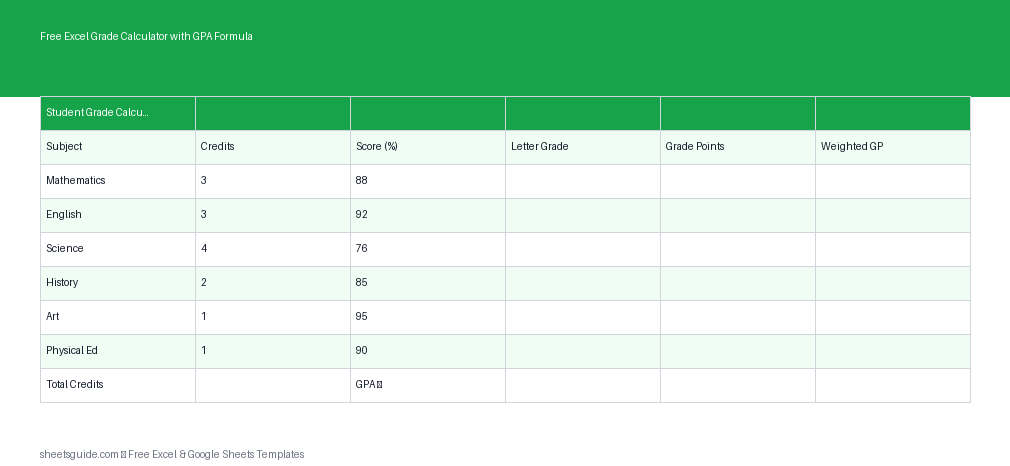
This Excel template provides a structured and automated way to calculate academic performance. Instead of manually converting scores into grades and then into GPA values, everything is handled through formulas.
The template includes the following columns:
- Subject – Name of the course or subject
- Credits – Credit hours assigned to the subject
- Score – Numeric score or percentage achieved
- Grade – Letter grade automatically assigned
- Grade Points – Numeric GPA equivalent
- Weighted GP – Grade points multiplied by credits
At the bottom of the sheet, totals and GPA are automatically calculated using weighted averages, ensuring accurate results every time.
Why Use an Excel Grade Calculator?
Manual grade tracking often leads to inconsistencies, especially when dealing with weighted systems. This Excel template eliminates those issues and provides clarity at a glance.
- Accuracy: Built-in formulas remove calculation errors
- Speed: Instantly compute GPA as soon as you enter scores
- Consistency: Standardized grading logic across all subjects
- Flexibility: Works for schools, colleges, and personal tracking
It’s especially useful for students aiming to monitor their academic standing throughout the semester rather than waiting for final reports.
How the GPA Formula Works
This template uses a weighted GPA calculation, which accounts for both grade points and credit hours. Here’s how it works conceptually:
- Each score is converted into a letter grade (e.g., A, B, C)
- The letter grade is mapped to grade points (e.g., A = 4.0, B = 3.0)
- Grade points are multiplied by the number of credits
- All weighted grade points are summed
- The total is divided by total credits to calculate GPA
This ensures that subjects with more credits have a greater impact on the final GPA, which reflects most academic systems accurately.
Who This Template Is For
This Excel template is designed to be flexible and practical for different users:
- Students: Track semester performance and predict final GPA
- Teachers: Maintain consistent grading records
- Parents: Monitor academic progress easily
- Academic advisors: Help students plan grade improvements
Because it’s customizable, you can adjust grading scales, credit systems, or subjects based on your needs.
Key Features of the Excel Template
- Automatic grade assignment based on score ranges
- Built-in GPA formula with weighted averages
- Simple, clean layout for easy data entry
- Fully editable grading scale
- Compatible with Excel and Google Sheets
These features make it suitable for both beginners and advanced spreadsheet users.
How to Use in Excel
Using this Excel template is straightforward, even if you have limited spreadsheet experience.
- Download and open the Excel template in Microsoft Excel
- Enter each subject in the Subject column
- Input credit hours for each subject
- Add your scores as percentages or numeric values
- Review automatic calculations for Grade, Grade Points, and Weighted GP
- Check the GPA summary at the bottom of the sheet
The formulas are already built in, so there’s no need to edit them. Simply focus on entering accurate data.
If you prefer working in Google Sheets, you can upload the same Excel file and use it without any changes. A separate section with guidance for Google Sheets will help you get started there.
Customizing the Template
One of the biggest advantages of using an Excel template is flexibility. You can tailor it to match your institution’s grading system.
Here are a few common customizations:
- Adjust grade thresholds: Modify score ranges for A, B, C, etc.
- Change grade points: Use a 5.0 or other GPA scale if needed
- Add more rows: Track additional subjects or semesters
- Include comments: Add notes for each subject
These changes can be made directly in Excel without breaking the core calculations, as long as formulas are preserved.
Tips for Accurate Grade Tracking
To get the most out of this Excel template, it’s important to use it consistently and correctly.
- Update scores regularly instead of waiting until the end of the term
- Double-check credit values to ensure GPA accuracy
- Avoid overwriting formula cells
- Keep a backup copy before making structural changes
These simple habits will help maintain the reliability of your calculations.
Common Mistakes to Avoid
Even with automation, a few common mistakes can affect results:
- Entering text instead of numbers in the Score column
- Accidentally deleting formulas in calculated columns
- Using inconsistent grading scales
- Leaving blank credit fields
By paying attention to these details, you can ensure that your GPA remains accurate and meaningful.
Why This Excel Template Saves Time
Without a structured system, calculating GPA involves multiple steps and repeated work. This Excel template automates everything, allowing you to focus on analysis rather than calculation.
Instead of asking “What’s my GPA now?” you’ll always have a real-time answer. That makes it easier to set academic goals, identify weak areas, and improve performance proactively.
Final Thoughts
This free Excel template is a practical tool for anyone who wants a clear, reliable way to track grades and calculate GPA. With automatic formulas, a clean layout, and full compatibility with Google Sheets, it offers both simplicity and power.
Whether you’re managing a full course load or just keeping tabs on a few subjects, this template helps you stay organized and informed—without the hassle of manual calculations.