
“`html
Free Excel Inventory Management Template
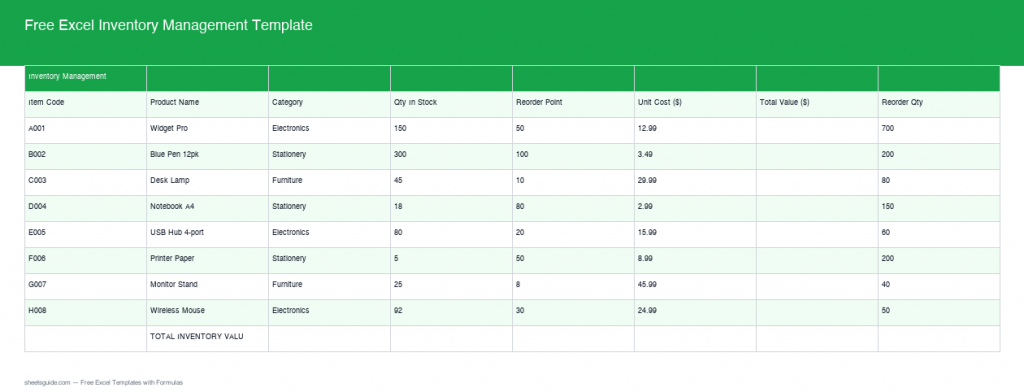
Managing your inventory just got simpler with our updated and free Excel Inventory Management Template. Equipped with real formulas and advanced features, this template streamlines your inventory tracking, saves time, and minimizes errors.
Introduction
In today’s fast-paced business environment, effective inventory management is crucial. An efficient system helps maintain optimal stock levels, ensuring product availability and cost-efficiency. Poor inventory management can lead to excessive costs, lost sales, and damage to customer satisfaction. To address these challenges, our updated free Excel Inventory Management Template now includes built-in formulas and smart features, making inventory management easier than ever.
What’s Included
Our template provides a comprehensive solution designed to cater to various inventory management needs. Here’s what’s included:
- Automatic calculation of total value (Qty × Cost)
- Smart status alerts for stock levels
- Total inventory value summary
- User-friendly interface with customization options
- Support for multiple product categories
- Color-coded status indicators for better visualization
- Customizable fields for tracking additional information like supplier details and purchase dates
Key Features & Formulas
Let’s dive into the main features and formulas that make this template stand out:
1. Auto Total Value Calculation
The template automatically calculates the total value of items using the formula =Quantity*Cost. This ensures accurate valuation of your stock at any given time. For instance, if you have 50 units of Product A, each costing $20, the total value would be =50*20, providing you $1000 instant insight into your worth of the product.
2. Smart Status Alerts
Stay ahead with our intelligent status alert system. The template flags items with messages like OUT OF STOCK, REORDER NOW, LOW STOCK, or OK, using condition-based formulas that help you manage reorder points effectively. For example, if you set a threshold of 10 units for a product, and your inventory falls to 9, the template will immediately alert you to reorder, preventing any disruption in supply.
3. Total Inventory Value Summary
Get a quick overview of your total inventory value with the built-in summary feature. This helps in assessing the financial health of your stock efficiently. This summary can serve as a powerful tool for monthly fiscal assessments, allowing you to spot trends over time and plan your budget accordingly.
4. Customization Options
The user-friendly interface allows for customization, so you can adapt it to your specific business needs. Whether you want to track seasonal products, manage supplier information, or categorize items differently, the template can be tailored to fit. You can also add additional columns such as ‘Last Restock Date’ or ‘Sales Velocity’ to enhance informational depth.
How to Use in Excel
Using this template in Excel is straightforward:
- Download the template from the link provided below.
- Open the file in Excel, and customize it with your inventory data.
- Watch as the built-in formulas automatically update totals and status alerts based on your inputs.
- Regularly monitor the total inventory value summary for financial planning and analysis.
- Consider saving the template as a new file each season for better tracking of inventory trends over time.
Tips
Here are some tips to maximize the effectiveness of this template:
- Regularly update your inventory data to ensure accuracy, ideally on a weekly or monthly basis depending on your business volume.
- Adjust reorder levels and costs as needed to reflect changing market conditions. Keeping updated with supplier price changes will help maintain margins.
- Utilize Excel’s data validation features to enhance data entry accuracy, preventing common errors like typing a letter instead of a number.
- Make use of filters and sorting options in Excel for easy navigation through your inventory data, especially when dealing with large datasets.
- Consider integrating this template into your overall business management software by exporting data for broader analysis.
How to Use This Template in Google Sheets
This template is provided as an Excel sheet, but it can easily be imported into Google Sheets for those who prefer cloud-based solutions. Simply upload the template to your Google Drive, open it with Google Sheets, and enjoy similar functionality with enhanced collaborative features. This allows multiple team members to access and update inventory data in real-time, ensuring everyone is on the same page.
Conclusion
In summary, the Free Excel Inventory Management Template offers business owners a streamlined method for keeping track of inventory, optimizing stock levels, and ultimately improving efficiency. By utilizing features like automatic calculations and smart alerts, you can save time and avoid costly errors. Download the template today and take the first step towards mastering your inventory management.
“`