
Meetings can either drive progress or quietly drain time. The difference usually comes down to structure. A clear agenda, defined roles, and tracked action items make meetings more focused and productive. This free Excel meeting agenda template is designed to help you plan, run, and follow up on meetings without chaos.
Built for Excel and fully compatible with Google Sheets, this template gives you a simple but powerful system to organize discussion points, assign responsibilities, and ensure nothing falls through the cracks.
Why Use an Excel Meeting Agenda Template?
Without a structured agenda, meetings often drift, run over time, and leave participants unclear about next steps. This Excel template solves those problems by bringing everything into one organized view.
- Clarity: Everyone knows what will be discussed and who is responsible
- Efficiency: Allocate time to each topic and stay on track
- Accountability: Assign owners and due dates to action items
- Consistency: Use the same format across all meetings
- Follow-through: Track decisions and ensure tasks are completed
What’s Included in the Template
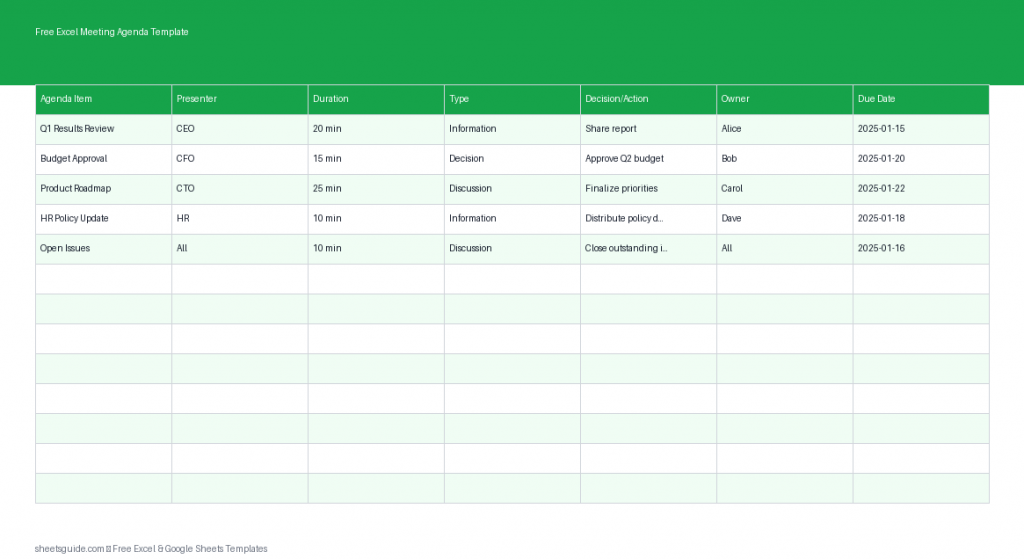
This Excel template uses a structured table with the following columns:
- Agenda Item: The topic or discussion point
- Presenter: Person responsible for leading the discussion
- Duration: Allocated time for the topic
- Type: Category such as Discussion, Decision, or Update
- Decision/Action: Key outcomes or required next steps
- Owner: Person responsible for completing the action
- Due Date: Deadline for the action item
This structure ensures that every meeting is not just a conversation, but a step toward measurable progress.
How to Use in Excel
- List agenda items in advance: Start by filling in the Agenda Item column before the meeting. This helps participants prepare and keeps discussions focused.
- Assign presenters: Add the person responsible for each topic. This avoids confusion and ensures ownership of each discussion.
- Set time limits: Use the Duration column to allocate realistic time for each item. This helps prevent meetings from running over.
- Define the meeting type: Label each item as Discussion, Decision, or Update. This sets expectations for what needs to happen.
- Capture outcomes live: During the meeting, fill in the Decision/Action column with key takeaways and agreed next steps.
- Assign accountability: Record the Owner for each action item so responsibilities are clear.
- Set deadlines: Add Due Dates to ensure follow-through and keep projects moving forward.
- Review after the meeting: Use the completed template as a reference for follow-ups and progress tracking.
You can also enhance the template in Excel by adding filters, conditional formatting for overdue tasks, or color-coding different agenda types.
Best Practices for Running Effective Meetings
This Excel template works best when paired with a few simple meeting habits. These practices help you get maximum value from every session.
1. Share the Agenda in Advance
Send the agenda before the meeting so participants can prepare. This leads to more meaningful discussions and faster decisions.
2. Stick to Time Allocations
The Duration column is your guide. If a discussion runs long, decide whether to extend or move it offline.
3. Focus on Outcomes, Not Just Discussion
Every agenda item should result in either a decision or a clear action. Use the Decision/Action column to capture this.
4. Assign Clear Ownership
Action items without owners rarely get completed. Always assign one responsible person per task.
5. Track Follow-Ups
Revisit previous meeting templates to check progress on open items. This builds accountability and momentum.
Who Can Benefit from This Template?
This Excel meeting agenda template is flexible enough to work across different teams and industries.
- Project managers: Track tasks, deadlines, and team responsibilities
- Team leaders: Run structured weekly or monthly meetings
- Startups: Keep fast-moving discussions organized
- Corporate teams: Standardize meeting processes across departments
- Freelancers and consultants: Manage client meetings professionally
Ways to Customize the Template
One of the biggest advantages of using Excel is flexibility. You can easily tailor this template to match your workflow.
- Add a Status column to track progress (e.g., Not Started, In Progress, Completed)
- Use conditional formatting to highlight overdue tasks
- Create dropdown lists for the Type column to standardize entries
- Add a Meeting Date field at the top for better record keeping
- Duplicate sheets for recurring meetings to maintain history
These small enhancements can turn a simple agenda into a powerful management tool.
Common Mistakes to Avoid
Even with a good template, certain habits can reduce meeting effectiveness. Here are a few to watch out for:
- Overloading the agenda: Too many items lead to rushed discussions
- No clear outcomes: Meetings without decisions or actions waste time
- Unassigned tasks: Lack of ownership leads to missed follow-ups
- Ignoring time limits: This disrupts schedules and reduces productivity
- No review process: Failing to revisit past action items breaks accountability
Excel First, Google Sheets Ready
This is an Excel template, designed to take advantage of Excel’s structure and flexibility. If your team prefers working in the cloud, it also works seamlessly in Google Sheets without any major adjustments. You get the best of both worlds—Excel’s power and Google Sheets’ collaboration.
Final Thoughts
Meetings don’t have to feel unproductive or scattered. With the right structure, they become a reliable tool for decision-making and progress. This free Excel meeting agenda template gives you everything you need to plan discussions, assign responsibilities, and follow through on action items.
Whether you’re running daily standups, weekly team check-ins, or strategic planning sessions, this template helps you stay organized and focused. Start using it today and turn your meetings into results-driven sessions.