
Hiring can get messy fast. Between tracking applications, scheduling interviews, and keeping notes on candidates, it’s easy to lose important details or miss follow-ups. That’s exactly where a structured Excel template can make a big difference.
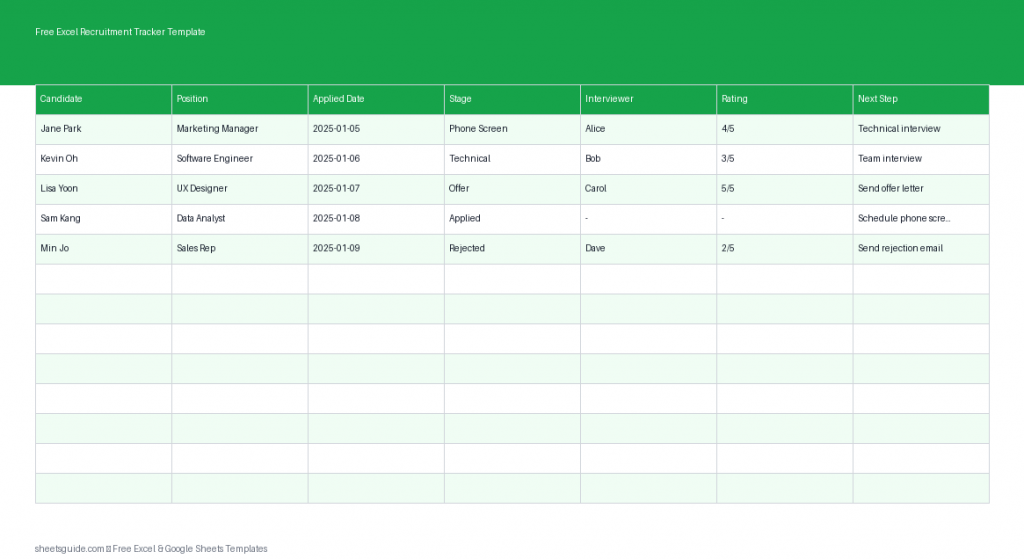
This Free Excel Recruitment Tracker Template helps you manage your entire hiring pipeline in one place—from the moment a candidate applies to the final hiring decision. It’s simple, flexible, and works seamlessly in both Microsoft Excel and Google Sheets, so you can use it with your preferred tool.
What This Excel Recruitment Tracker Template Includes
This template is designed to cover the essential stages of the hiring process without overwhelming you. Each column plays a specific role in keeping your recruitment organized and actionable.
- Candidate – The name of the applicant
- Position – The job role they applied for
- Applied Date – When the application was submitted
- Stage – Current step in the hiring process (e.g., Applied, Interview, Offer)
- Interviewer – Person responsible for evaluating the candidate
- Rating – Your assessment score or ranking
- Next Step – What needs to happen next (e.g., Schedule interview, Send offer)
With just these columns, you get a clean overview of your entire hiring pipeline while still capturing the details that matter.
Why Use an Excel Template for Recruitment Tracking?
While there are many recruiting tools available, not every team needs complex software. A well-structured Excel template offers a practical alternative that’s easy to customize and immediately usable.
1. Centralized Candidate Information
Instead of juggling emails, notes, and documents, everything lives in one place. You can quickly scan the spreadsheet to see who’s in which stage and what actions are pending.
2. Improved Hiring Workflow
By clearly defining stages and next steps, your recruitment process becomes more consistent. This reduces delays and ensures no candidate falls through the cracks.
3. Easy Collaboration
Because this Excel template also works in Google Sheets, your team can collaborate in real time when needed. Multiple stakeholders can update ratings, assign interviewers, and track progress together.
4. Fully Customizable
You can adapt the template to fit any hiring process. Whether you’re recruiting for one role or managing dozens of candidates across departments, the structure remains flexible.
How to Use in Excel
Getting started with this Excel template is straightforward. Follow these steps to set up and manage your recruitment process effectively:
- Download and open the template in Excel
Save a copy to your computer or shared drive so you can edit and update it regularly. - Enter candidate details
Start by adding each applicant’s name, the position they applied for, and the application date. This forms the foundation of your tracker. - Define your hiring stages
Customize the Stage column with labels that match your workflow. Common stages include Applied, Screening, Interview, Final Round, Offer, and Hired. - Assign interviewers
Use the Interviewer column to track who is responsible for each candidate. This keeps accountability clear and avoids confusion. - Add ratings consistently
Use a simple scoring system (e.g., 1–5 or 1–10) in the Rating column. Consistent scoring helps compare candidates objectively. - Update next steps regularly
The Next Step column is critical for momentum. After each interaction, update what needs to happen next so nothing is forgotten. - Sort and filter your data
Use Excel’s built-in filters to view candidates by stage, interviewer, or rating. This makes it easy to prioritize tasks and identify bottlenecks. - Review and maintain weekly
Set aside time each week to review the tracker, update statuses, and clean up outdated entries.
Practical Tips for Better Recruitment Tracking
To get the most out of this Excel template, it helps to adopt a few best practices. These small adjustments can significantly improve your hiring efficiency.
Standardize Your Stages
Keep your stage names consistent across all roles. This makes reporting easier and helps everyone on your team understand the hiring pipeline at a glance.
Use Conditional Formatting
In Excel, you can highlight candidates based on stage or rating. For example, mark high-rated candidates in green or overdue next steps in red. This adds visual clarity to your tracker.
Track Time-to-Hire
By comparing the Applied Date with later stages, you can measure how long your hiring process takes. This helps identify delays and optimize your workflow.
Keep Notes Brief but Useful
While this template focuses on structured data, you can add short notes in the Next Step field or extend the sheet with a notes column if needed. Keep entries concise and actionable.
Regularly Archive Old Candidates
Once a hiring cycle is complete, move older entries to a separate sheet. This keeps your main tracker clean and focused on active candidates.
Who This Excel Template Is For
This recruitment tracker is ideal for a wide range of users:
- Small business owners managing hiring without dedicated HR software
- HR professionals who want a lightweight tracking tool
- Recruiters handling multiple candidates at once
- Hiring managers coordinating interviews and decisions
- Startups needing a flexible and cost-effective solution
If you’re currently relying on scattered notes or email threads, this Excel template offers a clear upgrade in organization and visibility.
Customize It to Fit Your Hiring Process
One of the biggest advantages of using an Excel template is flexibility. You can easily tailor it to match your workflow.
- Add a Source column to track where candidates came from
- Include a Contact Information column for quick reference
- Create a Department column if hiring across teams
- Expand the Rating system into multiple criteria (e.g., skills, culture fit)
Because the template works in both Excel and Google Sheets, you can also share it with team members for collaborative hiring while keeping full control over structure and data.
Final Thoughts
A well-organized hiring process doesn’t require complicated tools. This Free Excel Recruitment Tracker Template gives you everything you need to manage candidates, track progress, and make informed hiring decisions—all in a simple, accessible format.
Whether you’re hiring your first employee or managing multiple roles, this Excel template helps you stay on top of every detail while keeping your workflow efficient and consistent.
Start using it today and bring clarity to your recruitment process.