
“`html
Free Excel Sales Pipeline Tracker Template
Introduction
Managing your sales pipeline effectively is crucial for forecasting revenue and understanding your sales process. Our Free Excel Sales Pipeline Tracker Template is now more powerful than ever, with built-in formulas and advanced features to streamline your sales management. Say goodbye to manual calculations and hello to real-time insights! This template not only aids in tracking your sales but also enhances your decision-making process, ensuring you stay on top of your sales game.
What’s Included
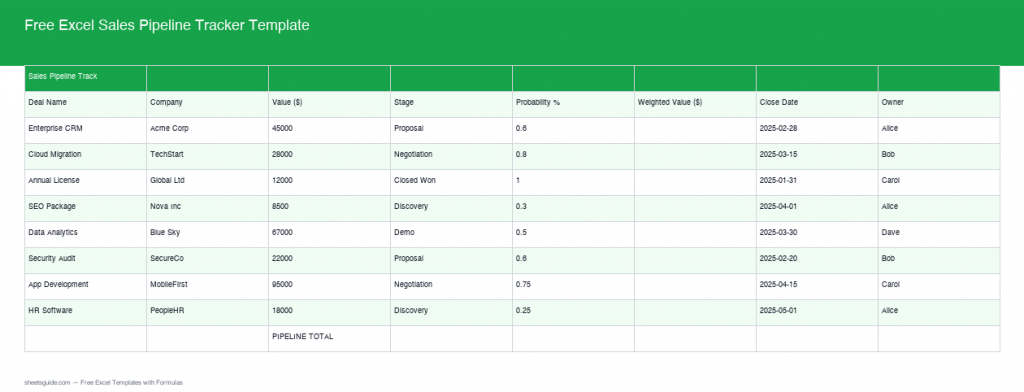
This comprehensive template includes everything you need to efficiently manage your sales pipeline. Each section is thoughtfully designed to ensure you can track and analyze your pipeline with ease. From individual deal tracking to forecasting, this template covers it all. You will find sections dedicated to:
- Deal Information: Input deal names, values, sources, and potential closing dates.
- Contact Management: Log details about customer contacts including emails and phone numbers for direct follow-up.
- Sales Stages: Clearly define the various stages of your sales process, such as lead, opportunity, negotiation, and closed-won/lost.
- Notes and Follow-up Reminders: Add important notes and set reminders for follow-ups for each deal, ensuring you never miss a touchpoint.
All these features work together to provide a holistic view of your pipeline, allowing you to optimize every step of your sales process.
Key Features & Formulas
- Weighted Deal Value Formula: Automatically calculates the expected deal value by multiplying the total value by the probability percentage. This ensures you have a realistic view of potential revenue from each deal, allowing you to prioritize your sales efforts effectively.
- Pipeline Total: Aggregate all your weighted deal values to get a clear snapshot of total potential revenue. This formula auto-updates, ensuring real-time accuracy as you update your data. It provides insights into how much revenue you can realistically expect in the upcoming period.
- Forecast vs. Actual: Track your forecasted sales against actual sales to measure performance and refine your predictions. This feature can highlight discrepancies, enabling you to adjust your strategies promptly.
- Stage-Based Color Coding: Easily visualize the progress of each deal with color coding based on the deal stage, allowing for a quick assessment of your pipeline’s health. This visual representation helps you spot bottlenecks and prioritize deals needing attention.
How to Use in Excel
Using the template is straightforward. Once downloaded, open it in Excel and start by updating the pre-entered data with your own. The built-in formulas ensure all calculations are automatic. Pay particular attention to the fields like ‘Deal Value’ and ‘Probability %’, as these directly impact the weighted deal values and overall pipeline total.
To maximize the template’s utility, consider these steps:
- Input all current deals: Start with your live sales opportunities, entering all necessary details such as name, potential revenue, expected closing date, and stage of the sale.
- Update regularly: Set a reminder to check and update your pipeline at the end of each week to ensure your figures remain up-to-date.
- Analyze your data: Use the insights gained to motivate your sales team, focusing on areas of strength or those needing improvement.
Tips
1. Regularly update your deal stages and probability percentages to keep forecasts accurate. Don’t hesitate to adjust the probability based on recent interactions with your prospects.
2. Customize the color-coding scheme to fit your team’s needs for quick visual cues. Engaging visuals can enhance team understanding and streamline communication.
3. Use the ‘Forecast vs. Actual’ feature to identify trends and adjust your sales strategy accordingly. This historical perspective can be invaluable for long-term planning and making informed decisions.
4. Leverage the notes section to document key insights or customer feedback that can shape your strategy moving forward. Having context around each deal can be a game changer.
How to Use This Template in Google Sheets
This template is provided as an .xlsx file compatible with both Microsoft Excel and Google Sheets. Follow these steps:
- Download the .xlsx file using the button above.
- Open Google Sheets and select File > Import.
- Select the upload tab and drag the .xlsx file into Google Sheets.
- Once imported, ensure all formulas are functioning correctly; sometimes small adjustments may be necessary.
- Start customizing and monitoring your sales pipeline right away!
By following these guidelines, you can take control of your sales process, leveraging data to make informed decisions that drive results. Whether you’re a small business owner or part of a larger sales team, this Free Excel Sales Pipeline Tracker Template is an essential tool for achieving your sales goals.
“`