
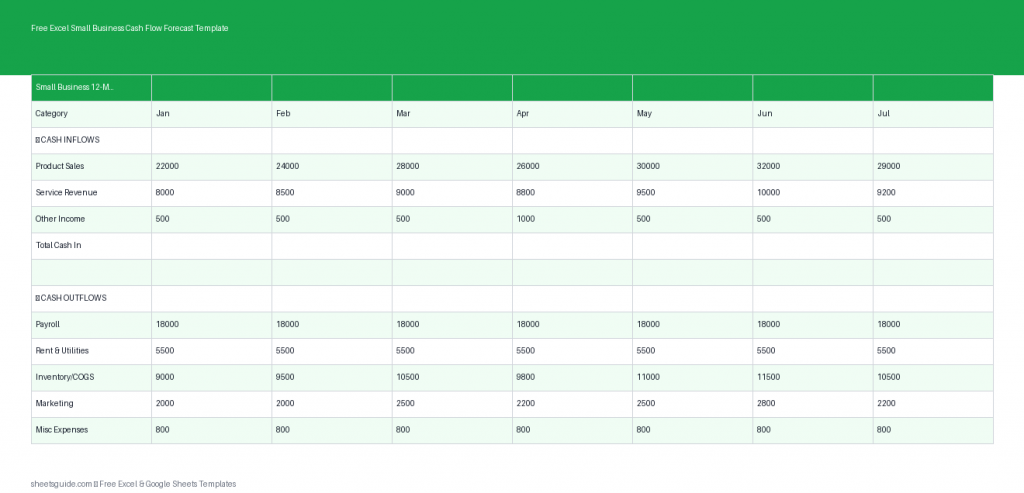
Managing cash flow is one of the most critical responsibilities for any small business owner. Profitability alone doesn’t guarantee survival—cash timing does. That’s where a reliable forecasting system becomes essential. This Excel template is designed to help you project your cash inflows and outflows over a 12-month period, giving you a clear, forward-looking view of your business finances. It also works seamlessly in Google Sheets, so you can use it across platforms without losing functionality.
Whether you’re planning for growth, preparing for seasonal fluctuations, or simply trying to avoid cash shortages, this template gives you the structure and clarity needed to stay in control.
What This Excel Template Does
This Excel template helps you forecast your monthly cash position by tracking:
- Cash In: All incoming revenue such as sales, loans, or investments
- Cash Out: Expenses like rent, payroll, inventory, and utilities
- Net Flow: The difference between cash in and cash out
- Opening Balance: Your starting cash for each month
- Closing Balance: Your ending cash after accounting for net flow
The template automatically calculates your net flow and rolling balances, so you always know where your business stands financially.
Why Cash Flow Forecasting Matters
Many small businesses fail not because they lack customers, but because they run out of cash. A cash flow forecast helps you anticipate problems before they happen and make smarter financial decisions.
With this Excel template, you can:
- Identify months where cash may run low
- Plan for large expenses in advance
- Adjust spending or increase revenue efforts proactively
- Make informed decisions about hiring, inventory, or expansion
- Communicate financial expectations clearly with partners or lenders
Instead of reacting to financial stress, you stay one step ahead.
Template Structure Overview
The Excel template includes a clean, easy-to-use table with the following columns:
- Month – A 12-month timeline for your forecast
- Cash In – Total expected income for each month
- Cash Out – Total expected expenses
- Net Flow – Automatically calculated (Cash In minus Cash Out)
- Opening Balance – Your starting cash for the month
- Closing Balance – Automatically calculated ending cash
The key benefit is automation: once you enter your inflows and outflows, the template handles the math and rolling balances for you.
How to Use in Excel
- Download and open the Excel template
Open the file in Microsoft Excel. Make sure calculations are enabled (they typically are by default). - Enter your starting cash balance
In the first row, input your current cash position under “Opening Balance.” This sets the foundation for the entire forecast. - Fill in your monthly cash inflows
Estimate how much money your business will receive each month. Include all income sources such as product sales, service revenue, or funding. - Add your expected expenses
Enter all outgoing cash, including fixed costs (rent, salaries) and variable costs (marketing, inventory, utilities). - Review automatic calculations
The template will instantly calculate your Net Flow and Closing Balance. Each month’s closing balance becomes the next month’s opening balance. - Scan for cash gaps
Look for months where your closing balance dips too low or becomes negative. These are warning signs that action is needed. - Adjust and refine
Update your numbers as your business evolves. Forecasting is not a one-time task—it should be reviewed regularly.
If you prefer working in Google Sheets, you can upload this Excel template and use it with the same structure and formulas intact.
Practical Ways to Use This Template
1. Plan for Seasonal Fluctuations
Many small businesses experience highs and lows throughout the year. Retail peaks during holidays, while service businesses may slow down during certain months. This template helps you prepare by showing exactly when revenue drops and how it impacts your cash position.
2. Prepare for Large Expenses
Big costs like equipment purchases, tax payments, or annual subscriptions can disrupt your cash flow if they’re not planned for. By forecasting ahead, you can spread out expenses or build reserves in advance.
3. Test “What-If” Scenarios
Thinking about hiring a new employee? Launching a marketing campaign? Use the template to simulate how those decisions will affect your cash flow before committing.
4. Manage Growth Carefully
Growth often requires upfront investment—more inventory, more staff, or increased marketing. This template helps ensure you don’t overextend your cash while scaling.
5. Stay in Control During Uncertainty
Economic changes, delayed payments, or unexpected expenses can all impact your business. A forecast gives you a buffer of awareness, helping you respond quickly instead of scrambling.
Tips for Accurate Forecasting
Your forecast is only as useful as the data you put into it. Here are a few tips to improve accuracy:
- Be realistic, not optimistic – Overestimating income can lead to risky decisions
- Use historical data – Base your projections on past performance when possible
- Include all expenses – Small recurring costs add up quickly
- Update regularly – Review and adjust your forecast monthly
- Build a buffer – Plan for unexpected costs or delays in payments
Consistency matters more than perfection. Even a simple, regularly updated forecast is far more valuable than a complex one you rarely use.
Who This Excel Template Is For
This Excel template is ideal for:
- Small business owners managing day-to-day finances
- Freelancers and consultants with variable income
- Startups planning their first year of operations
- Side hustlers transitioning into full-time businesses
- Anyone who wants better visibility into cash flow
You don’t need advanced financial knowledge to use it. The structure is straightforward, and the calculations are handled automatically.
Benefits of Using This Template
- Clarity – See exactly where your money is coming from and going
- Control – Make decisions based on real projections, not guesswork
- Confidence – Reduce uncertainty by planning ahead
- Simplicity – No پیچیدہ formulas to build yourself
- Flexibility – Works in Excel and Google Sheets
Instead of juggling numbers across multiple tools, everything is organized in one place.
Make Cash Flow a Habit
The real power of this Excel template comes from consistent use. Set aside time each month to review your numbers, update projections, and adjust your plans. Over time, you’ll develop a stronger understanding of your business’s financial patterns.
Cash flow forecasting isn’t just about avoiding problems—it’s about creating opportunities. When you know your financial position, you can invest, grow, and operate with confidence.
Download the template, customize it for your business, and start planning your next 12 months with clarity and control.