
“`html
Free Excel Work Schedule Template with Built-In Formulas
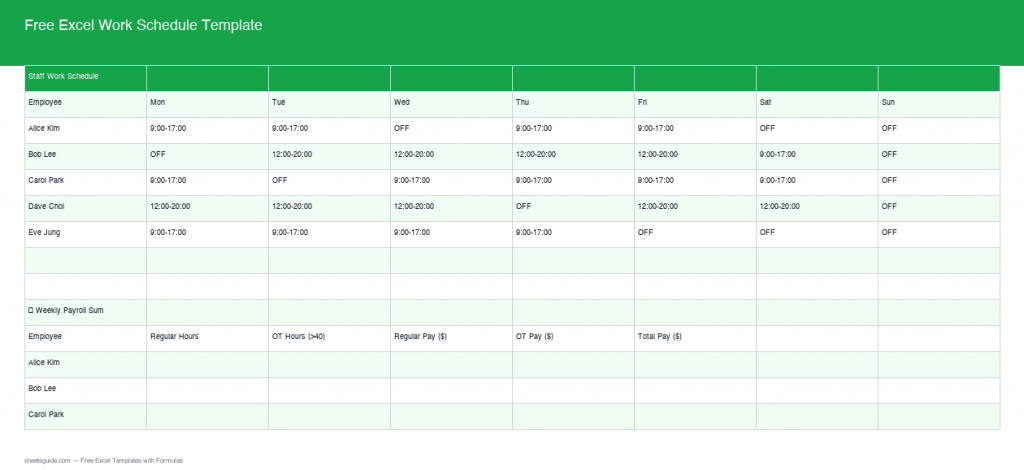
Managing work schedules and payroll can be a complex task, but with our updated Excel Work Schedule Template, it’s easier than ever. Now featuring real formulas and advanced features, this template simplifies weekly scheduling and payroll management, ensuring accuracy without the manual effort. Read on to discover how this template can transform your workflow, and download it for free!
What’s Included
This template offers a comprehensive solution for managing employee schedules and payroll. Here’s what you’ll find inside:
- Weekly Shift Schedule: Plan and track employee shifts with ease, accommodating a variety of schedules ranging from 9-to-5 to night shifts.
- Payroll Calculator: Integrated to effortlessly handle payroll calculations, ensuring your team is compensated correctly.
- Auto Total Hours: Automatically sums up regular and overtime hours worked by each employee, reducing the likelihood of human error.
- Overtime Detection: Instantly identifies when employees have exceeded regular hours, allowing you to manage costs and compliance easily.
- Leave Tracker: Keep track of vacation and sick days, providing visibility into employee availability.
- Color-Coded Shifts: Use color highlighting for different shifts or roles, making it visually intuitive to navigate the schedule.
Key Features & Formulas
The template is designed with several smart formulas to streamline your operations:
- Total Hours Calculation: Automatically calculates the total hours worked for each shift, saving you precious time in calculations.
- Overtime Calculation: Detects overtime hours and adjusts pay calculations accordingly, so you never overpay or underpay.
- Regular vs OT Pay: Distinguishes between regular and overtime rates, ensuring accurate pay allocations without confusion.
- Gross Pay Calculation: Compiles all data to provide a weekly gross pay total per employee, making payroll a breeze.
- Dynamic Date Reference: The template can be adjusted to reflect any specific week you want, allowing for easy planning and tracking.
How to Use in Excel
Getting started with this template is simple:
- Download: Click on the link above to download your free copy.
- Input Data: Enter your employee names, hourly rates, and work hours into the designated fields. Ensure that you input data as per the template’s instructions for accurate calculations.
- Review Auto-Calculations: Let the formulas do the work as they automatically update totals and payroll data, providing real-time insights.
- Adjust if Needed: Modify preset values such as hourly rates according to your specific requirements, particularly if you have multiple pay grades.
- Save Regularly: Make sure to save your file frequently, especially after updating data, to prevent any loss of information.
Tips
To maximize the efficiency of this template:
- Ensure all employee names and data entries are complete before reviewing totals to avoid discrepancies in payroll calculations.
- Regularly update the template to reflect any changes in schedules or pay rates—this helps maintain operational accuracy.
- Train your team on using Excel if multiple users need access to the file. Consider creating a user guide for your team to aid understanding.
- Foster good communication about shifts, allowing employees to report any scheduling errors or requests directly.
- Utilize the color-coded shifts feature to help visually segment different roles; this makes it easier for managers to see who is available at a glance.
How to Use This Template in Google Sheets
This template is provided as an .xlsx file compatible with both Microsoft Excel and Google Sheets. Follow these steps:
- Download the .xlsx file using the button above.
- Open Google Drive and click New, then File Upload to upload the downloaded template.
- After the file uploads, right-click it in Google Drive, choose Open with, and then select Google Sheets to begin editing.
- Input your data just as you would in Excel, and the integrated formulas will function seamlessly to manage your scheduling and payroll.
- Consider sharing the Google Sheet with your team for collaborative access, ensuring everyone is on the same page regarding schedules.
Conclusion
The Free Excel Work Schedule Template with Built-In Formulas is an invaluable asset for any organization looking to streamline their scheduling and payroll process. With its user-friendly features and automated calculations, you can focus more on running your business and less on manual data entry and error correction. Don’t hesitate to download it for free and start improving your workplace efficiency today!
“`