
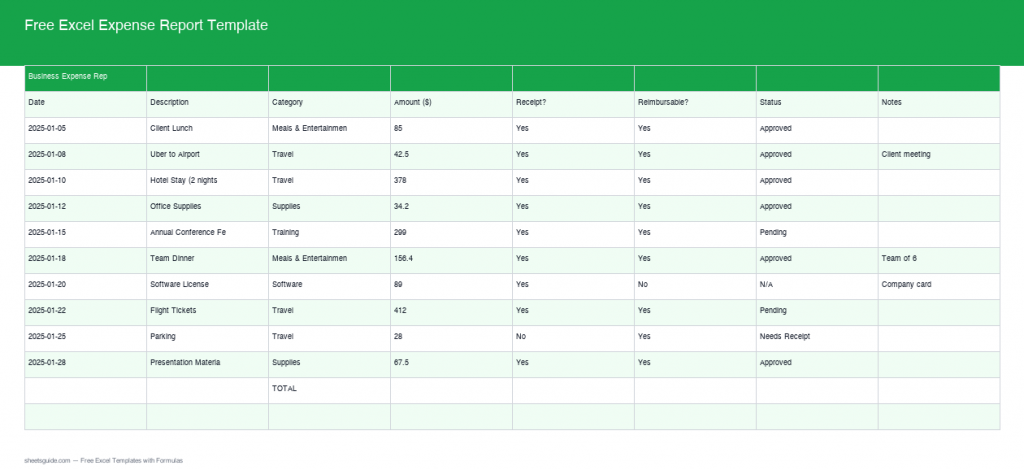
Free Excel Expense Report Template
Introduction
Managing expenses effectively is crucial for both individuals and businesses alike. Whether you are a business owner, an employee, or simply someone keeping track of personal finances, having an efficient system is essential. Our Free Excel Expense Report Template is designed to help you streamline this process, and we are excited to introduce the latest version, now featuring real formulas and advanced features that will make expense tracking more precise and effortless.
What’s Included
Our improved Excel template is packed with features to facilitate detailed expense tracking. With built-in auto-calculations and advanced functionalities, managing your expenses has never been easier. The template covers essential expense categories such as Travel, Meals, Supplies, Training, and Software, with more capabilities added to suit diverse needs.
Key Features & Formulas
The latest version of our template comes with several key features designed to save you time and effort. Here’s a closer look at the functionalities it offers:
- Auto Grand Total: Automatically calculates the total of all expenses, providing a quick overview of your spending.
- SUMIF by Category: Enables you to instantly sum expenses based on categories such as Travel, Meals, Supplies, Training, and Software using the SUMIF function.
- Count and Average per Category: Gain insights into your spending habits with COUNTIF and AVERAGEIF functions, offering a count and average calculation for each expense category.
- Status Flags: Facilitates efficient document management with pending/needs receipt status flags, helping you track which expenses are completed and which require additional follow-up.
How to Use in Excel
Getting started with the Excel Expense Report Template is simple. Here’s how you can maximize its potential:
- Download and Open: Start by downloading the template using the link provided above and open it in Excel.
- Enter Your Expenses: Fill in your expenses under the appropriate categories. The built-in formulas will handle the calculations for you.
- Review Calculations: Let the template automatically calculate your totals, averages, and more, giving you immediate insights.
- Track Status: Use the status flags to mark expenses as pending or needing receipts, keeping your records organized and up-to-date.
Tips
To get the most out of your spreadsheet experience, consider the following tips:
- Regularly update your expenses to keep track of your spending accurately.
- Review category totals and averages regularly to identify potential areas of overspending.
- Utilize the status flags to maintain a well-organized expense management system.
- Customize the template to add new categories or modify existing ones as necessary for your specific needs.
How to Use This Template in Google Sheets
This template is provided as an .xlsx file compatible with both Microsoft Excel and Google Sheets. Follow these steps:
- Download the .xlsx file using the button above.
- Open Google Drive and click + New → File upload.
- Right-click the uploaded file and choose Open with → Google Sheets.
- Click File → Save as Google Sheets to save an editable copy.
All formulas and formatting are fully compatible with Google Sheets.
Conclusion
Our Free Excel Expense Report Template is more than just a spreadsheet; it’s a comprehensive tool designed to simplify your financial management. With real formulas and enhanced features, you can now track your expenses with greater accuracy and efficiency. Take control of your finances by downloading the template today!