
“`html
Free Excel Monthly Budget Tracker Template
Introduction
Managing your finances is now more seamless with our upgraded Excel Monthly Budget Tracker Template. With built-in formulas and advanced features, this tool takes budgeting to the next level, making it easier for you to stay on top of your expenses and savings. Whether you’re looking to control your spending or save for a goal, this template has everything you need. By implementing effective budgeting practices, you can cultivate smarter spending habits and boost your financial awareness.
What’s Included
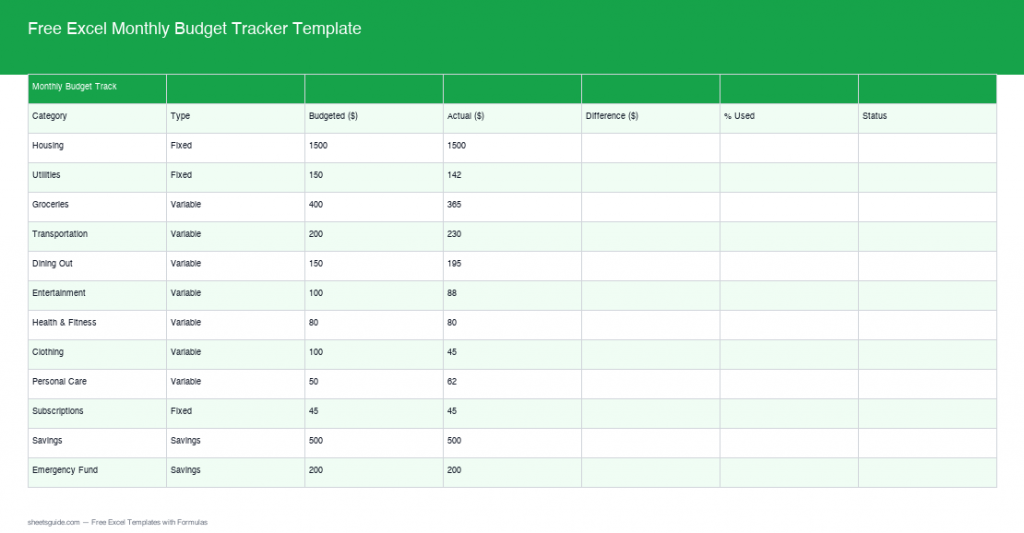
This Excel template is designed to help you track your monthly budget effortlessly. It’s packed with built-in formulas and enhanced features to provide real-time insights into your financial health. Here’s a glimpse of what you will find:
- An intuitive and user-friendly interface that simplifies navigation
- Auto-calculating columns for tracking differences and percentage used, allowing for quick assessments
- Status flags that alert you if you’re On Track, Over Budget, or Exceeded your limits, promoting immediate financial awareness
- An income summary section with a net savings formula, providing an overview of your financial health
- Customizable categories for expenses, enabling a more personalized and relevant budgeting experience
- Graphs and visual representations of your financial data to assist with quick comprehension and analysis
Key Features & Formulas
The standout aspect of our budget tracker is its robust formulaic backbone, which automates many calculations, saving you time and effort. Here’s how:
Auto-Calculating Columns
The tracker automatically calculates the difference between your budgeted and actual spending as well as the percentage of the budget used. This gives you real-time insights into your spending habits. For example, if your budget for groceries is $300 but you spent $350, the tracker will display an automatic difference of -$50 and a percentage used of 116.67%. This immediate feedback allows you to adjust your spending right away.
Status Flags
Get instant alerts about your financial status. The template uses conditional formatting to display status flags, so you can quickly see whether you’re On Track, Over Budget, or have Exceeded your preset limits. These flags turn red, yellow, or green based on your performance against your budget, enabling a quick visual assessment of your financial health.
Income Summary Section
Your income summary isn’t just a tally of your earnings. It includes a net savings formula that automatically calculates how much you save each month after expenses, helping you better plan for future financial goals. For instance, if your total income is $3,000 and your total expenses amount to $2,500, the template will show a net savings of $500. Keeping track of your savings progress has never been easier.
How to Use in Excel
Using the template is straightforward. After downloading the file, open it in Excel and follow these steps:
- Enter your Income data for the month. Be sure to account for all sources of income, such as salaries, bonuses, or side gigs.
- Add budgeted and actual expenses in their respective columns. Categorizing your expenses can lead to better spending decisions.
- Observe the auto-calculating columns update for instant feedback. Familiarize yourself with the patterns in your spending.
- Track your financial status with the status flags. If you notice a recurring trend of being Over Budget, adjust your expenses for the next month.
- Review your net savings at the end of each month in the income summary section. This helps in setting realistic savings goals for the future.
Tips
- Regular Updates: Keep your expenses updated regularly for the most accurate insights. Consider updating your tracker at the end of each day or week.
- Budget Review: Regularly review your budget categories to adjust spending as needed. If you consistently find yourself overspending in one area, consider re-evaluating that category.
- Custom Categories: Tailor your categories to better reflect your lifestyle and spending habits. For instance, if you spend more on dining out than groceries, create a dedicated category for restaurants.
- Set Financial Goals: Use the template to set monthly, quarterly, or annual financial goals. Whether it’s building an emergency fund or saving for a vacation, having specific goals can motivate you to stay on budget.
- Utilize Visual Aids: Take advantage of graphs and charts included in the template. They provide a bird’s-eye view of your financial trends, making them an excellent tool for identifying areas of improvement.
- Discuss Your Budget: If you share financial responsibilities with a partner or family, make sure to discuss and review the budget together to ensure everyone is on the same page.
Conclusion
A well-structured monthly budget can significantly impact your financial well-being. This Excel Monthly Budget Tracker Template is designed not just for tracking expenses but also as a tool to empower you toward achieving your financial aspirations. By following the steps outlined above and utilizing the provided tips, you can turn budgeting from a chore into a strategic part of your life. Download the template today and take the first step towards financial clarity and control!
“`