
“`html
Free Excel Project Timeline Tracker Template
Introduction
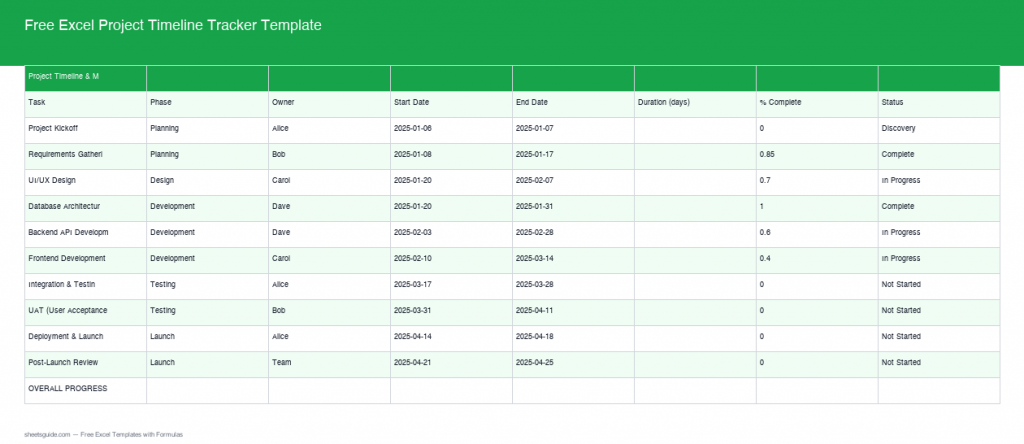
Managing a project effectively demands careful coordination of timelines, tasks, and status updates. With our newly enhanced Free Excel Project Timeline Tracker Template, you can streamline your project management tasks more effectively than ever before. This updated version now includes real formulas that auto-calculate and advanced features that enhance its utility. Whether you’re managing a small project or a complex portfolio of tasks, this template is ready to assist. Not only does it simplify your project management, but it also promotes accountability and better decision-making.
What’s Included
The project timeline tracker is designed to cover all aspects of project management from start to finish. Here’s what’s included in this powerful Excel template:
- A clear and easy-to-navigate interface that minimizes confusion and maximizes efficiency.
- Auto duration calculation feature that saves time and reduces manual errors.
- Overall progress tracking with an average formula, giving you instant insights.
- Color-coded status indicators showing Complete, In Progress, and Not Started tasks for quick visual assessments.
- Dependency tracking to manage task sequences, crucial for large and interconnected project plans.
Key Features & Formulas
Let’s dive deeper into the key features and formulas that make this template indispensable for project management professionals:
- Auto Duration Calculation: This formula auto-calculates the task duration by subtracting the Start Date from the End Date. Using the formula
=DATEDIF(Start_Date, End_Date, "D")ensures your timeline is accurate, allowing you to manage deadlines effectively. - Overall Progress Average: Get a bird’s eye view of your project progress by calculating the average completion percentage across all tasks using
=AVERAGE(Progress_Percentage_Range). This is critical for stakeholders who want a quick summary of how the project is trending. - Color-Coded Status: Conditional formatting is applied to visually distinguish tasks. Green indicates Complete, yellow shows In Progress, and red signals Not Started. This visual cue assists in quickly identifying areas that need attention.
- Dependency Tracking: Logically manage tasks by setting precedents and understanding how one task may impact another. For example, if Task B relies on Task A’s completion, this tracking ensures that you don’t assign Task B until Task A is finished, preventing bottlenecks.
How to Use in Excel
Using this template is straightforward, making it accessible even for those who may not be Excel experts. Here’s a step-by-step guide to help you:
- Download the template using the button above.
- Open the template in Excel.
- Enter your project details including task names, start and end dates, and individual responsibilities if necessary.
- Update the status of each task regularly to see automatic adjustments in the overall progress and color coding; this helps maintain an accurate picture of the project’s health.
- Utilize the dependency tracking feature by linking tasks. This ensures a smooth workflow management where adjustments in one task automatically inform related tasks.
Tips for Maximizing Your Template
- Regularly update your project status to utilize the full predictive capability of the template. Frequent updates can help anticipate delays and reallocate resources efficiently.
- Take advantage of Excel’s built-in sharing features such as co-authoring. This facilitates collaboration with your team, allowing everyone to stay aligned on project progress.
- Explore Excel’s Conditional Formatting options further to create custom rules that suit your specific project needs. For instance, you might want to add criteria to highlight overdue tasks automatically.
- Consider combining this template with other tools such as Gantt charts for a more visual project timeline. You can manually create a Gantt chart in a separate tab based on data from the tracker.
- Set reminders to review the project timeline weekly or bi-weekly, ensuring your project stays on track and addressing any issues as they arise.
Conclusion
In today’s fast-paced business environment, effective project management is critical to success. Our Free Excel Project Timeline Tracker Template not only simplifies the planning and tracking process but also empowers teams to work smarter. Whether you’re a project manager, team leader, or an individual contributor, this template equips you with the tools necessary to meet deadlines and achieve project goals efficiently. Download the template today and enhance your project management experience!
“`