
Running a successful restaurant isn’t just about great food—it’s about numbers. If you don’t know exactly how much each dish costs to produce and how much profit it generates, you’re operating in the dark. That’s where this Free Excel Restaurant Food Cost Calculator comes in.
This Excel template helps you track food costs, calculate profit margins, and compare ideal versus actual costs so you can make smarter pricing decisions. It’s designed to work seamlessly in Excel and is also fully compatible with Google Sheets, making it easy to use no matter your setup.
Why Food Cost Tracking Matters
Food cost is one of the most important metrics in the restaurant industry. Even small miscalculations can significantly impact your bottom line. Without a structured way to monitor costs, you may be:
- Underpricing menu items and losing profit
- Overpricing and discouraging customers
- Missing inefficiencies in your kitchen operations
- Struggling to maintain consistent margins
This Excel template gives you a clear, organized view of your menu performance so you can identify problems early and take action.
What This Excel Template Includes
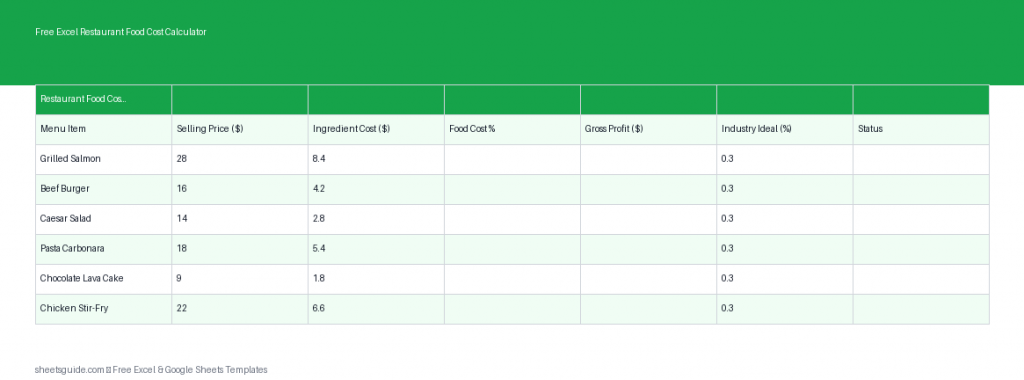
The Free Excel Restaurant Food Cost Calculator is built with essential columns that give you immediate insights into your menu:
- Menu Item – Name of the dish or product
- Selling Price – Price charged to customers
- Food Cost – Cost to produce the item
- Food Cost % – Percentage of cost relative to price
- Gross Profit – Profit earned per item
- Ideal Cost % – Target cost percentage for your business
Each field works together to give you a complete financial picture of every item on your menu.
Key Benefits of Using This Template
1. Accurate Pricing Decisions
Setting the right price is critical. This template helps you determine whether your menu items are priced correctly based on real costs, not guesswork.
2. Improved Profit Margins
By comparing food cost percentages with your ideal targets, you can quickly identify which items are underperforming and adjust accordingly.
3. Better Cost Control
Tracking actual food costs helps you spot waste, supplier price increases, or portion control issues before they become major problems.
4. Menu Optimization
Not all menu items are equally profitable. This template helps you identify your most and least profitable dishes so you can refine your menu strategy.
5. Easy to Use and Customize
This Excel template is simple enough for beginners but flexible enough for experienced restaurant managers. You can easily adapt it to fit your menu and operations.
How to Use in Excel
- Download and open the Excel template
Open the file in Microsoft Excel. Make sure editing is enabled so formulas function properly. - Enter your menu items
List each dish or product in the “Menu Item” column. - Add selling prices
Input the price you charge customers for each item. - Input food costs
Calculate and enter the cost of ingredients per dish. Be as accurate as possible for best results. - Review automatic calculations
The template will automatically calculate:- Food Cost %
- Gross Profit
- Set your ideal cost percentage
Enter your target food cost percentage (typically 25%–35% depending on your restaurant type). - Analyze performance
Compare actual food cost percentages with your ideal cost to identify items that need adjustment. - Adjust pricing or costs
Use the insights to tweak pricing, portion sizes, or supplier choices to improve profitability.
If you prefer working online or collaborating with a team, this Excel template can also be uploaded and used in Google Sheets with full functionality.
Understanding the Key Metrics
Food Cost %
This is one of the most critical numbers in restaurant management. It shows what portion of your selling price is consumed by ingredient costs.
Formula: (Food Cost ÷ Selling Price) × 100
For example, if a dish costs $4 to make and sells for $12, the food cost percentage is 33.3%.
Gross Profit
This tells you how much money you earn per item after covering food costs.
Formula: Selling Price − Food Cost
A higher gross profit generally indicates a more valuable menu item.
Ideal Cost %
This is your target benchmark. If your actual food cost percentage is higher than your ideal, it may indicate inefficiencies or pricing issues.
Practical Use Cases
Menu Engineering
Use the template to categorize items into high-profit and low-profit groups. Focus on promoting high-margin dishes and reconsidering underperformers.
Cost Monitoring
Regularly update food costs to reflect supplier price changes. This ensures your pricing remains aligned with current expenses.
New Menu Development
Before launching a new dish, calculate its expected food cost and profitability to ensure it fits your business goals.
Portion Control Adjustments
If food cost percentages are too high, you may need to adjust portion sizes without compromising customer satisfaction.
Supplier Comparison
Test how different supplier pricing affects your margins by updating food cost values and reviewing the results instantly.
Tips for Getting the Most Out of This Template
- Update regularly: Keep your data current to maintain accurate insights.
- Be precise with costs: Include every ingredient, even small ones.
- Review weekly or monthly: Regular reviews help catch issues early.
- Focus on trends: Look for patterns rather than one-time anomalies.
- Train your team: Ensure managers understand how to use the data effectively.
Who Should Use This Excel Template?
This Excel template is ideal for:
- Restaurant owners and managers
- Food truck operators
- Cafe and bakery owners
- Catering businesses
- Anyone managing food-related costs and pricing
Whether you’re running a small independent restaurant or managing multiple locations, this tool provides valuable insights that can improve your profitability.
Take Control of Your Restaurant Costs
Profitability in the restaurant business comes down to control—control over costs, pricing, and performance. This Free Excel Restaurant Food Cost Calculator gives you the clarity you need to make informed decisions and run a more efficient operation.
Instead of relying on estimates or outdated numbers, you’ll have a reliable system that shows exactly where your money is going and how to improve your margins.
Download the Excel template, start tracking your menu today, and take a more data-driven approach to your restaurant’s success.