
Managing sales commissions can quickly become complicated, especially when you’re working with tiered rate structures. This Excel template is designed to simplify the entire process by automatically calculating commissions based on sales thresholds using built-in formulas. Whether you manage a small team or a growing sales department, this tool helps you stay accurate, consistent, and efficient.
Built in Excel and fully compatible with Google Sheets, this template gives you a flexible and reliable way to track sales performance and payouts without manual calculations.
What This Excel Template Does
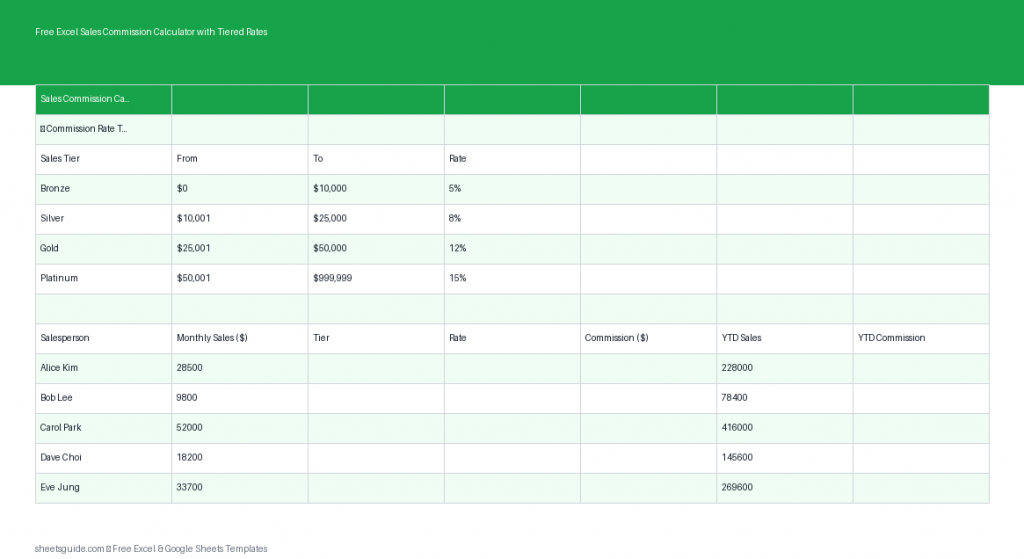
This Excel template automates commission calculations using tiered rate structures. Instead of manually applying different rates based on sales levels, the spreadsheet uses nested IF formulas to determine the correct commission rate and calculate the final payout instantly.
The template includes the following columns:
- Salesperson – Name of the team member
- Sales Amount – Total sales generated
- Tier – Assigned tier based on sales volume
- Rate – Commission percentage for that tier
- Commission – Calculated payout
- YTD Total – Year-to-date earnings
Why Use a Tiered Commission Structure?
Tiered commission systems reward performance and motivate sales teams to exceed targets. Instead of a flat rate, commissions increase as sales volume grows. This encourages higher productivity while maintaining control over payout structures.
However, managing tiered systems manually often leads to errors. This is where an Excel template becomes essential—it removes guesswork and ensures every calculation follows your rules precisely.
Key Features of This Excel Template
- Automated tier classification using formulas
- Dynamic commission rate assignment
- Instant commission calculations
- Year-to-date tracking for performance insights
- Fully customizable thresholds and rates
- Works in Excel and is compatible with Google Sheets
How Tiered Commission Calculations Work
The template uses nested IF formulas to assign commission tiers. For example:
- 0–$5,000 → 5% commission
- $5,001–$10,000 → 7% commission
- $10,001+ → 10% commission
When you enter a sales amount, the formula automatically:
- Evaluates the correct tier
- Applies the corresponding rate
- Calculates the commission amount
This eliminates manual errors and ensures consistency across your team.
Practical Use Cases
This Excel template is highly versatile and can be used in many business scenarios:
- Sales Teams – Track individual and team commissions
- Freelancers – Calculate earnings based on performance tiers
- Small Businesses – Manage commission-based compensation
- Managers – Forecast commission expenses
- HR Teams – Maintain transparent compensation records
How to Customize the Template
Every business has unique commission rules. This Excel template is designed to be easily customizable:
- Adjust tier thresholds to match your sales targets
- Change commission percentages for each tier
- Add more tiers if needed
- Expand columns for additional metrics like region or product
Because everything is formula-driven, updates automatically flow through the entire sheet.
How to Use in Excel
- Open the Excel template in Microsoft Excel
- Enter each salesperson’s name in the Salesperson column
- Input the total sales amount in the Sales Amount column
- Review the automatically assigned Tier and Rate
- Check the calculated Commission value
- Track cumulative earnings in the YTD Total column
- Modify tier thresholds and rates if your commission structure changes
The template is ready to use immediately, with formulas pre-built so you can focus on data entry and analysis.
Tips for Getting the Most Out of This Template
- Keep your sales data updated regularly for accurate tracking
- Use filters to analyze performance by salesperson
- Duplicate the sheet monthly to maintain clean records
- Protect formula cells to prevent accidental edits
- Use conditional formatting to highlight top performers
Benefits of Using Excel for Commission Tracking
Excel remains one of the most powerful tools for financial tracking and analysis. With this template, you get:
- Full control over your data
- Transparent and auditable calculations
- Flexibility to adapt as your business grows
- Compatibility with Google Sheets for easy sharing
Unlike complex software systems, this Excel template is simple, effective, and easy to maintain.
Common Mistakes to Avoid
Even with automation, it’s important to avoid common pitfalls:
- Entering incorrect sales figures
- Overwriting formula cells
- Forgetting to update tier thresholds
- Not reviewing totals regularly
A quick review process ensures your commission calculations remain accurate.
Who This Template Is For
This Excel template is ideal for anyone who needs a reliable way to calculate tiered commissions without complicated systems. It works especially well for:
- Startup founders managing early sales teams
- Sales managers overseeing performance incentives
- Accountants tracking commission expenses
- Independent consultants earning variable income
Final Thoughts
This Excel template takes the complexity out of tiered commission calculations. By automating formulas and organizing your data clearly, it helps you save time, reduce errors, and gain better visibility into sales performance.
Whether you’re managing a team or tracking your own earnings, this tool provides a structured and dependable solution. And since it works seamlessly in Excel and is compatible with Google Sheets, you can use it across platforms without any hassle.
Start using this Excel template today to streamline your commission tracking and focus more on growing your sales.