
“`html
Free Excel Employee Time Tracking Template
Introduction
Discover our enhanced free Excel Employee Time Tracking Template, equipped with powerful real formulas and advanced features tailor-made for effortless management of employee work hours. Suitable for small businesses or large corporations, this tool ensures precise time tracking, simplifies payroll calculation, and improves efficiency. Keeping an accurate record of employee hours is critical for maintaining fair payroll and fostering a transparent workplace culture.
What's Included
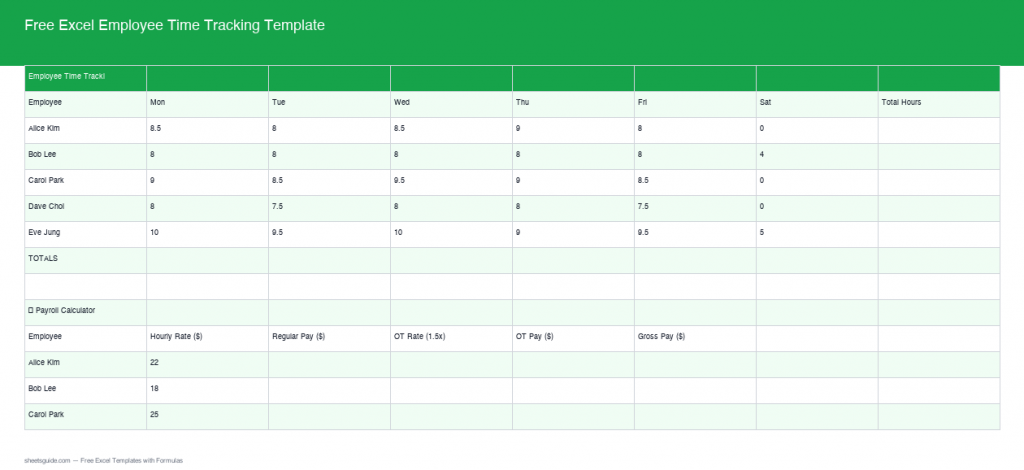
This Excel template includes an automated system to track hours worked and calculate overtime. It also features a payroll section to compute regular, overtime, and gross pay and displays weekly totals in a streamlined manner. The clear layout and organized sections help in quick reference, making it easier for managers and HR personnel to manage work hours efficiently. The template is designed to be user-friendly, with pre-inserted formulas that execute all the heavy lifting, allowing you to focus on what truly matters—running your business and attending to customer needs. Additionally, there’s space to include important notes or comments regarding each employee’s hours or specific projects.
Key Features & Formulas
- Auto Total Hours Calculation: Automatically calculates total hours worked per employee every pay period, reducing manual data entry errors and saving valuable time.
- Overtime Calculation: Efficiently identifies and computes any hours worked over 40 as overtime, ensuring compliance with labor laws, thereby protecting your business from potential legal issues.
- Payroll Section: Integrates formulas for regular pay, overtime pay, and gross pay, providing clarity and accuracy in salary distribution, which is crucial for employee satisfaction and retention.
- Weekly Totals: Summarizes the weekly total hours and pay for easy overview and reference, helping managers to quickly assess productivity levels and manage operational costs.
- Customizable Fields: The template allows for customization so you can cater the fields to fit specific needs of your business, such as adding project codes, department names, or special pay rates.
How to Use in Excel
To utilize this template, simply download it using the link below. Once downloaded, open the file in Excel. Enter each employee’s daily clock-in and clock-out times. The template will automatically calculate daily hours, identify any overtime, and populate the payroll section with detailed breakdowns of regular, overtime, and total pay. Make sure to familiarize yourself with the layout, noting where to enter information for different employees. If your team has varying pay rates, you can adjust the inputs accordingly, ensuring that calculations reflect the accurate compensation structure.
Tips
- Regularly update employee data and time logs to ensure accuracy in tracking and payroll. Consistency helps in reducing discrepancies that could lead to mistrust among employees.
- Review formulas provided in the template for a deeper understanding of calculations. Customize them if your business has specific requirements or to add new features such as commission calculations for sales staff.
- Back up your Excel file regularly to avoid data loss, and consider keeping a cloud-based copy that can be accessed from anywhere.
- Train your staff on how to use the template effectively to help them understand the importance of accurate time tracking and its effect on payroll.
- Utilize conditional formatting in Excel to highlight important fields, such as overhours or missing data, so it can be quickly addressed.
How to Use This Template in Google Sheets
This template is provided as an .xlsx file compatible with both Microsoft Excel and Google Sheets. Follow these steps:
- Download the .xlsx file using the button above.
- Open Google Drive and click + New → File upload.
- Right-click the uploaded file and choose Open with → Google Sheets.
- Click on File → Save as Google Sheets to create a new Google Sheets version of the template that you can edit and share easily with your team.
- Ensure the proper sharing settings are applied so that only authorized personnel can modify the document, keeping sensitive information secure.
- Regularly monitor and audit the entries in Google Sheets to maintain data integrity and track employee productivity over time.
Using this template in Google Sheets offers the added benefit of real-time collaboration, allowing multiple users to input their hours without the hassle of sending files back and forth.
“`